You're probably dealing with one of two situations right now. Your team has a solid 3-axis process, but parts are starting to demand angled features, work on multiple faces, or tighter positional relationships that become painful after repeated re-clamping. Or you're quoting work that looks profitable on paper, then watching setup time, operator attention, and inspection headaches eat the margin.
That's where many small-to-mid-sized manufacturers start looking at 4 axis CNC milling machines. Not because the technology sounds advanced, but because the current process has stopped scaling. The key decision isn't just whether to add a rotary axis. It's whether that upgrade will fit your workflow, your people, and your production goals well enough to improve output and service without creating a new bottleneck.
Table of Contents
- Beyond 3 Axes The Next Step in Manufacturing Efficiency
- Understanding 4 Axis CNC Milling Mechanics
- 3 Axis vs 4 Axis vs 5 Axis Milling Compared
- Key Applications for 4 Axis Machining
- How to Select the Right 4 Axis CNC System
- Integrating 4 Axis Milling for Maximum ROI
- When to Partner with a Manufacturing Engineering Expert
Beyond 3 Axes The Next Step in Manufacturing Efficiency
A common shop-floor pattern goes like this. A part starts as a simple block or cylindrical blank, and the first operations run fine on a 3-axis machine. Then the print adds cross-holes, flats at angular positions, side features that must stay true to top-side pockets, or wrapped geometry that forces the operator to stop, unclamp, rotate, indicate, and prove everything again.
That's manageable on low-volume work. It gets expensive fast when the same part repeats across shifts or product families.
The first cost isn't spindle time. It's labor wrapped around the spindle. Every extra setup adds fixture handling, alignment checks, program offsets, in-process inspection, and the chance that one orientation won't match the last. Shops often blame the machine when the actual issue is that the process no longer fits the part.
When 3-axis stops being efficient
The warning signs are easy to recognize:
- Operators babysit setups: Good machinists spend too much time re-orienting parts instead of cutting metal.
- Inspection keeps finding relationship errors: Features are in tolerance by themselves, but not relative to each other.
- Lead times stretch for no good reason: The cutting path isn't the problem. Setup sequencing is.
- Quoting becomes defensive: The estimator adds padding because too much depends on manual handling.
A 4-axis platform addresses that by letting the part rotate under CNC control while staying clamped from a known datum. That shift matters more than many buyers expect. It changes how you fixture, how you program, how you inspect, and how confidently you can repeat the same result.
Practical rule: If your team keeps solving the same multi-face part with custom angle plates, secondary fixtures, and operator workarounds, the process is already asking for a fourth axis.
For small-to-mid-sized manufacturers, real return on investment begins to materialize. A 4-axis machine can reduce friction in the whole production stream, especially when you're trying to optimize production and services, not just buy a more capable spindle.
Growth usually exposes the gap
Growth tends to expose process weakness before it exposes capacity limits. A shop can have enough machine hours available and still miss delivery because workholding, setups, and handoffs are too dependent on tribal knowledge. Adding 4-axis capability often becomes the next logical move because it helps standardize how parts move through production.
That said, the machine alone won't fix a weak process. If the wrong parts are selected for 4-axis, or the fixturing is an afterthought, you can end up with a more complex cell that still runs inconsistently. The companies that gain the most are the ones that treat 4-axis as a production upgrade, not as an isolated equipment purchase.
Understanding 4 Axis CNC Milling Mechanics
A standard mill moves along X, Y, and Z. Left to right, front to back, and up to down. That covers a lot of work, especially for plates, housings, and prismatic parts.
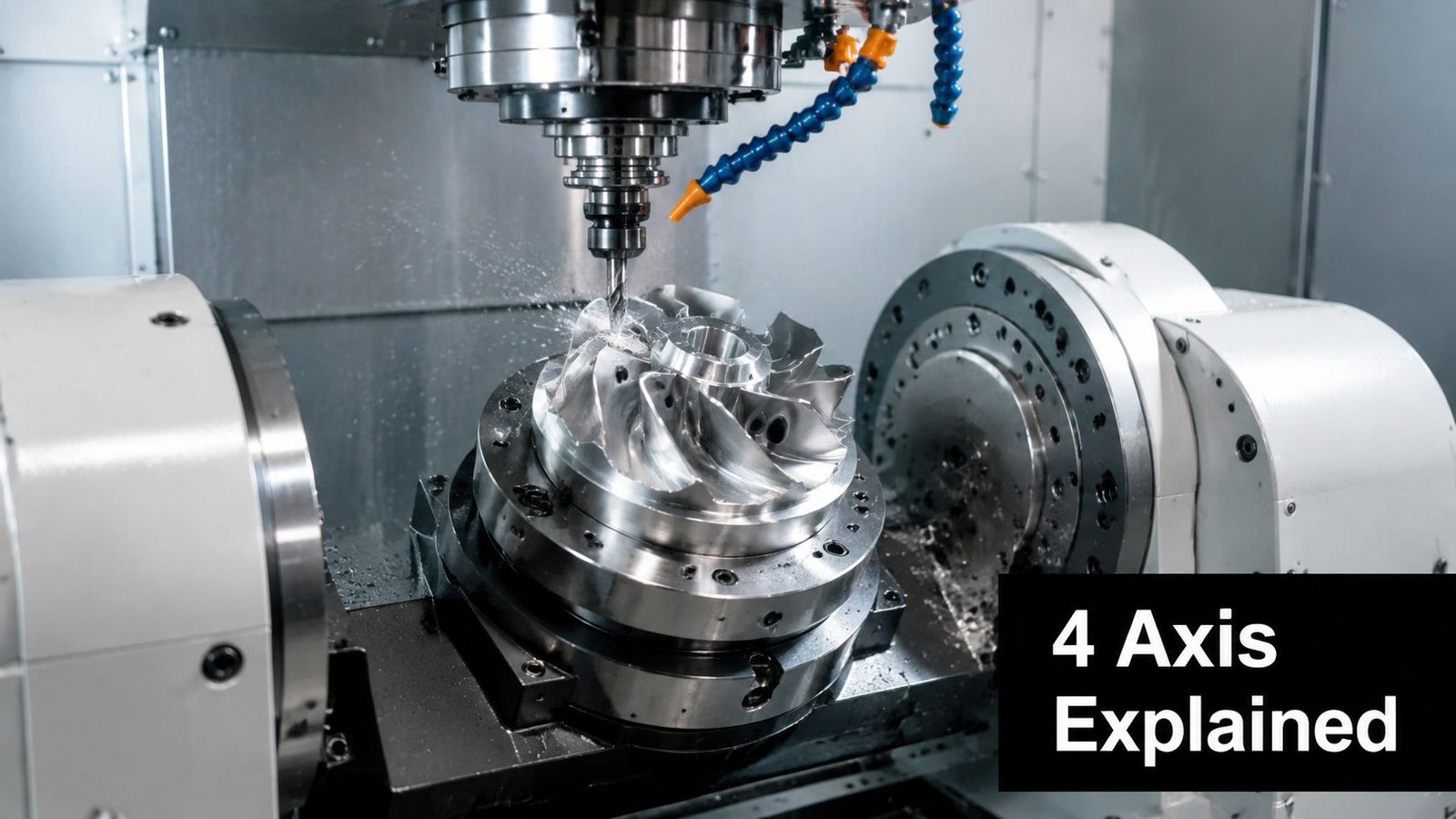
A 4-axis CNC milling machine adds a rotary axis, usually called the A-axis, which rotates the workpiece around the X-axis. In practical terms, the cutter still moves like a mill, but the part can now turn to present another face or a continuous curved surface to the tool.
What the fourth axis actually changes
The simplest way to explain it is this. A 3-axis mill cuts whatever face you point upward. A 4-axis mill can rotate the part to bring another face into position without the operator removing it from the fixture.
It's like adding a potter's wheel to a milling setup. Instead of stopping to reposition the work manually, the table turns the part to the exact angle the program calls for. That's why 4-axis opens the door to multi-face machining in one clamping, circumferential features, and wrapped toolpaths that don't make sense on a fixed part.
That also explains why it's different from a basic manual indexing fixture. The rotary movement isn't improvised. It's integrated into the control, so the programmed rotation becomes part of the machining sequence.
If you want a baseline reference for standard milling before adding the rotary discussion, it helps to review how a three-axis milling machine works.
Indexed and continuous motion are not the same
Not all 4-axis work is equal. Buyers often lump everything into one category, and that causes poor machine selection.
There are two common modes:
- Indexed 4-axis: The table rotates to a set angle, locks, and the machine performs a 3-axis operation on that face.
- Continuous 4-axis: The rotary axis moves while the tool is cutting, allowing the machine to generate helical, wrapped, or flowing geometry.
Indexed work covers a lot of real production. Flats on a shaft, hole patterns around a circumference, and multi-face prismatic components often fit this mode well. Continuous motion matters when geometry must be generated while the part rotates, such as spiral features, cams, or contouring around a cylindrical body.
A lot of shops don't need full simultaneous motion for every job. They need reliable, repeatable indexing tied to solid fixturing and clean post-processing.
That distinction affects controller requirements, CAM output, proving time, and operator confidence. It also affects whether your machine becomes a daily production asset or an expensive capability that only one programmer wants to touch.
A short demonstration makes the motion easier to visualize:
The takeaway is straightforward. The fourth axis doesn't just add movement. It changes how you think about orientation, access, and part relationships. That's why it often solves problems that seem, at first glance, like tolerance or labor issues.
3 Axis vs 4 Axis vs 5 Axis Milling Compared
The wrong comparison is “Which machine is best?” The right comparison is “Which machine matches the parts we run, the people we have, and the level of process control we can support?”
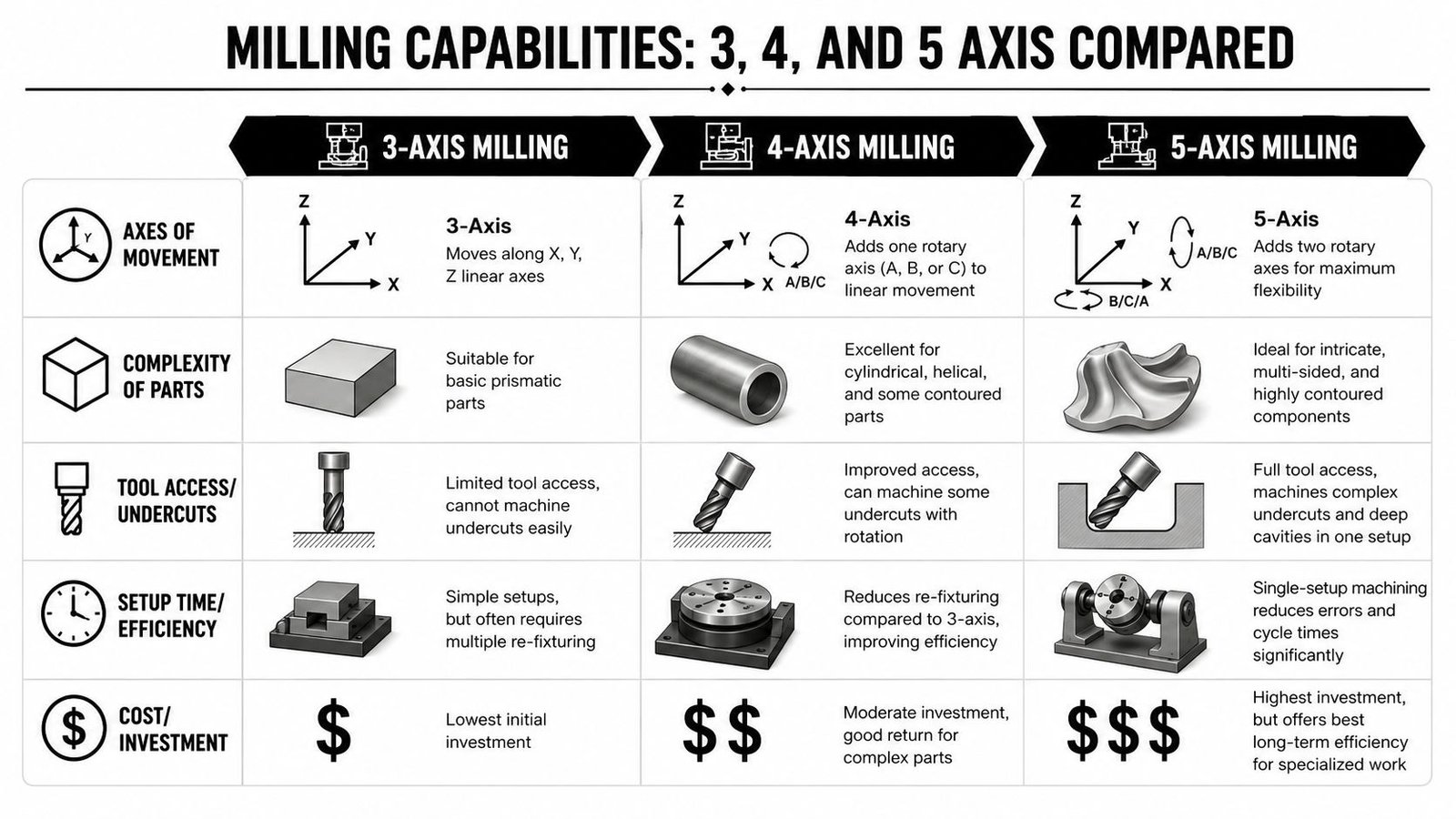
A lot of shops jump from 3-axis curiosity straight to 5-axis ambition. In practice, 4 axis CNC milling machines often sit in the most useful middle ground. They add real capability without forcing every job into the cost, complexity, and programming burden of full 5-axis work.
Where each platform fits
A 3-axis machine is still the best answer for many block-style parts. If the work is mostly top-access pockets, drilling, facing, and simple contouring, adding axis count won't automatically improve the result. You may just create more programming overhead than value.
A 4-axis machine earns its keep when the part needs access around the perimeter, on several faces, or along a cylindrical surface. It's especially effective when reducing re-fixturing improves consistency and throughput.
A 5-axis machine becomes the right answer when tool orientation itself must change to reach complex surfaces, deep cavities, or undercuts in a controlled way. That capability is powerful, but it also demands stronger CAM discipline, better collision management, and more advanced setup knowledge. For shops weighing that next step, this overview of 5-axis CNC milling helps clarify where the jump really makes sense.
Comparison of CNC Milling Axes
| Criterion | 3-Axis | 4-Axis | 5-Axis |
|---|---|---|---|
| Part complexity | Best for prismatic parts and accessible features | Strong for multi-face, cylindrical, helical, and some contoured parts | Best for intricate, highly contoured, multi-sided geometry |
| Setup burden | Often requires multiple re-fixturing steps for complex parts | Reduces re-fixturing by rotating the part in-cycle | Can often complete most features in one setup |
| Programming demand | Lowest learning curve | Moderate, especially when rotary motion is integrated into CAM | Highest complexity and strongest need for simulation discipline |
| Operator skill requirement | Broadly available in most shops | Needs a team comfortable with rotary workholding and verification | Usually needs specialized programming and setup experience |
| Initial investment | Lowest | Moderate | Highest |
| Typical production fit | Simple plates, brackets, housings, pockets | Shafts, gears, turbine-style parts, multi-face components, wrapped features | Aerospace-style surfaces, implants, complex molds, deep cavity parts |
| Access to hard-to-reach features | Limited | Improved, especially around a part's circumference or multiple sides | Most flexible access and tool orientation |
| ROI pattern | Strong on simple work and stable repeat jobs | Strong where setup reduction and feature alignment matter | Strong only when the part mix consistently needs that level of capability |
The table makes one thing clear. Four-axis is often the practical upgrade for manufacturers that are growing into more demanding work but aren't ready to rebuild their whole machining strategy around 5-axis.
The trade-offs that matter on the floor
A 4-axis machine can underperform if the shop treats it like a universal replacement for 3-axis work. It isn't. For straightforward prismatic parts, a rigid 3-axis machine with smart workholding can be faster to set, easier to train on, and simpler to schedule.
By the same token, a 5-axis machine can be excessive if the requirement is just angular access and better setup control. Shops sometimes buy capability they can't consistently use because only one programmer understands the post, or because proving times remain high.
Shop-floor reality: The sweet spot is the machine your team can run well every day, not the one with the most impressive demo part.
For many small and midsized operations, 4-axis lands in that sweet spot. It improves flexibility, supports a wider range of parts, and can produce visible gains in efficiency when integrated into the right workflow.
Key Applications for 4 Axis Machining
The most profitable 4-axis work usually shares one trait. The part needs controlled access around more than one face, but it doesn't require full tool articulation from every angle. That sounds simple, but it covers a wide span of production.
Medical device work is one of the clearest examples. Surgical tools, instrument handles, implant-related components, and precision assemblies often require features that must stay tightly related across multiple faces or around a cylindrical body. In a GMP-aware environment, repeatable fixturing and reduced manual handling matter because process consistency matters. The fourth axis helps maintain that consistency by limiting how often the operator has to disturb the datum structure during machining.
Medical device work and controlled process demands
For medical manufacturers, the value isn't only geometric capability. It's process discipline.
A 4-axis setup can help when a part needs:
- Angular feature alignment: Cross-holes, slots, flats, or indexed details that must stay true to a common reference.
- Better surface continuity: Curved or wrapped areas that look inconsistent if handled through multiple manual setups.
- Stable repeatability: Fewer touchpoints between setups, fewer opportunities for variation, and clearer inspection logic.
That matters for production teams trying to optimize production and services while staying mindful of validation, documentation, and operator consistency. The machine doesn't create GMP compliance on its own, but it can support a cleaner and more controllable process.
Other jobs where the fourth axis pays off
Outside medical manufacturing, 4-axis earns attention in several recurring applications.
Aerospace and high-spec industrial parts
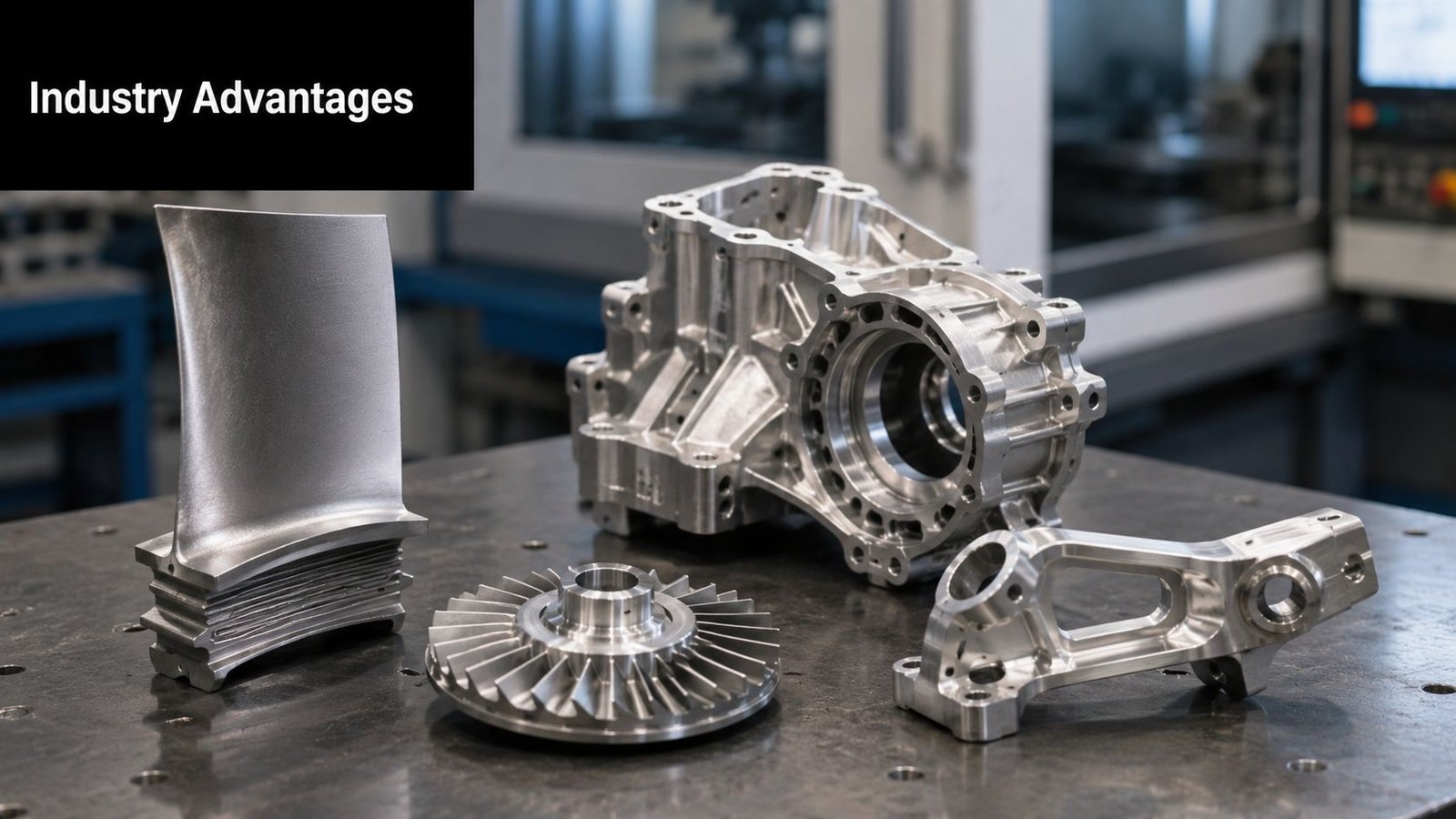
Components with angled holes, perimeter features, blade-like forms, or cylindrical bodies often fit 4-axis well. The fourth axis improves access without forcing the programmer into full 5-axis strategies. That can be a big advantage when the goal is dependable production rather than showcase geometry.
Mold details and patterned components
Mold-making often involves repeated features positioned around a contour or part body. Rotary positioning can simplify those operations and reduce the chance of mismatch between orientations. Shops also use 4-axis effectively for engravings or grooves wrapped around curved surfaces.
Prototype and bridge production
For custom prototypes and early production runs, the fourth axis can shorten the path from CAM to part when geometry spans multiple sides. Instead of building a stack of one-off fixtures, the team can hold the part once and let the program handle the orientation changes.
One of the best uses of 4-axis is not extreme complexity. It's medium-complexity work that repeats often enough for setup discipline to matter.
Power transmission and rotating parts
Shafts, couplers, gear-related blanks, and parts with circumferential features are natural fits. These jobs often become awkward on 3-axis because every new orientation introduces another chance for small misalignment to become a larger quality problem.
The fourth axis is critical in these applications because it supports three things at the same time: fewer setups, stronger positional relationships, and smoother workflow from operation to inspection. That's where the machine stops being just a technical upgrade and becomes a production tool with business value.
How to Select the Right 4 Axis CNC System
Buying a 4-axis system gets expensive when the selection process starts with spindle specs and ends with hope. The better approach is to begin with your parts, then map machine configuration, controls, tooling, and workflow to what those parts demand.
Start with the part not the machine brochure
The first filter is geometry. Ask what the machine must do repeatedly, not what it might do someday.
Look at your current and expected part mix through these questions:
- Which features create extra setups now: Multi-face details, bolt patterns around a diameter, angled milling, wrapped toolpaths, or contouring on cylindrical stock.
- What materials dominate the schedule: Aluminum, stainless, titanium, engineering plastics, and harder alloys place different demands on spindle behavior, rigidity, and workholding.
- How large are the parts really: Not just overall envelope, but usable envelope once the rotary device, fixture body, and tool length are included.
- What tolerances drive risk: The machine has to support the tolerance stack that matters most, not just the easiest features on the print.
That last point is where many purchases go wrong. Teams focus on broad machine capability but miss the positional relationships that make their parts difficult. A machine can be accurate in isolation and still underperform if the rotary setup isn't rigid enough for the actual cut strategy.
Machine configuration and control decisions
Rotary integration isn't one-size-fits-all. The physical configuration affects part access, rigidity, and ease of loading.
A few major choices deserve close attention:
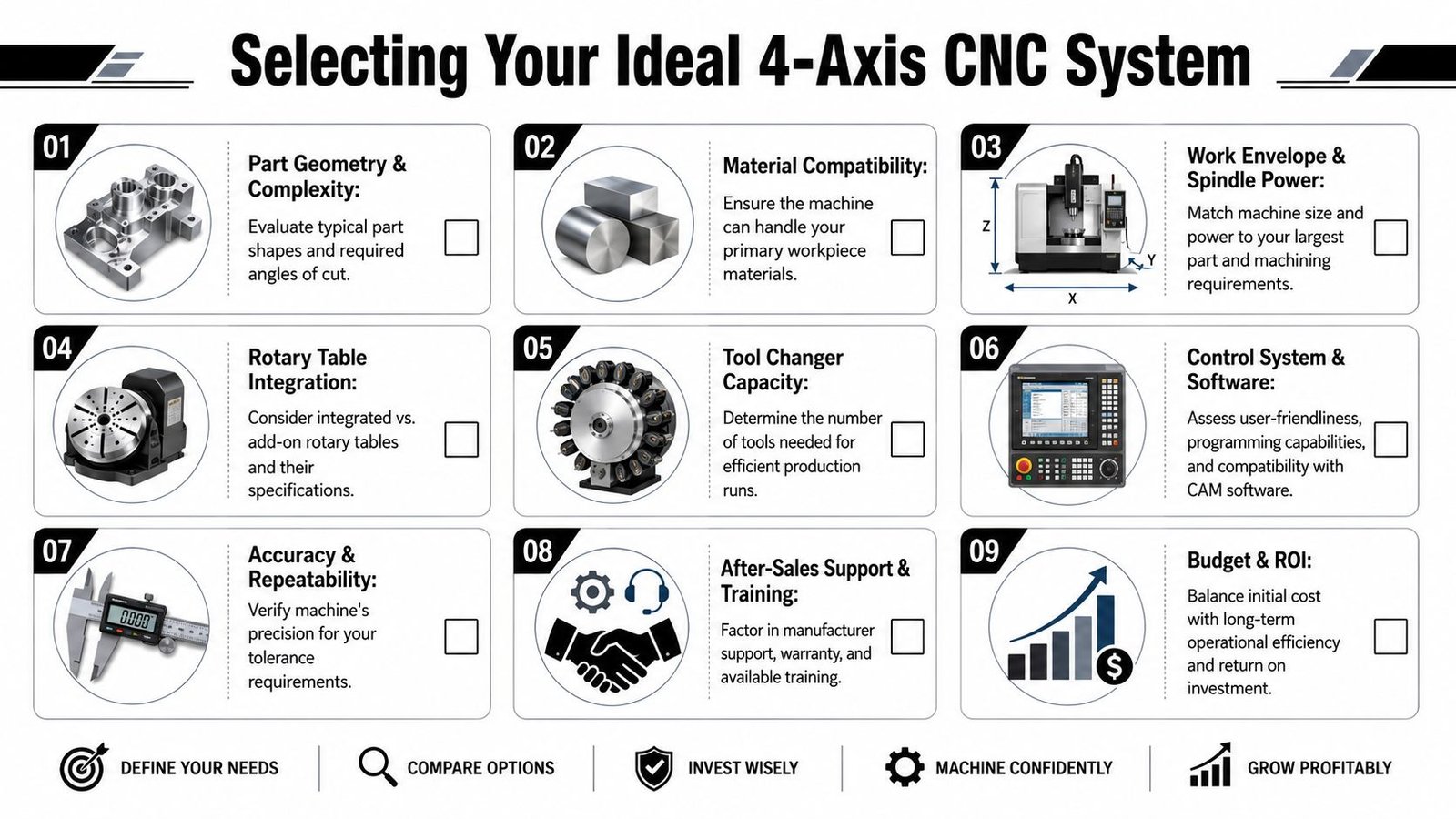
- Rotary table versus trunnion style: A rotary table works well for many indexed and cylindrical applications. A trunnion-style setup can improve access for some parts but may change work envelope and loading approach.
- Integrated axis versus add-on unit: A well-integrated system usually improves control behavior and shop-floor usability. Add-on units can work well, but compatibility and serviceability need to be checked carefully.
- Tailstock or auxiliary support: Long or slender parts may need support to prevent deflection during cutting.
- Controller and CAM compatibility: Your team needs a postprocessor and control environment they can trust. If rotary output is clumsy or verification is weak, adoption will stall.
A useful selection checklist helps keep these decisions grounded:
What buyers often underestimate
The machine itself is only part of the system. Shops often underestimate the surrounding requirements that determine whether 4-axis becomes productive.
Tooling strategy
A rotary setup changes tool access and clearance. Standard holders may not give enough reach or rigidity in all orientations. Tool length management becomes more important because every extra extension can reduce stability and affect finish.
Workholding design
The fixture has to do more than grip the part. It has to present the part cleanly to the spindle across the intended range of motion. Poor fixture design can block access, reduce rigidity, trap chips, or force awkward toolpaths.
Programming discipline
Even a good machine struggles when the CAM process isn't standardized. Shops need naming conventions, proven posts, simulation habits, and setup documentation that operators can follow without guessing.
The best 4-axis purchase is the one that matches your real production habits. If the system needs heroic programming or custom operator tricks every time, it won't deliver the return you expected.
Support and training
This matters more than many capital buyers want to admit. A machine that fits your team's skill level, with practical training and responsive support, often outperforms a more advanced option that nobody fully owns.
The right choice is rarely the most complex machine in the budget range. It's the one that handles your core parts well, fits your workflow, and leaves room to optimize production and services without overwhelming your current operation.
Integrating 4 Axis Milling for Maximum ROI
A standalone machine can cut parts. An integrated process makes money.
That's the distinction that often gets lost when manufacturers evaluate 4 axis CNC milling machines. The visible gain is rotary motion. The larger gain comes from everything built around that motion, including fixture design, loading method, error-proofing, operator flow, and how the machine connects to the rest of the cell.
The machine matters less than the process around it
A 4-axis platform creates opportunity, but integration determines whether that opportunity turns into lower cost per part and more stable throughput.
Consider what happens after the machine is installed. If operators still spend too much time aligning parts, changing ad hoc clamps, clearing chip traps from poor fixtures, or manually confirming that each blank is seated correctly, the shop won't capture the full value of the equipment. The spindle may be better, but the process is still fragile.
That's why custom workholding matters so much. Well-designed tooling and fixtures can reduce setup variation, improve access, and make part loading more consistent across operators and shifts.
Where integration creates real return
The strongest returns usually come from a handful of process improvements working together:
- Purpose-built fixturing: Fixtures that locate the part repeatably, expose the required faces, and reduce clamp interference make programs simpler and setups more reliable.
- Semi-automated clamping: Pneumatic or otherwise assisted clamping can reduce manual effort and improve repeatability, especially on recurring jobs.
- Part presence verification: Sensors or simple confirmation logic help prevent air cuts, bad loads, and avoidable scrap.
- Consistent datum strategy: The part should move through machining and inspection with a clear, stable reference structure.
- Operator-friendly sequence design: Loading, unloading, deburring handoff, and inspection steps should make sense in the actual cell, not just in CAD.
The value of integration is that it attacks hidden losses. Not just cutting time, but hesitation, rechecking, fixture inconsistency, and labor dependency.
A 4-axis cell performs best when manual intervention becomes deliberate instead of constant.
There's also a staffing advantage. A process designed around reliable fixturing and simple automation is easier to transfer across shifts. That matters for small and midsized manufacturers where one experienced setup person often carries too much of the operation in their head.
ROI comes from flow not just speed
Many buyers focus on whether the fourth axis makes the toolpath faster. Sometimes it does. But the bigger return often comes from smoother flow through the entire operation. One clamp instead of several. One fixture family instead of custom improvisation for every revision. One inspection plan built around a stable orientation strategy.
That's how 4-axis becomes a strategic upgrade. Not as a feature on a spec sheet, but as part of a broader manufacturing solution to optimize production and services.
When to Partner with a Manufacturing Engineering Expert
A 4-axis project looks simple from a distance. Buy the machine, post the code, start cutting. In practice, the decision touches quoting, fixture design, process planning, controls, operator training, inspection logic, and future scalability.
That's manageable in-house if your team already has deep experience with multi-axis implementation. If not, the risk isn't just a difficult startup. The risk is buying capable equipment and never getting the full return because the surrounding process never gets fully engineered.
Signs your team should bring in outside support
Outside manufacturing engineering support makes sense when several of these are true:
- The part mix is changing: You're taking on more multi-face or cylindrical work, but your existing methods are still built around 3-axis habits.
- Fixtures are becoming one-off fixes: The team keeps solving new jobs with custom improvisation instead of reusable standards.
- Programming and setup knowledge sit with too few people: If one programmer or lead machinist owns the whole process, scale becomes fragile.
- You need cleaner integration: The machine has to fit into a semi-automated line, validated process, or a more controlled production environment.
- Capital justification depends on throughput gains: The purchase has to produce measurable operational improvement, not just added capability.
Expert help is most valuable before the machine arrives, when the process can still be shaped around the right assumptions.
What expert involvement should deliver
Good engineering support should narrow risk, not add theory. It should help define the right machine class, the right rotary approach, the right fixture concept, and the right level of automation for your actual operation. It should also connect machine capability to daily execution, which is where most return is won or lost.
For medical device manufacturers and other regulated or quality-sensitive operations, that outside perspective becomes even more valuable. Process choices affect repeatability, documentation, training, and how easily the line can hold performance over time.
If your team is evaluating 4-axis as part of a broader effort to optimize production and services, it helps to work with a partner that understands equipment, controls, workholding, semi-automation, and real plant constraints together, rather than as separate problems.
If you're evaluating a 4-axis upgrade and want help turning machine capability into a practical production system, System Engineering & Automation works with manufacturers to improve quality, efficiency, and scalability through engineering, tooling, fixtures, and right-sized automation.