A production line rarely fails at a convenient time. A semi-automated station stops, operators start waiting, supervisors start calling, and maintenance gets pulled in before anyone has a clear view of what happened. One person checks an old spreadsheet, someone else searches email for the last service note, and the technician who finally arrives still has to ask basic questions about the asset, the warranty, and the spare part that may or may not be in stock.
That kind of scramble gets mislabeled as a maintenance problem. In practice, it's an operations problem. It disrupts throughput, creates quality risk, delays shipments, and ties up people who should be focused on production instead of chasing information.
For manufacturers running custom equipment, semi-automated cells, or regulated production environments, service coordination isn't a back-office task. It sits close to the heart of uptime. That's where ifs field service management becomes relevant. Used properly, it acts less like another software purchase and more like the operating layer that connects installed assets, service teams, and business systems so the factory floor gets support with context instead of guesswork.
Table of Contents
- Introduction The Real Cost of Disconnected Service Operations
- What Is IFS Field Service Management for a Manufacturer
- Core Features That Drive Production Uptime
- Key Benefits for Manufacturing and Medical Device Makers
- Integrating IFS FSM with Your On-Site Automation Systems
- Common Pitfalls and Your Strategic Next Steps
Introduction The Real Cost of Disconnected Service Operations
A packaging line stops because a vision-guided station begins faulting intermittently. Production sees a machine issue. Maintenance sees a controls issue. Service sees an open question because nobody can confirm whether the last repair solved the root cause or only reset the symptom.
The delay starts before the technician even travels.
Dispatch has one version of the problem. The plant has another. The asset record lives in one system, parts availability in another, and the warranty or service contract details may be buried in someone's inbox. By the time a person gets to the machine, the organization has already lost time to internal friction.
Where the real cost shows up
The obvious loss is downtime. The less obvious losses are often harder on the business:
- Production disruption: operators wait, schedules slip, and downstream stations may idle.
- Quality exposure: rushed restarts can create inconsistent output or undocumented adjustments.
- Labor waste: planners, supervisors, technicians, and buyers spend time hunting for facts.
- Repeat visits: the first response fails when the technician arrives without the right context or part.
Disconnected service operations don't just delay repair. They make every repair more expensive than it should be.
In manufacturing, especially with semi-automated or custom equipment, service information has to move as fast as production does. A line supervisor doesn't care whether the failure came from maintenance, controls, software, or a vendor-managed component. They care whether the asset gets back into a stable operating state quickly and traceably.
Why this problem keeps repeating
Most plants don't lack effort. They lack a shared operating system for service. Teams still rely on calls, whiteboards, ERP notes, tribal knowledge, and disconnected maintenance records. That works until asset complexity rises, service volumes increase, or compliance expectations tighten.
IFS positions field service management as the coordination of people and resources working outside the office, including scheduling, dispatching, tracking field agents, managing customer interactions, and service delivery through an enterprise-grade platform tied to broader business systems, as described in the IFS field service management glossary.
For a manufacturer, that matters because uptime depends on more than sending a technician. It depends on sending the right technician, with the right information, into the right production context.
What Is IFS Field Service Management for a Manufacturer
A manufacturer doesn't need another generic service app. It needs a system that connects installed equipment, technicians, service decisions, and business records without forcing people to re-enter the same information in three different places.
ifs field service management is best understood as an enterprise-grade coordination layer for field teams and assets. Its core functions include scheduling, dispatching, work order management, asset maintenance, and mobile technician workflows in real time. It has also evolved beyond basic dispatch into a broader digital operations layer tied to ERP and CRM systems.
Why manufacturers need more than dispatch software
On the factory floor, service work is never isolated. A machine repair affects output. A spare part affects purchasing. A warranty decision affects cost recovery. A calibration or service note may affect quality documentation.
That's why a plant-level view of FSM is more useful than a generic software definition.
A simple dispatch tool can tell you who is going where. It usually can't give planners and technicians a shared, current picture of the asset, its service history, and the commercial rules around that visit. Manufacturers with custom tooling, integrated controls, and mixed manual-to-automated processes often hit that limit quickly.
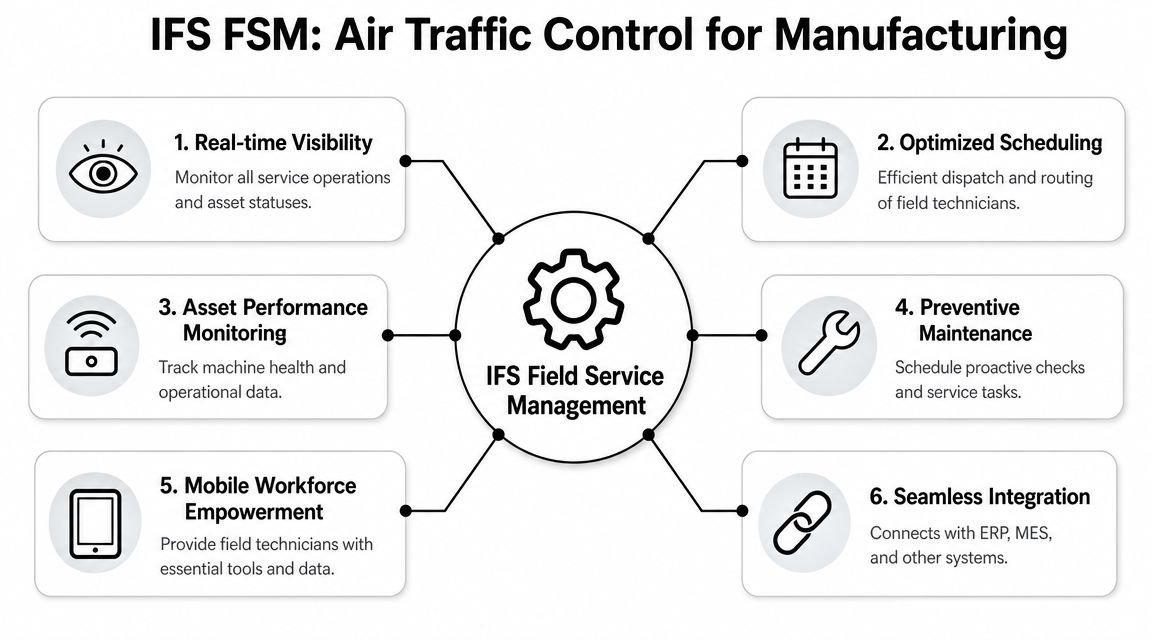
Think of it as air traffic control for service
The air traffic control analogy fits because the main value is coordination under pressure. Assets, technicians, parts, and service commitments are all moving pieces. If they aren't visible in one operating picture, conflict and delay become normal.
In manufacturing terms, IFS FSM helps create a single source of truth across:
| Manufacturing need | What the platform coordinates |
|---|---|
| Asset support | Service history, maintenance activity, current work orders |
| Technician deployment | Scheduling, dispatch, mobile task execution |
| Commercial context | Contracts, warranty, customer commitments |
| Business follow-through | Work completion, billing, analytics |
That matters most when the plant can't afford ambiguity. A service team shouldn't need separate calls to determine whether an issue is covered, what happened last time, or which technician has the right experience with a specific machine family.
Practical rule: If your technicians spend too much time clarifying the job before they can do the job, the problem is usually system design, not technician effort.
For manufacturers considering automation upgrades or supporting installed equipment in the field, IFS FSM becomes the bridge between the front office and the physical production environment. ERP handles orders and financial control. Production systems handle process execution. FSM sits between them where service actions need both operational and business context.
That's why this software tends to matter more as equipment gets more specialized. The more custom the machine, the less room there is for vague dispatch notes and disconnected records.
Core Features That Drive Production Uptime
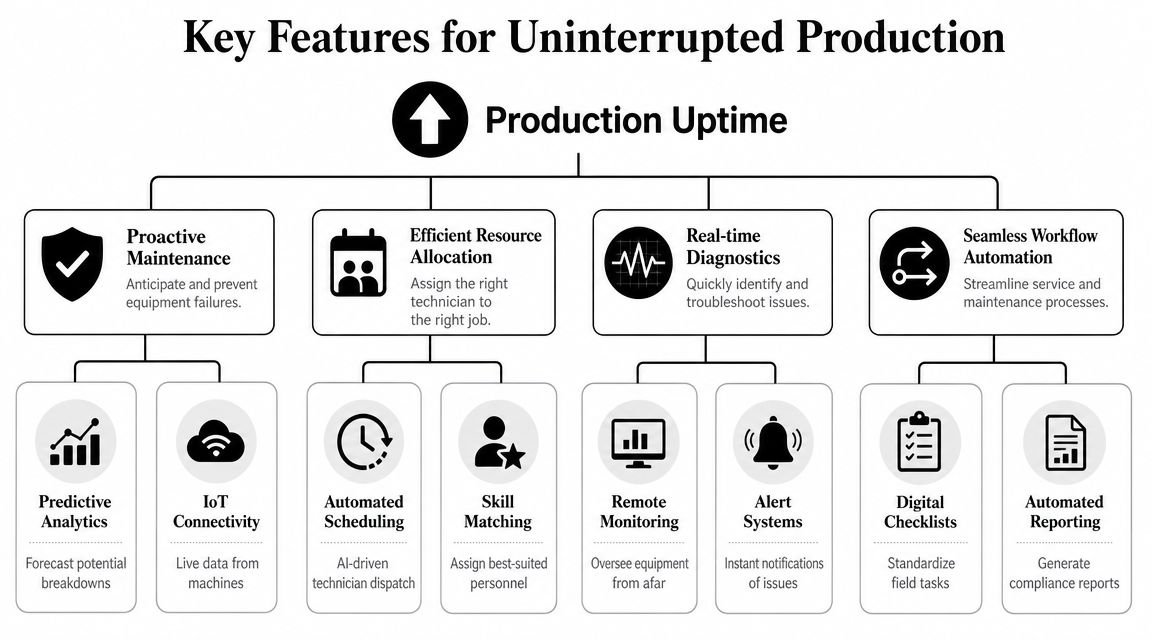
Manufacturing teams don't buy field service software for the dashboard. They buy it because avoidable downtime keeps happening for very predictable reasons. The technician is available but lacks machine history. The planner knows the urgency but not the skill match. The part exists somewhere in inventory but isn't tied to the work order. The job gets finished, but the closeout takes so long that billing and analysis happen days later.
IFS FSM is built to reduce those handoff failures by connecting service execution into one flow.
Scheduling with production context
One of the practical strengths in IFS FSM is that scheduling, dispatch, inventory, and billing sit in a single platform. IFS states that the system unifies asset and customer data so a technician assignment can be made using live asset history, warranty, and SLA context, then closed directly into invoicing, reducing data re-entry and dispatch delay, as described on the Siemens IFS FSM overview.
That changes planning behavior in useful ways. Dispatchers aren't assigning work based only on availability. They can assign based on service context. For a manufacturer, that means the response can reflect machine criticality, prior failure history, entitlement status, and what follow-up will be required after the repair.
A lot of plants are also trying to connect service events to machine-state visibility. That's where broader real-time automation strategies become relevant. If the production environment can signal conditions quickly and service planning can respond with context, downtime becomes more manageable.
Mobile execution that reduces rework
A mobile workflow matters because many service failures start with incomplete information at the point of work. If the technician receives only a short dispatch note, they spend the first part of the visit reconstructing the problem.
A better mobile workflow gives the technician access to the job record, asset history, parts requirements, and service tasks before arrival. On the floor, that reduces improvisation and helps standardize how work gets documented.
This is especially useful for:
- Custom equipment support: technicians can review prior modifications before opening the machine.
- Semi-automated stations: mobile work orders can capture recurring faults that aren't obvious in high-level ERP records.
- Regulated tasks: digital checklists create more consistent service evidence than handwritten notes.
Later in the service cycle, the same mobile closeout becomes just as important. If the technician completes work digitally, operations, finance, and service leadership don't have to wait for manual paperwork to know what happened.
A short video overview helps show how these workflows fit together in practice.
Parts visibility and closed-loop workflow
A first visit rarely succeeds if the service team can't connect diagnosis to parts availability. That's why inventory linkage is not a side feature. It's part of uptime.
The strongest FSM setups connect three decisions in one chain:
- What failed
- Who should fix it
- What parts and commercial steps follow
When those stay disconnected, planners create workarounds. When they stay in one workflow, service becomes faster and cleaner.
The best service platforms don't just speed dispatch. They reduce the number of times the organization has to ask the same question twice.
For manufacturers, that closed-loop flow also improves learning. Work orders don't end as static records. They become operational feedback. Teams can see which assets are repeatedly failing, where technician utilization is strained, and which service patterns are creating the most disruption to production.
Key Benefits for Manufacturing and Medical Device Makers
The business case for ifs field service management isn't about software breadth alone. It's about whether the platform improves the outcomes manufacturers care about: stable uptime, fewer avoidable visits, stronger traceability, and better use of technical labor.
Those benefits become clearer in environments where equipment is specialized and downtime is expensive even when nobody calculates the exact number.
Uptime improves when service context improves
Manufacturing service quality rises when technicians walk into a job with the full picture. IFS describes a key differentiator as real-time visibility across asset history, warranty status, and SLA commitments, supporting the service lifecycle from initial contact through final billing on the IFS FSM product page.
That kind of visibility has a direct operational effect. Dispatch can make better decisions before the truck rolls. Technicians can prepare for the likely failure mode. Supervisors can see whether the service response matches the urgency of the asset.
In plants with semi-automated lines or custom stations, that often shows up first in fewer repeat visits and more controlled recovery from faults. The gain isn't abstract. It comes from fewer missing details during planning and execution.
Traceability matters more in regulated production
Medical device makers and other GMP-aware manufacturers care about a different layer of value. They need service records that are usable, reviewable, and defensible.
IFS states that this visibility reduces documentation gaps and strengthens traceability around assets, parts, and contracts. That matters when service work affects calibration status, machine readiness, change control, or maintenance evidence tied to production quality.
A paper-heavy or email-driven service model creates too many opportunities for missing records. A digital workflow is usually stronger because it can tie work instructions, task completion, parts usage, and asset-specific history together.
For regulated manufacturers, that means FSM isn't just a response tool. It supports process discipline.
| Operational priority | Why FSM helps |
|---|---|
| Audit readiness | Service actions are documented in structured workflows |
| Asset traceability | Parts, contracts, and service history stay tied to the equipment |
| Controlled execution | Technicians follow defined tasks instead of informal memory |
| Cross-functional visibility | Quality, operations, and service can review the same record set |
In regulated manufacturing, an undocumented repair can create almost as much trouble as the original failure.
Where the ROI usually shows up first
The strongest returns usually appear in a few practical areas before they show up in a formal financial model.
One is technician productivity. If technicians stop wasting time on clarification, duplicate entry, and paper closeout, more of their time goes to actual service work.
Another is service capacity. Better scheduling and clearer records let the existing team handle complexity with less chaos. That matters when experienced technical labor is hard to replace.
The third is production stability. Operations leaders may not care what software category solved the issue. They care that support around critical assets becomes more predictable.
That said, the ROI case isn't automatic. A plant with modest service volume and relatively simple equipment may not need the full depth of an enterprise FSM suite. The value rises when asset complexity, traceability demands, installed-base support, or coordination across sites starts stretching lighter tools beyond their useful limit.
Integrating IFS FSM with Your On-Site Automation Systems
The question manufacturers usually ask isn't whether FSM sounds useful. It's whether it can connect to the actual equipment environment they run today. That may include PLC-driven machines, vision systems, SCADA layers, custom stations, sensors, and operator interfaces that evolved over time rather than from a single clean architecture.
That's where integration discipline matters more than software marketing.
How the digital and physical layers connect
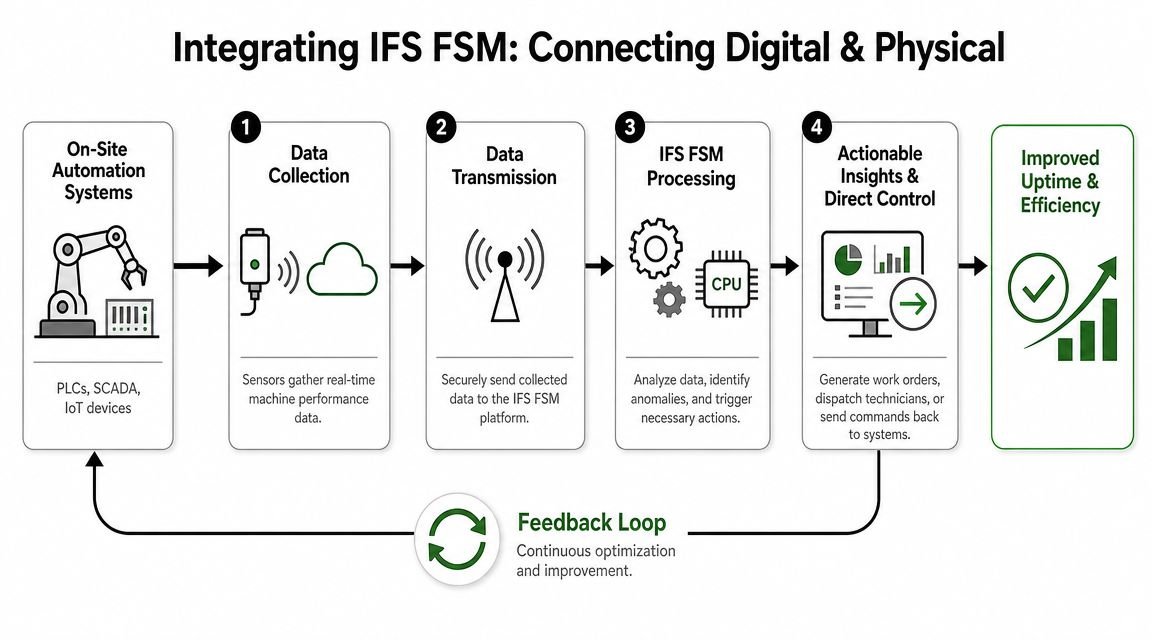
In a connected operation, machine data doesn't just sit in the controls environment. It informs service action. A fault condition, repeated alarm pattern, or maintenance threshold can feed the service process so the asset effectively signals when human intervention is required.
That doesn't mean every PLC event should create a work order. Plants that do that too early create noise. The better approach is to connect meaningful asset conditions to service rules and escalation paths.
A practical integration pattern often looks like this:
- Machine or sensor layer: equipment generates status, alarm, or condition data.
- Control and monitoring layer: PLC, HMI, SCADA, or data collection tools organize what's happening.
- Service layer: IFS FSM turns selected conditions into actionable service events.
- Execution layer: planners dispatch, technicians respond, and work records return to the business system.
Manufacturers evaluating this path usually need a clear view of their automation control systems before deciding how much service orchestration should be automated. Good integration starts with knowing what your machines can already report reliably.
Start with critical assets, not the whole plant
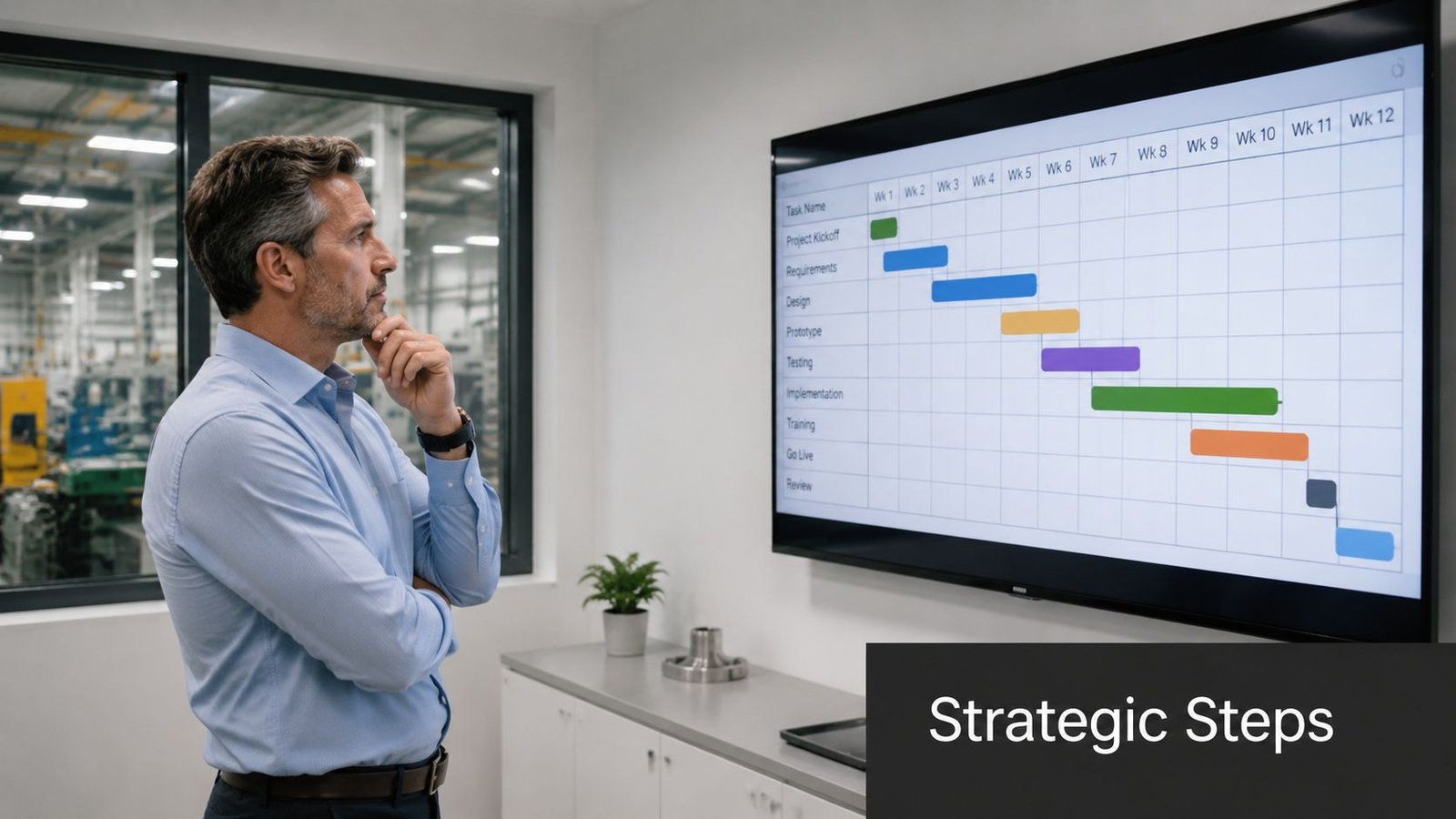
A phased rollout works better than a plant-wide launch in most manufacturing settings. The reason is simple. Not every asset creates the same business risk, and not every machine needs the same level of service workflow.
Start where downtime hurts most. That might be a bottleneck station, a validated process asset, or an installed machine family that generates recurring support work across customer sites.
A useful pilot scope usually includes:
- A small group of high-impact assets
- A defined technician or service team
- Clear work order and closeout standards
- Parts and service history aligned to those assets
This approach exposes weak data, unclear ownership, and workflow gaps early while the project is still manageable.
When a full FSM platform makes sense
There's a legitimate trade-off here. IFS FSM is positioned as an end-to-end, AI-enabled suite, but the strategic question is whether that depth fits your current scale and service complexity. The TNTRA analysis of IFS field service management raises the key issue directly: at what operational scale does the feature depth produce positive ROI, especially for mid-sized manufacturers focused on cost-effectiveness?
That's the right question.
A full FSM platform tends to make more sense when several of these conditions are true:
- Service work spans multiple systems: scheduling, parts, billing, and asset history are fragmented.
- The installed base is growing: more field support is required for machines already in operation.
- Compliance expectations are rising: service traceability needs to be structured, not informal.
- Technician deployment is complex: skills, geography, and parts coordination matter.
- Production relies on custom or uptime-critical assets: a weak service process creates outsized operational pain.
If those conditions aren't present, a lighter tool may be enough for now. If they are, delaying a stronger service platform often means paying the cost in slower response, more coordination labor, and recurring downtime.
Common Pitfalls and Your Strategic Next Steps
Most failures with enterprise service platforms don't come from bad software. They come from bad implementation choices. Plants try to digitize chaos instead of fixing workflow, asset data, and ownership first.
That's avoidable if the project starts with operational discipline instead of feature enthusiasm.
Mistakes that slow adoption
The first common mistake is the big-bang rollout. Teams try to connect every asset, every workflow, and every user group at once. That usually hides basic process issues until they become expensive.
The second is poor asset data. If service history is inconsistent, naming is sloppy, or installed-base records are incomplete, the platform inherits confusion instead of removing it.
The third is late technician involvement. Service systems fail when the people using them daily feel they were handed a process instead of being asked how work happens.
A few warning signs show up early:
- Too many exceptions: every team says its workflow is unique, so nothing gets standardized.
- No clear ownership: operations, maintenance, IT, and service all assume someone else is leading.
- Weak closeout discipline: work gets done, but records remain incomplete or delayed.
- Unclear success criteria: the project launches without agreed operational KPIs.
Field lesson: Clean asset structure beats clever configuration. If the asset record is wrong, every downstream workflow suffers.
A practical starting checklist
A sensible evaluation starts on the shop floor and in the service process, not in a demo environment.
Use this checklist before selecting scope or implementation timing:
Map your current failure response
Track what happens from machine fault to completed repair. Look for handoffs, duplicate entry, and missing context.Identify the assets that drive the most disruption
Don't begin with low-consequence equipment. Start where service quality has the biggest effect on uptime, quality, or compliance.Review your service data quality
Check asset naming, service history, parts linkage, and warranty or contract visibility.Define what “better” means operationally
That may be fewer repeat visits, faster dispatch decisions, better traceability, or more complete work records.Decide whether you need FSM breadth or a narrower tool
If your environment is modest, simpler software may be enough. If you're managing custom equipment, distributed support, or regulated documentation, deeper capability may pay back.
A separate planning step is worth taking before any major rollout: involve a partner who understands both production systems and implementation realities. An operations team that needs help assessing fit, scope, and deployment risk can use guidance like finding the right solution to optimize your processes to frame the decision around actual manufacturing needs rather than software checklists.
The best next move is rarely “buy the biggest platform.” It's to define the service problem precisely, pilot where the pain is real, and build the system around how production works.
If you're evaluating how service management should connect to your automation strategy, System Engineering & Automation can help assess the operational problem first. That includes identifying where downtime, service complexity, and equipment support justify a stronger digital workflow, and where a simpler approach will do the job with less cost and disruption.