
You can have the right orders, the right machines, and the right people on the floor, and still miss ship dates because the schedule wasn't built to survive the day. A material delay shows up. A line-clearance hold lands in the middle of the shift. Then a rush order walks in from sales and everything downstream starts slipping.
That's the answer to what is production scheduling. It isn't a pretty calendar or a stack of dates in ERP. It's the discipline of turning demand, capacity, material readiness, labor skill, and quality constraints into a plan the plant can execute, then keeping that plan stable when the floor changes underneath it.
Table of Contents
- The Day the Schedule Falls Apart
- What Production Scheduling Means
- Core Methods and Approaches Compared
- Key KPIs That Reveal Schedule Health
- Common Scheduling Failures and How to Prevent Them
- Choosing the Right Level of Automation
- Real Scenarios From the Shop Floor
- Your 90 Day Scheduling Optimization Roadmap
The Day the Schedule Falls Apart
The morning starts with a plant manager standing at the whiteboard, coffee in hand, looking at a plan that was already fragile before anyone clocked in. By 8 a.m., three rush orders are sitting in inboxes, one critical material is still on a truck, and a line-clearance hold has frozen a cell that was supposed to run first. The schedule still exists, but it's no longer executable.
That's the moment a lot of small and mid-sized plants get trapped in. They don't fail because nobody knows how to sequence jobs. They fail because the schedule was treated like a fixed promise instead of a living control system. Once the first disruption hits, every rework decision creates more queue time, more WIP, and more rescheduling churn.
Practical rule: if the plan can't survive a material delay, a staffing gap, or a hold/release event, it isn't a schedule yet, it's a wish list.
Production scheduling matters because it sits between planning and shop-floor reality. ERP and MRP may tell you what should be made, but scheduling is the step that converts that demand into starts, finishes, release dates, and a sequence the floor can follow, which is why the most useful KPIs are always tied to schedule realism and execution, not just output volume. In practice, that's the difference between firefighting all week and keeping commitments predictable.
For manufacturers that support customers with production solutions, the conversation has to stay grounded. The goal isn't automation for its own sake. The goal is a schedule that stays stable enough to run, flexible enough to absorb disruption, and transparent enough that supervisors know what changed and why.
What Production Scheduling Means
At the simplest level, production scheduling turns demand into a detailed plan for when work starts, when it finishes, and what resources it uses. On a busy shop floor, that can look as ordinary as a kitchen ticket rail. Orders arrive, the expediter sequences them, and each station gets the right work in the right order so the operation does not get buried by its own volume.
Scheduling as the translation layer
The job is translation. ERP and MRP tell you what the plant needs to make. Scheduling turns that into an executable constraint model that assigns each job to a specific machine, labor group, and time window while respecting finite capacity, setup time, material availability, and quality gates such as line clearance or hold, release. That makes scheduling the bridge between planning and actual manufacturing performance, with planned starts, finishes, and release dates for execution SAP-aligned production scheduling concepts, finite-capacity scheduling constraints.
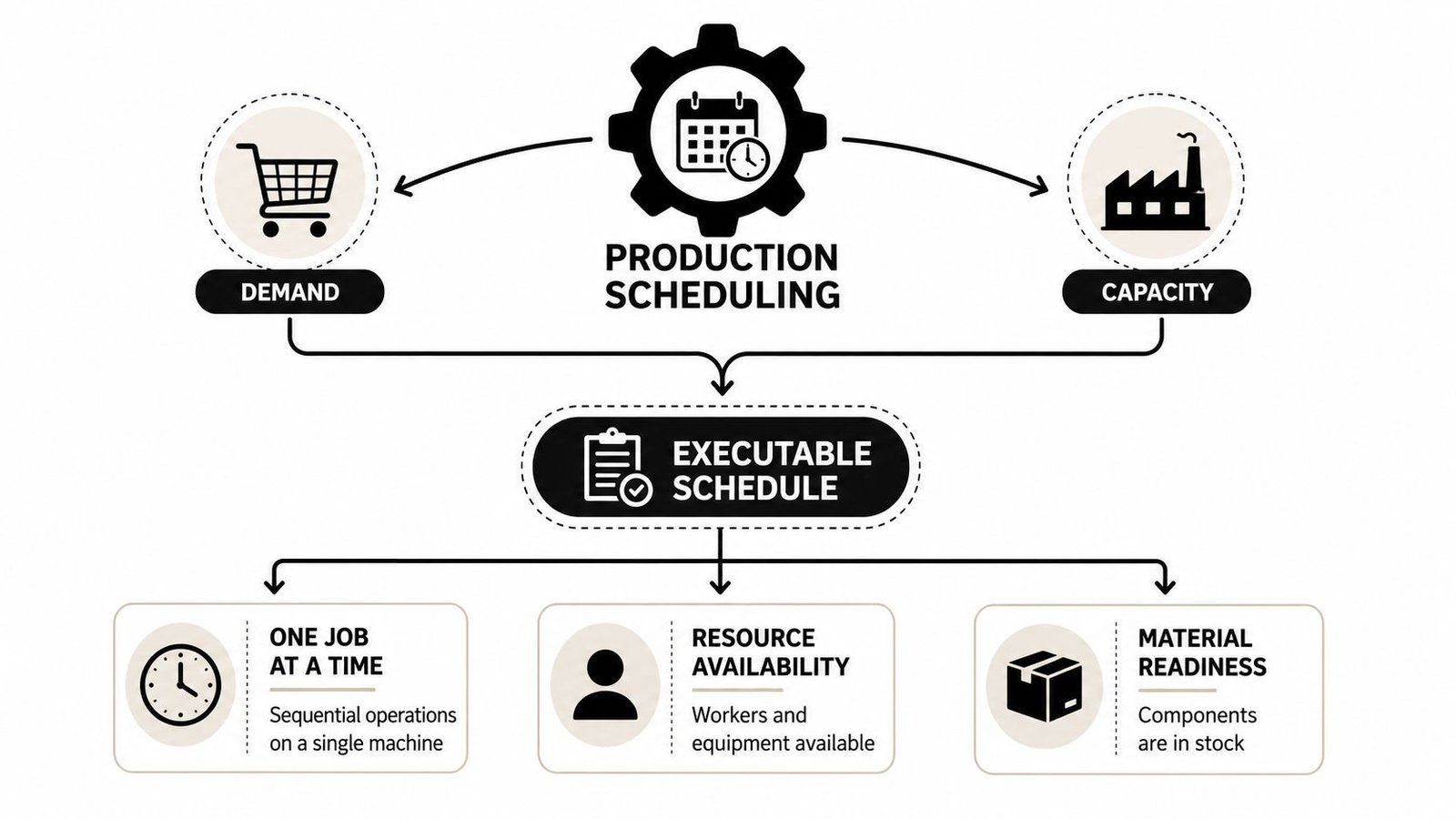
A practical schedule has to answer four questions at once:
- What gets made. The job or order itself, tied to customer demand or forecast.
- Where it runs. The machine, work center, or line that can process it.
- When it runs. The start and finish window that fits available capacity.
- What must be true first. Materials on hand, qualified labor available, and quality holds cleared.
If one of those pieces is missing, the schedule may still look clean on paper, but it will not hold on the floor. In GMP-aware plants, that usually shows up fast, a line is waiting on release, the wrong skill mix is assigned, or a changeover gets missed and the whole sequence slips. The practical habit is to treat scheduling as a daily constraint check, not a monthly planning exercise.
For plants that are mapping their broader capacity picture, this fits naturally with production capacity planning, which sets the boundary the schedule has to live inside.
Core Methods and Approaches Compared
The method you choose should match the plant you run, not the one in the software demo. A high-volume make-to-stock line can tolerate one style of scheduling. A GMP-aware job shop with frequent holds, changeovers, and skill constraints needs something much tighter.
Capacity logic and time direction
The first choice is finite versus infinite capacity. Finite scheduling respects real machine time, labor availability, material supply, and maintenance windows, so it produces a schedule the floor can execute finite vs. infinite scheduling explained. Infinite scheduling assumes capacity is available and is useful as a rough planning baseline, but it can overcommit the plant fast when setups, labor gaps, or shortages show up.
Then there's forward versus backward scheduling. Forward scheduling starts when resources are available and moves ahead in time. Backward scheduling starts from the promised date and works back to find the latest start that still hits the due date forward and backward scheduling). In a plant with long lead times and a stable order book, forward scheduling can keep utilization clean. In a customer-driven environment, backward scheduling keeps the promise date in view first.
Priority rules matter too, especially when the queue is messy.
- FCFS works when the process is stable and fairness matters.
- EDD helps when due dates are the main risk.
- SPT can reduce time in queue when lots are small and changeovers are manageable.
- Critical ratio helps a scheduler focus on the jobs closest to becoming late.
The best rule isn't the one with the smartest label. It's the one your supervisors can apply consistently when the line is under pressure.
A simple decision guide helps. Use finite capacity when setups, labor qualification, or material constraints drive reality. Use backward scheduling when customer due dates are tight and the promise date is fixed. Use forward scheduling when you're building inventory and need clean utilization. Use priority rules as a daily dispatch layer, not as a substitute for an executable plan.
For a deeper look at how scheduling choices affect downstream throughput, see throughput optimization.
Key KPIs That Reveal Schedule Health
A schedule can look active and still be drifting out of control. On a GMP-aware shop floor, the right KPIs show whether the plan can survive real conditions, not just whether it looked tidy on paper.
What the dashboard should tell you
Schedule adherence measures how often operations finish in the planned time window and sequence, and many manufacturing guides treat 95%+ as a strong benchmark for that metric schedule KPI guidance. On-time delivery shows how often orders ship on or before the promised date, which is the metric customers feel when the schedule holds, or misses.
The rest of the picture comes from the supporting indicators. Schedule attainment shows whether the plan was met, and one KPI framework flags attainment below 90% for two periods as a trigger for root-cause review schedule attainment trigger. Changeover time, queue time, throughput, capacity utilization, and WIP show where the schedule is losing stability before the due dates start slipping.
A useful way to read them together looks like this:
| Signal | What it usually means |
|---|---|
| High utilization, weak delivery | The plant is busy, but sequencing or setup losses are hurting flow |
| Rising WIP, flat output | Work is building up in front of a constraint |
| Good adherence, poor delivery | The plan is being followed, but the plan itself may be unrealistic |
| Low attainment, frequent rework | The schedule is getting broken and rebuilt too often |
These metrics are not substitutes for each other. They point to different failure modes in the same system. When queue time rises before customer complaints show up, the schedule is already warning you where to look.
I have seen plants use dashboards as wall art, and I have seen them use dashboards to protect output. The difference is discipline. If attainment drops, the response should go straight to the bottleneck, the missing material, the quality hold, or the changeover loss that caused the miss. For a practical view of how scheduling supports flow, throughput optimization is the right companion topic.
Common Scheduling Failures and How to Prevent Them
Most schedule failures get blamed on bad luck. In reality, they're usually signs that the schedule was too brittle for the level of volatility on the floor. Rush orders, bottlenecks, missing material, and rescheduling churn are symptoms of a system that can't absorb change without breaking.
Stability rules that keep the floor moving
The hardest part of production scheduling isn't making the first plan. It's deciding what gets protected when the day changes. Plants that handle this well use frozen windows, which hold the near-term plan stable for a defined period, and a separate flex zone for changes farther out. That gives supervisors room to execute without turning every new request into a full resequence.
Practical rule: protect the next block of work, then allow controlled changes only where the floor can absorb them.
A second rule is to use escalation triggers. When schedule attainment slips, the response shouldn't be informal. The planner, supervisor, and quality lead should know when to review the bottleneck, when to challenge a rush order, and when to stop accepting new work into a congested cell. That avoids the common trap where every problem gets handled by reshuffling the entire day.
Queue time is another warning sign. If work sits too long before the constraint, the plant may still report strong utilization while deliveries start moving late. That's why stability matters more than heroic last-minute rescheduling. A plant can tolerate one disruption. It usually can't tolerate ten “small” changes that all cascade through the same line.
A good field habit is simple. Lock the morning plan, let the floor run, and only reopen sequencing at a defined review point unless a true expediter event appears. That approach doesn't eliminate flexibility, but it keeps flexibility from becoming chaos.
The main shift in thinking is this. A schedule should be stable enough that operators trust it and flexible enough that planners can update it without losing control. When those two conditions are in balance, the schedule stops being a source of noise and starts acting like a control system.
Choosing the Right Level of Automation
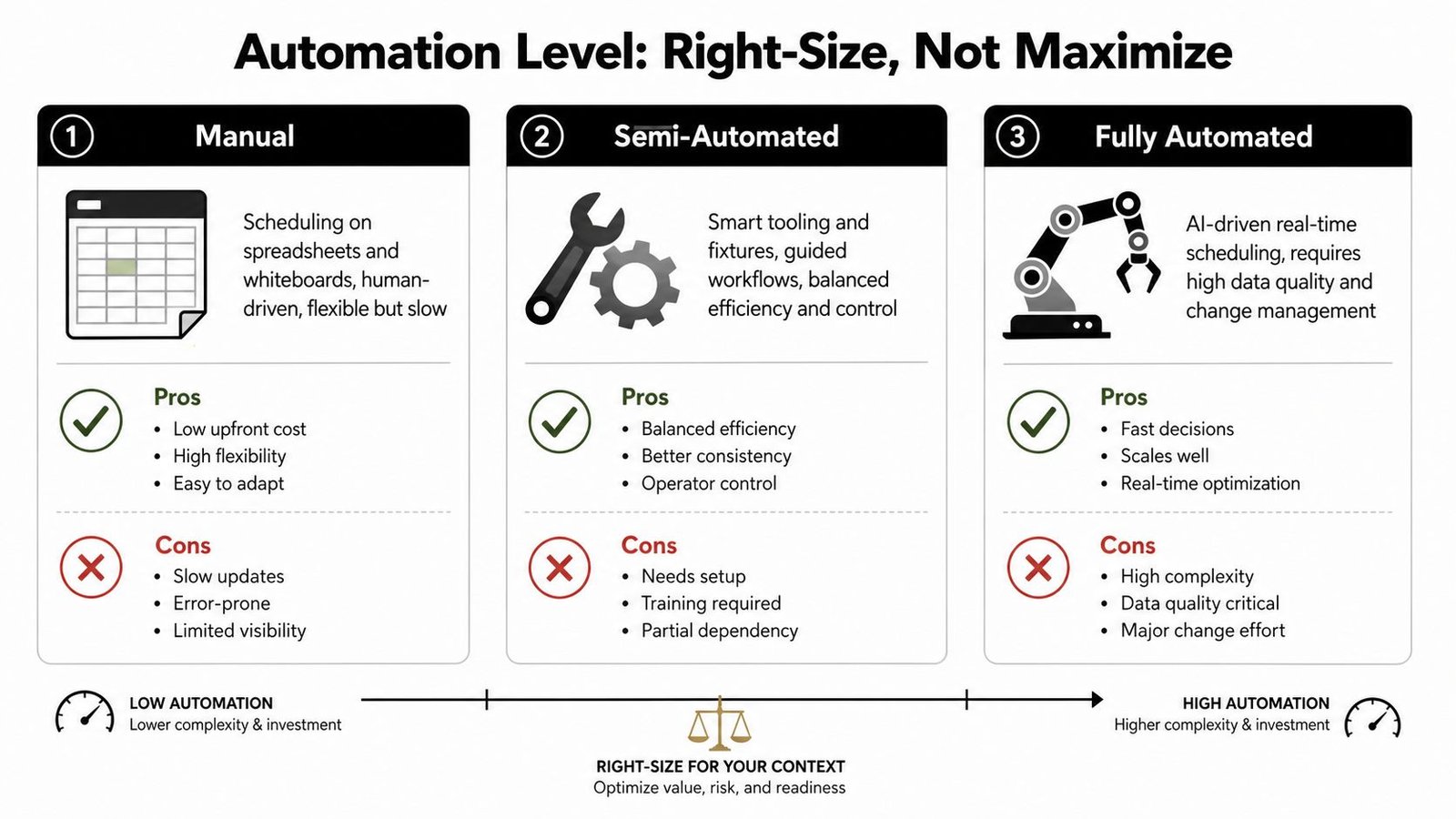
Automation should be sized to the plant's complexity, not sold as an all-or-nothing upgrade. For many small and mid-sized manufacturers, the right answer isn't fully automated orchestration. It's a mix of human judgment, good tooling, and just enough software to remove the most painful manual steps.
Manual, semi-automated, and fully automated paths
Manual scheduling still works in some low-complexity environments. Spreadsheets, whiteboards, and experienced supervisors can handle simple product families and predictable demand. The weakness is obvious, though. Manual plans are slow to update, hard to audit, and easy to break when the floor changes.
Semi-automated scheduling sits in the middle. It uses smart tooling, fixtures, integrated controls, and human-in-the-loop decision points to keep the schedule both usable and adaptable. That's often the best fit for GMP-aware operations, where line clearance, hold/release, and qualification records matter as much as sequence logic. SEA's own positioning around semi-automatic systems, custom tooling, fixtures, and integrated controls reflects this right-sized approach to automation.
Fully automated scheduling through APS, MES, or ERP modules makes sense when data quality is strong, routings are stable, and the business can absorb the change-management burden. It can be powerful, but it's not automatically better. If the plant still fights master data errors, ad hoc shortages, or inconsistent labor qualification records, more automation can just make the wrong plan move faster.
For a practical ROI lens, use automation ROI calculator thinking before committing to software or equipment changes. The right question isn't “How automated can we get?” It's “What level of automation will improve execution without stripping out flexibility?”
Real Scenarios From the Shop Floor
Two plants can have the same scheduling problem and need very different answers. The right fix depends on the mix, the constraints, and how much volatility the line sees every day.
Medical devices and high-mix work
In a medical device assembly cell, a line-clearance hold lands right as the shift starts. The team also has a qualification requirement on one operation, so not everyone can step in. A semi-automated schedule with smart fixtures keeps the cell moving without violating GMP records, because the scheduler can preserve the hold, reassign qualified labor, and resequence around the blocked step without losing traceability.
The warning signs would be weak schedule attainment, rising queue time before the constrained station, and delivery slips that lag the original disruption by hours or days. The adjustment is not to “push harder.” It's to preserve the hold status, protect qualified work, and resequence only the approved operations until release.
In a high-mix small batch shop, the problem looks different. A rush order arrives, changeover time is eating the afternoon, and two jobs are competing for the same bottleneck machine. Priority rules, a frozen morning window, and a controlled resequence solve more than a bigger dashboard ever will. The KPI signals here are usually a drop in schedule adherence, growing WIP, and throughput that stalls even though the equipment looks busy.
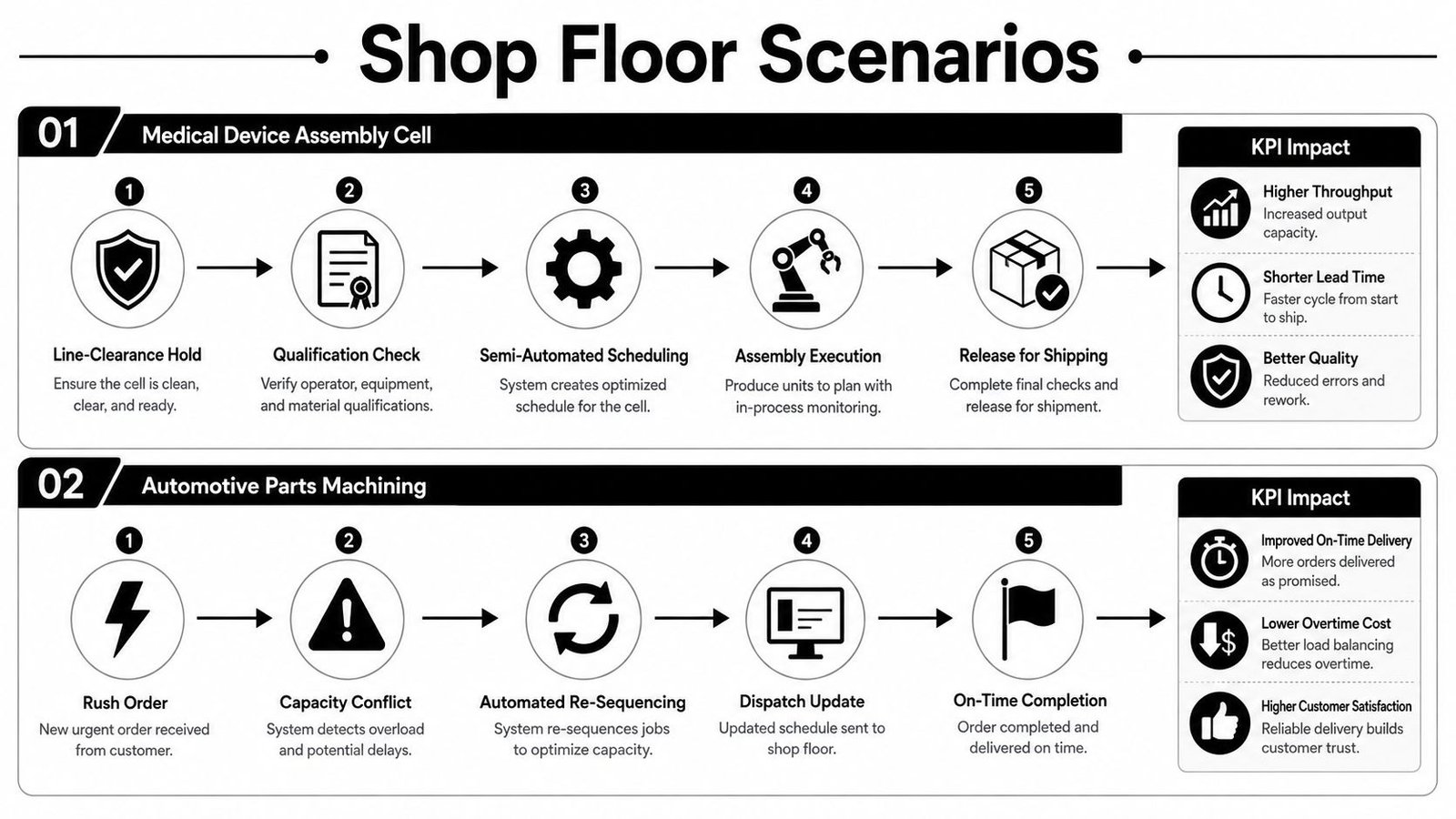
The important lesson from both scenarios is the same. The schedule has to protect the constraint, respect quality gates, and leave room for controlled change. If it can't do those three things, it won't stay executable.
Your 90 Day Scheduling Optimization Roadmap
A better schedule usually comes from disciplined iteration, not a giant software rollout. The next 90 days should be enough to make the process more stable if the team stays focused on constraints, methods, and execution review.
First 30 days, map reality
Start by documenting the current schedule, the constraints, and the points where it breaks. Capture the KPI baseline for schedule adherence, attainment, changeover time, queue time, throughput, and WIP. Then list the daily disruptions that cause the most rescheduling churn, including material shortages, labor gaps, and quality holds.
Next 30 days, right-size the method
Match the scheduling method to the plant's actual complexity. If the line is low mix and stable, a simpler method may be enough. If the plant runs frequent changeovers, qualification checks, or GMP constraints, move toward finite capacity logic and semi-automated workflows before you chase full automation.
Final 30 days, execute and review
Stand up weekly schedule-attainment reviews, define who can approve resequencing, and set escalation triggers for bottlenecks and rush orders. If the schedule keeps failing in the same place, fix the constraint, not just the dates. That might mean new fixtures, better controls, tighter material release rules, or a different level of automation.
The plants that improve fastest are the ones that treat scheduling as an operating discipline. They do not just ask what should run next. They ask whether the schedule can survive the next disruption and still deliver.
System Engineering & Automation helps manufacturers build the kind of schedule that can be executed on a real floor, with the right mix of semi-automatic systems, custom tooling, fixtures, and integrated controls. If you're working through stability problems in production scheduling, visit System Engineering & Automation to see how their engineering approach can support your line, your compliance needs, and your delivery goals.