You're probably looking at a project that seems straightforward on paper. A manual station is too slow, quality variation is getting expensive, and labor availability isn't getting easier. The answer looks obvious: add a robot, an indexing table, vision inspection, a PLC-controlled fixture, or a semi-automated handling step.
Then the harder questions show up. Will the new system remove the bottleneck, or just move it downstream? What happens during cleaning, changeover, rework, or a jam recovery? In a GMP setting, can quality and maintenance support it without creating a validation burden that wipes out the business case?
That's where an automation risk assessment earns its keep. Done properly, it doesn't slow the project down. It stops you from buying speed at the cost of instability, scrap, audit exposure, or operator workarounds that defeat the design.
Table of Contents
- Why an Automation Risk Assessment Is Your Project's Safety Net
- Scoping Your Assessment for Real-World Impact
- Identifying Hazards with HAZOP and FMEA
- Scoring Risk and Building Your Action Matrix
- Designing GMP-Aware Controls and Mitigation Plans
- Creating a Living Document for Compliance and Improvement
Why an Automation Risk Assessment Is Your Project's Safety Net
Most failed automation projects don't fail because the actuator was undersized or the HMI screen looked bad. They fail because the team treated risk assessment like paperwork for EHS or QA, instead of using it to pressure-test the business case.
If you're a manufacturing manager approving capital spend, that matters. A machine can hit target cycle time during a demo and still underperform badly in production because no one assessed how operators load parts, how material behaves across shifts, or how the line recovers after minor faults. In medical device and other GMP-aware environments, those gaps don't just hurt output. They can create documentation issues, release delays, and repeated deviations.

ROI starts with fewer surprises
A useful automation risk assessment asks practical questions early:
- Where does the new process save labor: At loading, inspection, sealing, transfer, or data capture?
- Which failure stops the line fastest: Sensor misread, fixture wear, bad part presentation, software interlock, or operator bypass?
- What creates hidden cost: Scrap, rework, downtime, validation effort, maintenance callouts, or excessive changeover time?
- What breaks compliance first: Uncontrolled parameter changes, poor traceability, unclear alarms, or weak access control?
Those questions protect ROI better than optimistic throughput assumptions. They also help you choose the right level of automation. In Southeast Asia, that's often the key decision. Not full automation versus manual, but where a semi-automated step gives the best payback without overcomplicating the line.
Practical rule: If the process still depends on human judgment, hand loading, or frequent SKU changeovers, your biggest risks usually sit at the interface between operator and machine, not inside the PLC code.
Risk assessment is how you move faster with less regret
Teams sometimes worry that formal assessment will delay the project. In practice, the opposite is usually true. A short, disciplined review before design freeze is cheaper than redesigning guards, rewriting sequences, or revalidating a station after FAT.
That's also why many manufacturers are moving toward a more balanced automation approach rather than chasing complexity for its own sake. The idea behind a smarter path to automation without anxiety is sound: automate where it reduces burden and stabilizes output, but keep enough flexibility for real production conditions.
Safety net means operational trust
An automation risk assessment should give you confidence in three areas:
| Focus area | What you need to trust |
|---|---|
| Production | The system can run repeatably across normal shifts, not just under engineering supervision |
| Quality | Critical process parameters stay controlled and deviations are visible |
| Compliance | Operators, maintenance, and QA can explain how the system is controlled, changed, and verified |
When those three hold, automation becomes an asset. When they don't, the machine may still run, but the plant won't trust it.
Scoping Your Assessment for Real-World Impact
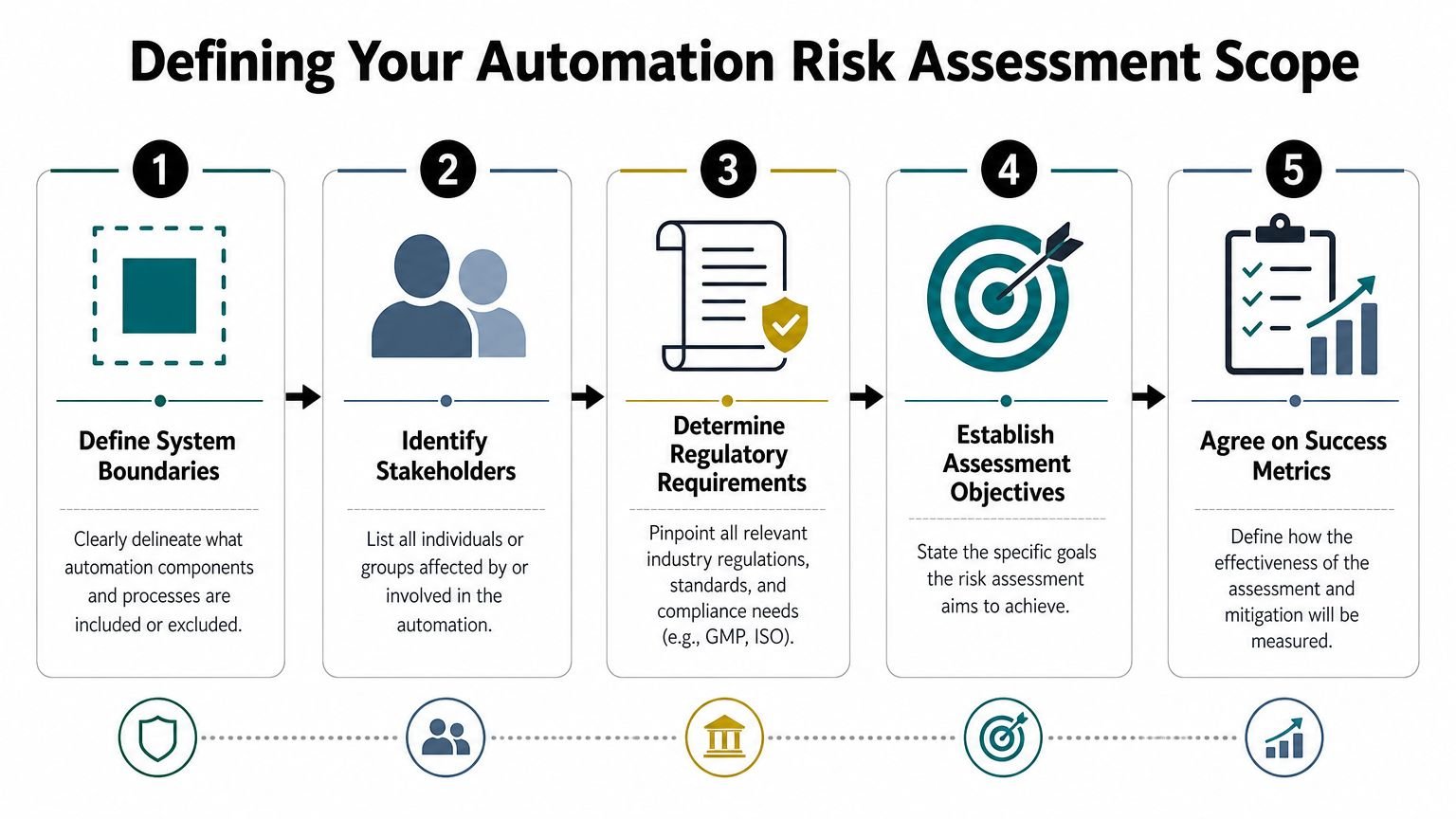
A weak scope ruins the assessment before the first meeting starts. If the team can't agree on what system is under review, every risk discussion turns into a side argument.
On the factory floor, scope should follow material flow and human interaction. Don't start with a vague label like “automated packaging line.” Start with a defined unit of operation: one feeding station, one semi-automated sealer, one palletizing cell, or one integrated line from infeed to reject handling.
Set hard boundaries first
Write down what's included and excluded. Be specific.
Included might be the fixture, light curtain, barcode scanner, vision sensor, reject bin logic, HMI recipe control, and operator load sequence. Excluded might be the upstream molding machine, warehouse labeling, and plant compressed air supply beyond the point of use.
That sounds basic, but it prevents a common problem. The controls engineer assumes upstream material is stable. Operations assumes the new station will compensate for variation. Quality assumes all critical checks are inside the machine. Nobody is wrong, but nobody is aligned.
Review every operating state
A station isn't only “running” or “stopped.” Risk changes across states, and a lot of real incidents happen outside steady production.
Use a state list like this during scoping:
- Startup and homing: Initial positioning, sensor checks, and parameter loading
- Normal production: Automatic sequence, operator loading, reject handling, data recording
- Changeover: Recipe selection, tooling swap, line clearance, first-piece verification
- Cleaning: Access panels open, guards removed, utilities isolated or partially available
- Maintenance and troubleshooting: Manual jog, forced outputs, bypass conditions, calibration
- Emergency stop and recovery: Safe stop behavior, restart logic, part disposition, alarm reset
The safest-looking station during production can become the highest-risk station during jam clearance or maintenance.
Assess at task level, not just machine level
This matters more in mixed environments than most guides admit. A broad labor narrative doesn't help much when one shift runs a stable SKU and another handles frequent changeovers with more manual intervention. Coface notes that many office-based functions show high automation potential, while technical and industrial production occupations often see selective task automation below 10%, which is why task-level assessment matters on the plant floor (Coface analysis of jobs most vulnerable to AI).
In practice, that means you shouldn't score “operator” as one risk source. Break the work into tasks:
- load part
- confirm orientation
- initiate cycle
- remove reject
- replenish consumables
- clear jam
- enter batch data
- verify first-off sample
One workstation can be low risk during cycle start and high risk during manual recovery. One SKU can tolerate minor alignment variation while another can't. One shift may have experienced operators who recognize drift early, while another follows alarms only.
Tie scope to compliance and decision-making
In GMP-aware manufacturing, scoping should also identify which functions affect product quality, traceability, electronic records, or controlled settings. That determines who must be in the review. Not just engineering and production, but QA, validation, maintenance, and sometimes IT if the system is networked.
A good scope gives you a usable map. A bad scope gives you a long meeting.
Identifying Hazards with HAZOP and FMEA
Once the scope is set, the best next move is to use two different lenses on the same process. HAZOP finds process deviations. FMEA finds component and function failures. If you use only one, you'll miss things.
Take a semi-automated sealing station for sterile medical device packaging. An operator loads the pouch and device tray into a fixture. The machine verifies position, applies heat and pressure for a set dwell time, and records the cycle result. It sounds controlled. It still has plenty of ways to go wrong.
Use HAZOP to challenge the process
HAZOP works well when you ask structured “what if” questions around process parameters and sequence steps. For a sealing station, the nodes might be loading, alignment, temperature control, pressure application, dwell time, cooling, and result logging.
Typical HAZOP prompts include less, more, none, reversed, early, late, and wrong. The discussion is practical, not academic.
For example:
| Process node | Guide word | Deviation | Possible consequence |
|---|---|---|---|
| Sealing temperature | Less | Heat too low | Weak seal, sterile barrier risk |
| Dwell time | More | Heat applied too long | Material damage or cosmetic defect |
| Part present check | None | Missing tray not detected | Empty cycle, wasted materials, false good record |
| Recipe selection | Wrong | Wrong SKU parameters loaded | Invalid process window |
| Reject transfer | Late | Reject not removed promptly | Mix-up with good parts |
This method is useful because it catches risks that don't look like hardware failure. Wrong recipe, delayed action, incorrect sequence recovery, or partial operator loading can all create serious quality issues.
Use FMEA to challenge the equipment
FMEA comes from a different angle. Instead of asking how the process can deviate, you ask how each element can fail and what happens next.
At the same sealing station, you might assess:
- Temperature sensor failure: Controller reads incorrectly and heat output becomes unreliable
- Heater element degradation: Seal quality drifts before maintenance notices
- Pneumatic regulator instability: Pressure varies between cycles
- Barcode scanner misread: Incorrect batch or recipe association
- PLC input fault: Guard status or part-present signal is interpreted wrongly
- Fixture wear: Part location shifts and the seal lands off target
The benefit of FMEA is traceability. Each failure mode maps to a component, function, cause, current control, and recommended action. Maintenance teams like it because it points directly to design improvements, inspection points, and spare-part strategy.
Don't run FMEA from a conference room drawing alone. Put the actual sequence on the screen, show the I/O list, and have operators describe how they recover from a fault.
Run the workshop with the right people
HAZOP and FMEA both work best with a small mixed team. In manufacturing, the strongest sessions usually include:
- Production: They know what happens when the station is under pressure
- Maintenance: They know failure patterns, access issues, and likely bypass behavior
- Quality or validation: They know which deviations affect release and documentation
- Controls and mechanical engineering: They know sequence logic, hardware limits, and intended safeguards
Keep the session anchored to the actual process. Use photos, sequence charts, P&IDs if relevant, HMI screenshots, and draft SOPs. If the line exists, stand at the machine for part of the review. That's when someone points out the awkward hand reach, the unreadable stack light angle, or the fact that the reject bin fills faster on one SKU.
What works and what doesn't
What works is a narrow session with a real example, a clear facilitator, and visible action capture.
What doesn't work is trying to assess an entire factory at once, relying on generic templates, or letting the meeting drift into design defense. The purpose isn't to prove the concept is good. The purpose is to expose where it can fail before production does it for you.
Scoring Risk and Building Your Action Matrix
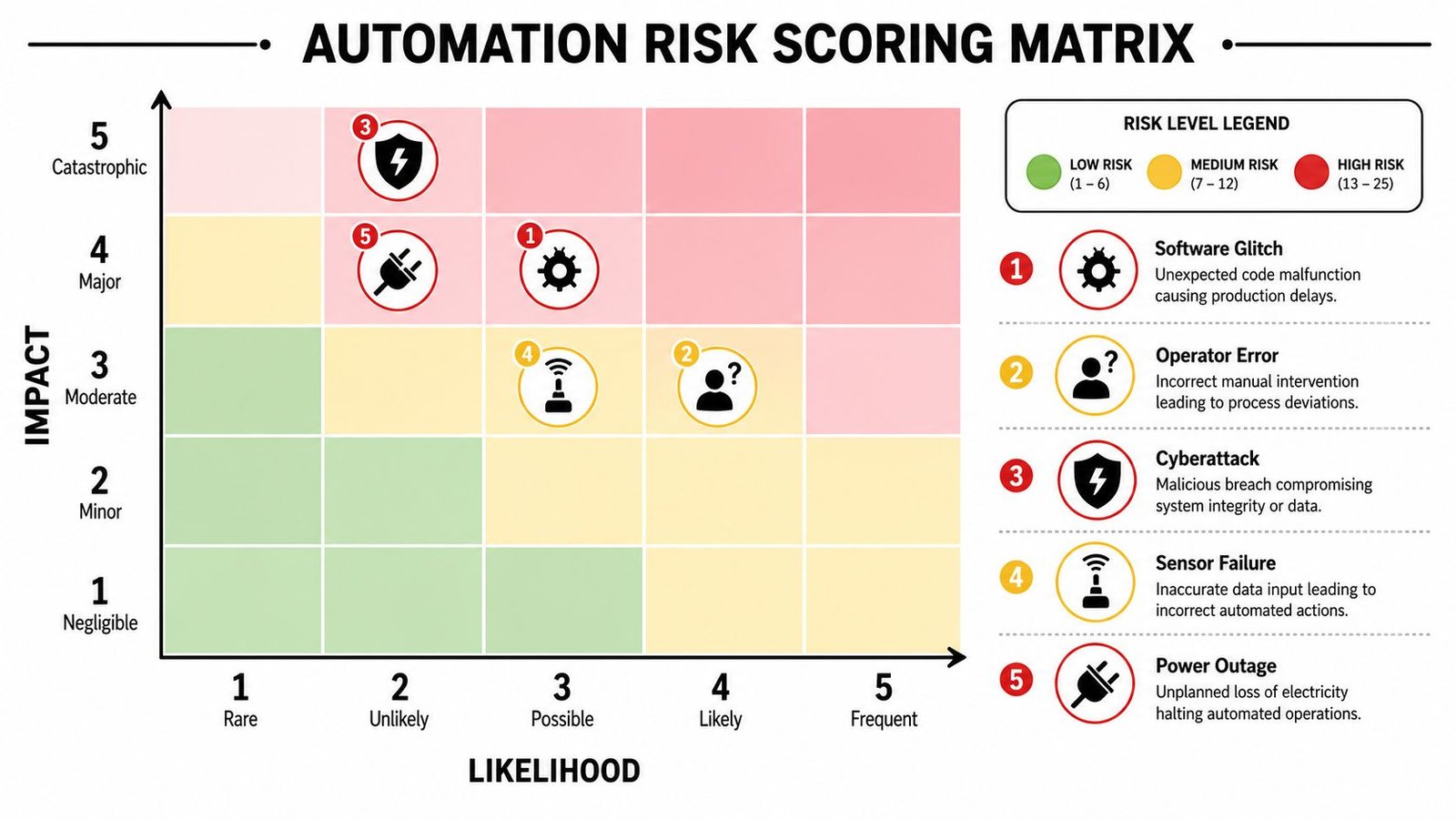
After hazard identification, the team needs a common way to decide what gets fixed first. Without scoring, every issue feels urgent to somebody. With scoring, you can separate nuisance faults from risks that threaten safety, product quality, or output stability.
A simple shop-floor method is to score severity, occurrence, and detection on a 1 to 5 scale. That's enough structure to prioritize action without pretending the numbers are more precise than they are.
Use practical scoring definitions
Don't write vague scoring criteria like “high” or “low.” Define what each factor means in your plant.
| Factor | What to ask | Example on the floor |
|---|---|---|
| Severity | If this happens, how bad is the outcome? | Minor delay, scrap, batch hold, operator injury risk, compliance impact |
| Occurrence | How likely is it under real operating conditions? | Rare startup issue, repeated shift issue, SKU-specific problem |
| Detection | How likely are we to catch it before harm occurs? | Obvious alarm, subtle drift, hidden failure, manual check only |
For example, a nuisance sensor that stops the station but always alarms clearly might score lower overall than a slow drift in seal temperature that still passes through production unnoticed.
Keep scales consistent across teams
One problem I see often is engineering scoring by design intent while production scores by lived experience. Engineering says the interlock makes a fault unlikely. Operators say the guard switch gets defeated during troubleshooting. Both views matter, but the score should reflect the condition the plant will face in practice.
A simple working rule helps:
- Severity reflects the worst credible consequence
- Occurrence reflects expected use, misuse, wear, and environmental variation
- Detection reflects the current control, not the future fix you hope to add
That keeps the matrix honest.
A factory acceptance test should also feed your scoring. If you're still defining how to challenge alarms, interlocks, and fault recovery, it helps to align the risk review with what FAT testing should verify before shipment.
Later in the project, this video is a useful visual reset for teams discussing how to structure risk review and mitigation around automation decisions:
Build an action matrix, not just a score sheet
A score by itself doesn't reduce risk. The action matrix is what makes the assessment usable. Each item should show:
- the hazard or failure mode
- current controls
- the score before mitigation
- the assigned action
- the owner
- the due date
- the residual score after action
If a risk has no owner and no verification method, it isn't controlled. It's only documented.
You can also separate actions by type. That helps managers approve budgets faster.
| Action type | Typical examples |
|---|---|
| Design change | Guard redesign, fixture poka-yoke, improved sensor placement |
| Controls change | Alarm logic, timeout handling, recipe lock, user access level |
| Procedure change | Setup verification, line clearance, jam recovery instruction |
| Verification | Additional FAT challenge, OQ test, calibration check |
Don't let RPN replace judgment
Many teams calculate a Risk Priority Number by multiplying severity, occurrence, and detection. That's useful for ranking. It shouldn't override common sense.
A high-severity GMP or safety risk deserves attention even if occurrence seems low. A frequent nuisance stop might deserve action too, not because it's dangerous, but because operators will eventually bypass something to keep production running. That's when reliability risk becomes safety or quality risk.
The point of scoring is not mathematical elegance. It's disciplined prioritization.
Designing GMP-Aware Controls and Mitigation Plans
Once risks are prioritized, the core engineering work starts. Controls have to reduce risk without making the process impossible to operate. That balance matters in manufacturing, especially in medical devices and other GMP-aware environments where a control that operators don't understand quickly turns into a deviation or a workaround.
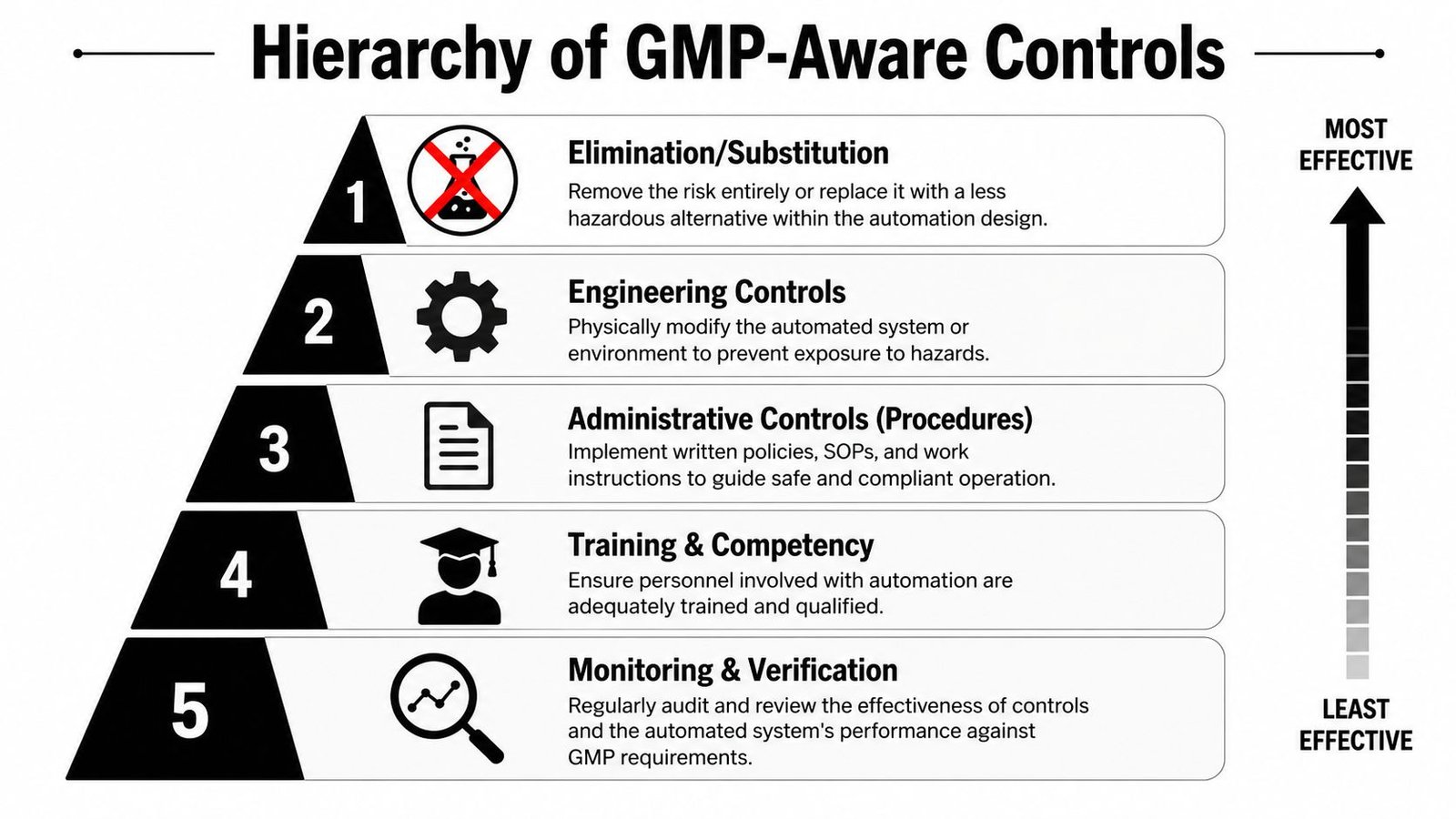
The best mitigation plans follow the hierarchy of controls. Start by asking whether the risk can be removed by design. If it can't, move down to engineering controls, procedures, training, and ongoing verification.
Start with hard design decisions
The most effective control is often a simple physical change.
If an operator can load a part in the wrong orientation, redesign the nest so the part only fits one way. If a reject can mix back into good product, separate the flow physically. If jam clearance requires unsafe reaching, move the actuator, add access, or split the sequence so recovery can happen with stored energy removed.
Those choices usually beat adding warnings to the HMI.
Here are common control types that work well on real equipment:
- Engineering controls: Interlocked guards, light curtains, two-hand anti-tie-down controls, keyed tooling, poka-yoke fixtures, torque-limited drives
- Process controls: Recipe lock by SKU, parameter limits, authenticated changes to critical settings, batch-linked data capture
- Detection controls: Vision confirmation, part-presence sensing, reject confirmation, alarm escalation
- Cyber and access controls: User roles, password governance, controlled remote access, change logging for PLC and HMI files
Make controls fit GMP reality
In regulated production, a control isn't complete until QA can understand it, validation can verify it, and operators can use it consistently. That's why control design should be tied to documented requirements early. If a seal temperature limit is critical, decide who can change it, how the system records it, how the line reacts to out-of-range conditions, and what evidence supports release.
A useful reference point is an overview of GMP in manufacturing, especially when the project team includes people from operations who don't work with validation every day.
Governance matters after startup
This is one of the most overlooked parts of automation risk assessment. Teams spend weeks on design review, then assume the system is “done” after commissioning. It isn't.
McKinsey notes that effective risk management for intelligent automation requires a dedicated governance framework that includes an inventory of automation use cases, vulnerability tracking, and ongoing monitoring with defined performance and risk indicators to prevent systems from drifting and becoming untrustworthy over time (McKinsey on managing the risks and returns of intelligent automation).
That guidance applies on the plant floor even when the system isn't branded as AI. Any automated decision logic can drift operationally through wear, material changes, software edits, or informal overrides.
A practical governance list includes:
- System inventory: Which stations make automated decisions, enforce limits, or create quality records
- Vulnerability log: Known weak points such as false rejects, scanner misreads, fixture wear, or override-prone alarms
- Performance indicators: Recurring faults, manual interventions, alarm frequency, reject patterns, parameter drift
- Override rules: Who can bypass what, for how long, and with what approval and record
- Review cadence: Engineering, quality, and production review after launch, after changes, and after major deviations
Good controls don't just stop hazards. They make abnormal conditions visible before operators start compensating in uncontrolled ways.
Validate what you install
In GMP-aware projects, mitigation should be verified through commissioning and validation activities, often framed as IQ, OQ, and PQ. The exact structure depends on the process, but the principle is the same. Don't just confirm the machine runs. Challenge the controls.
Test guard opening during cycle. Test wrong recipe selection. Test sensor disconnect. Test power loss and restart. Test how the system handles failed reads, reject confirmation, and access-level restrictions. If a safeguard exists only in the design file and not in executed tests, it won't hold much weight during a deviation review.
Creating a Living Document for Compliance and Improvement
A strong automation risk assessment doesn't end as a signed PDF in a shared drive. It becomes the reference file people use when the line changes, an alarm repeats, or QA asks why a control was chosen.
The file should be complete enough that a new engineer, validator, or auditor can follow the logic. That means keeping the scope, hazard analysis, risk scores, mitigation actions, verification evidence, and approval trail together. If those records live in separate folders with different owners, the plant loses the story of the system.
What the risk file should contain
At minimum, keep these elements linked:
- Scope definition: Boundaries, assumptions, included operating states, responsible functions
- Hazard analysis records: HAZOP notes, FMEA tables, identified failure modes and consequences
- Risk decisions: Scoring criteria, rationale, action priority, residual risk acceptance
- Control evidence: Drawings, software revisions, SOP references, training records, test results
- Change history: What changed, why it changed, who reviewed impact, and what was reverified
That last point is where many teams struggle. The machine evolves. Tooling gets modified, recipes are added, sensors are substituted, network architecture changes, and a temporary bypass somehow becomes permanent. If change control doesn't trigger a fresh review of the automation risk assessment, the document stops reflecting reality.
Use review cadence to keep trust
Set a review rhythm that matches operational risk. At a minimum, review after major deviations, recurring downtime patterns, process changes, and software or hardware revisions. For mixed manual and semi-automated systems, also review after shifts in staffing, training issues, or SKU mix changes, because those often alter how the equipment is used.
A living document does two jobs at once. It supports compliance, and it improves engineering judgment on the next project. Teams that keep these files current usually make better automation decisions later because they can see what failed, what held, and which controls operators respected.
The best risk assessment isn't the longest one. It's the one your plant still trusts a year after startup.
If you're planning a new semi-automated workstation, a GMP-aware line upgrade, or a custom fixture and controls project, System Engineering & Automation helps manufacturers build practical automation that improves quality, efficiency, and safety without overengineering the solution. Their team supports the full path from concept and design through installation, commissioning, and ongoing service, with a strong fit for cost-conscious manufacturers and medical device production environments.