You're standing beside a line that almost works. One station runs behind, operators swap in to cover breaks, a fixture drifts, and quality finds defects that should have been caught two steps earlier. Sales wants more throughput, but you don't have the budget, floor space, or product stability for a fully automated line.
That's the normal starting point for industrial automation and control, not a mega-factory. The useful question isn't which robot to buy. It's which layer controls the problem, what's the simplest control strategy that holds tolerance, and what's the smallest intervention that pays back. I would start there, because a well chosen semi-automated cell with sound controls will outperform an overbuilt line that nobody can change, validate, or maintain.
Table of Contents
- Where PLCs, DCS, SCADA and MES Sit in a Plant
- Control Strategies From On-Off Logic to Advanced Control
- Semi-Automated and Fully Automated Systems Compared
- How Control Systems Connect to MES and ERP
- Quality, Throughput and Maintenance Gains You Can Measure
- Safety Engineering for Automated Cells
- GMP-Aware Automation for Medical Device Production
- Choose Your First Automation Step
Where PLCs, DCS, SCADA and MES Sit in a Plant
Think of the plant as a body. Sensors are the nerves, PLCs are the reflexes at each machine, SCADA is the control room watching every line, MES is the production log, and ERP is the ledger for orders and money.
Those layers aren't interchangeable, and buying the wrong one won't fix a fault owned by another layer.
| System | Layer | Primary job | Typical use |
|---|---|---|---|
| PLC | Machine and cell level | Fast, deterministic logic for discrete and sequence control | Packaging line, assembly station |
| DCS | Process unit level | Coordinated continuous control across a plant area, with redundancy | Chemical reactor, utilities, batch process |
| SCADA | Supervisory level | Monitoring, alarms, trends and operator commands across lines or sites | Multi-line plant overview, water network |
| MES | Plant execution level | Work orders, traceability, batch records and performance tracking | Lot tracking, electronic batch records |
| ERP | Enterprise level | Planning, purchasing, inventory and finance | Order planning, material requirements |
PLC Versus DCS
The mix-up I hear most is PLC versus DCS, because both control equipment. A PLC suits discrete sequences, such as packaging, indexing, clamping, and assembly, where the machine steps through states quickly and repeatably. A DCS suits continuous or batch processes, such as chemical reactors and utilities, where many loops must stay coordinated across an area and redundancy matters more than raw scan speed.
Putting a process unit on scattered standalone controllers can leave you with loops that fight each other. Putting a simple assembly station on a DCS adds cost and complexity you won't use. Match the controller to the physics and the sequence, not to a vendor preference.
What SCADA Actually Does
SCADA doesn't replace PLCs or a DCS. It reads from them, presents alarms and trends, stores history, and lets operators issue supervisory commands. If the underlying machine logic is wrong, a prettier SCADA screen only shows the wrong behavior faster.
Use this diagnostic before you spend anything. Name where the problem first appears, then check which system owns it.
- Machine level: A stuck valve, a clamp that won't confirm, or a drive fault belongs to the PLC, sensors, and actuators.
- Supervisory level: Operators can't see which line alarmed first, so the gap is alarms and trending.
- Execution level: A missing lot record belongs to MES, even if the machine made good parts.
- Enterprise level: The right parts were made, but purchasing didn't order material, so ERP planning owns it.
Practical rule: Buy at the layer where the fault first appears, not at the layer where somebody finally notices it.
Control Strategies From On-Off Logic to Advanced Control
Start with a thermostat. On-off control turns heating fully on below the setpoint and fully off above it. It's cheap and reliable, but temperature swings around the target, and that swing becomes scrap if your process window is tight.
| Strategy | How it acts | Typical application |
|---|---|---|
| On-off | Switches the output fully on or off at the setpoint | Simple heating, cooling or tank level |
| PID | Adjusts output from proportional, integral and derivative terms | Temperature, pressure and flow loops |
| Sequential logic | Steps through machine states based on conditions and interlocks | Machine cycles, clamping, safety sequences |
| Recipe and batch control | Applies a stored parameter set per product or batch | Food, chemicals, pharmaceutical batches |
| Model predictive control | Predicts future behaviour and optimises moves over a time horizon | Multi-variable process units |
| Advisory analytics | Model suggests an action while the operator or an interlock decides | Maintenance alerts and inspection priority |
PID in Plain Language
PID control adjusts the output continuously instead of slamming it on and off. Proportional reacts to the current error, integral removes lasting offset, and derivative anticipates how fast the error is changing. That sounds tidy on paper, but poor tuning is where many field problems start, with oscillation, overshoot, or a loop that's stable at one rate and unstable at another.
If you're building foundational skills, review PLC programming basics before you touch tuning constants on a live loop. Record the original values, change one term at a time, and test at low, normal, and high load.
Sequences, Recipes and Higher Control
Sequential logic runs machine states. A press cycle, for example, won't start until guards are closed and clamps are confirmed. Those interlocks aren't an add-on. They're part of control, because the sequence must refuse an unsafe or incomplete state.
Recipe control extends that idea to changeover. One selected recipe sets temperatures, speeds, and timings for a product, so operators don't retype parameters from memory. Model predictive control earns its cost only on multi-variable units where loops interact strongly. Advisory analytics should suggest, not command, until you've proven its alarms in production.
Use the simplest strategy that holds the process variable within tolerance. Move up only when the simpler one can't meet quality or throughput targets.
Semi-Automated and Fully Automated Systems Compared
This choice is about volume and product variety, not how impressive the technology looks. Automation doesn't always mean robotics. It can involve mechanical fixtures, conveyors, vision systems or PLC-based controls, and each option automates a specific step.
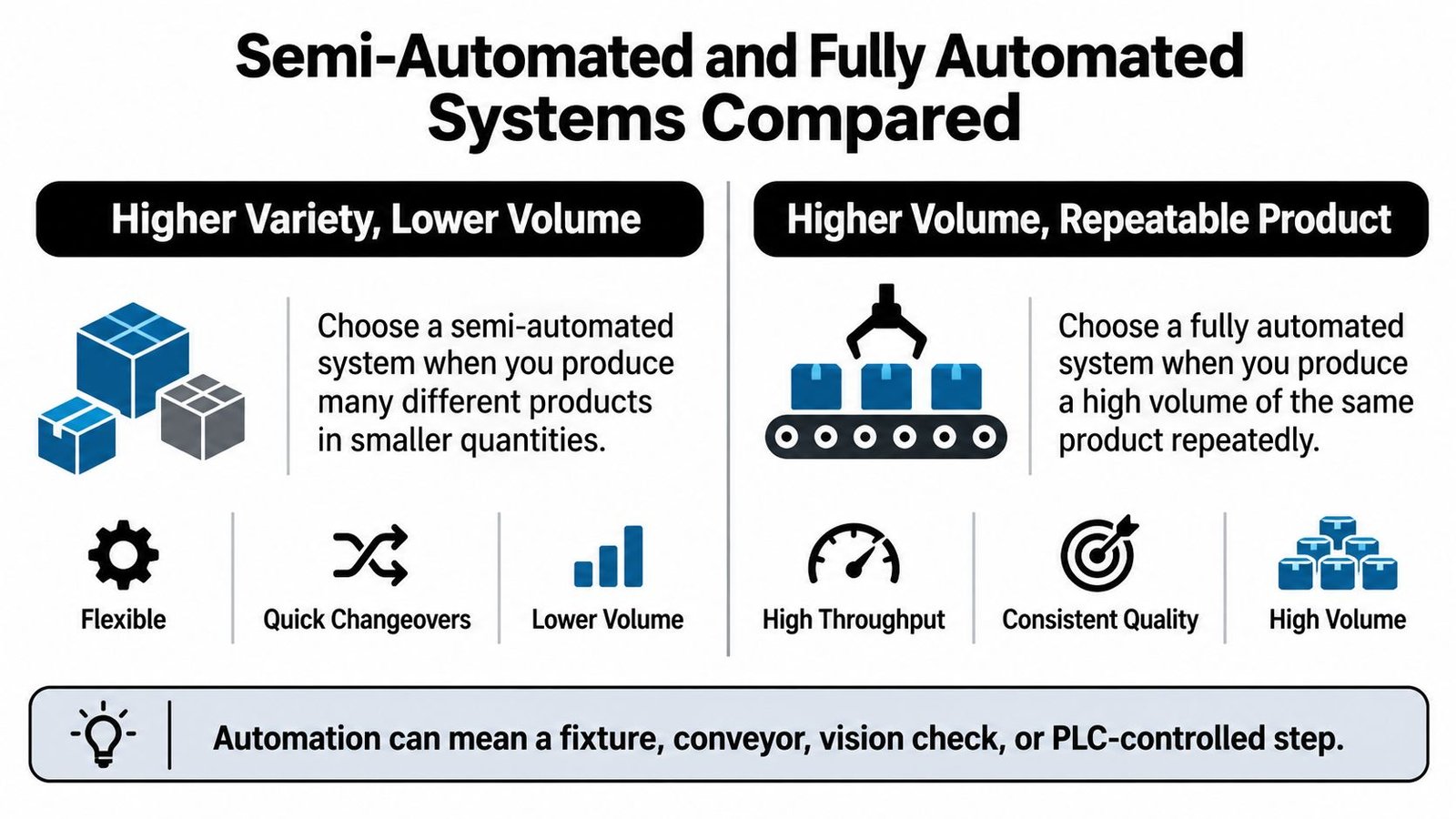
Semi-automatic workstations can automate repetitive steps such as assembly, packaging, inspection, or testing while operators keep control of the process. Fully automated systems are the most expensive option because of extra design work, specialized components, manufacturing, wiring, and complex programming.
| Criterion | Semi-automated | Fully automated |
|---|---|---|
| Upfront cost | Lower: fixtures, tooling and semi-automatic workstations | Highest: design, specialised components, wiring and programming |
| Labour dependency | Operator stays in control of the sequence | Reduced; machine runs the full cycle |
| Changeover flexibility | High for mixed product runs with quick-change tooling | Lower unless designed for variants |
| Repeatability | Improved by fixtures and error-proofing | Highest, once validated |
| Validation burden | Moderate, scoped to the cell | Higher, across the full line |
| Typical fit | Low to mid volume, varied products | High volume, stable product |
Upfront cost matters because a smaller cell leaves capital for tooling, spare parts, and training. Labour dependency drops with full automation, but you trade operators for technicians who can diagnose drives, vision, and PLC faults. Changeover flexibility favors semi-automation when variants change often, while repeatability favors full automation once the product is stable. Validation burden grows with line scope, which affects regulated plants directly. Typical fit should follow demand stability, not a sales forecast you hope comes true.
A Worked Choice
Say a line makes three product variants at moderate monthly volume, with weekly changeovers. I'd choose semi-automation with quick-change tooling, error-proofing, and a vision check at the defect-prone step. Say instead you're running a single part at very high volume across shifts with few changeovers. Then full automation can pay, because repeatability and unattended running outweigh flexibility.
A semi-automated cell with integrated controls is often the right answer for small and mid-sized plants, because you can expand it later without discarding the first investment.
Don't automate a moving target at full-line scale. Stabilize the product, the sequence, and the defect modes first.
How Control Systems Connect to MES and ERP
Follow one part, and the data path becomes clear. Each system should create one kind of record, own it, and pass it upward once.
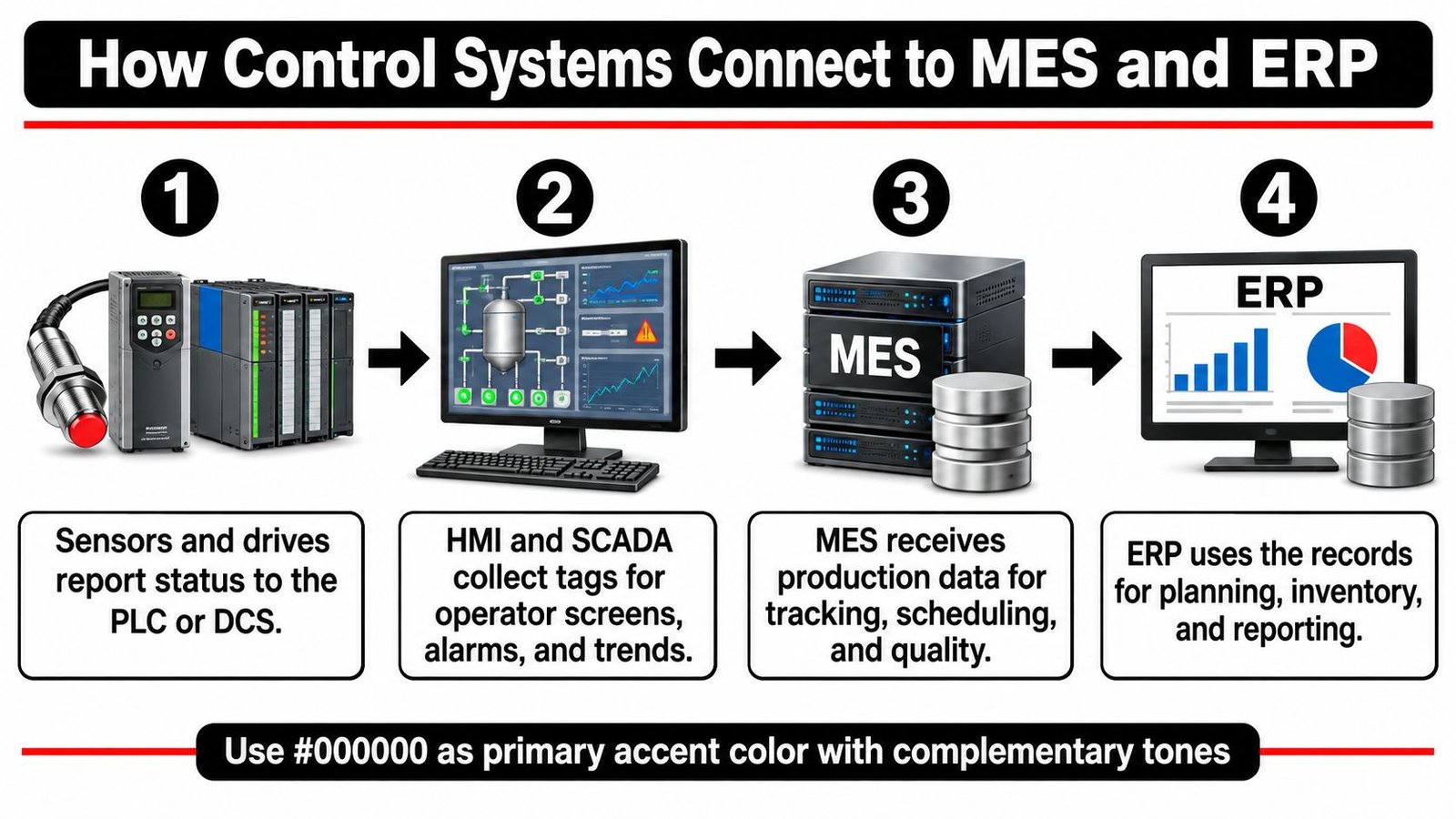
- Sensors and drives report to the PLC or DCS. Position, pressure, torque, and fault states stay deterministic at machine level. Don't route a safety or motion decision through an office network.
- HMI and SCADA collect tags. Operators get screens, alarms, and trends. Historians preserve what happened, in what order, so you can separate a process drift from a sensor failure.
- MES receives production data. Cycle counts, rejects, and lot IDs become traceability and electronic batch records. A part gains its auditable history here.
- ERP receives business results. Completed quantities, material consumption, and cost data feed planning and inventory. ERP shouldn't write directly to machine outputs.
- Schedules and recipes flow back down. MES releases the work, the controller executes the approved recipe, and operators see the same revision everywhere.
Integration Rules That Prevent Rework
Use a standard communication method such as OPC UA for tag exchange, and assign each tag one owning system so two systems never write the same value. We design automation systems that integrate with existing equipment and enhance, not disrupt, the production environment, which means the panel, I/O, and network boundary are planned together. An integrated control panel wired and tested as one unit shortens commissioning and makes faults easier to trace once the line connects to MES.
Before connecting anything, follow the risk-based approach in the NIST Guide to Industrial Control Systems Security. Map control-system zones, assets, communication paths, and the operational consequence of each failure, then apply controls zone by zone rather than using a generic checklist. Segment business and control networks, restrict and authenticate remote access, control software installation, monitor network behaviour, and keep documented change management.
Run a simple check first. List each data item the business needs, the system that creates it, and the first system that needs it. If nobody can name the owner, don't connect it yet.
Quality, Throughput and Maintenance Gains You Can Measure
Most of the payback from industrial automation and control shows up as less unplanned downtime and fewer defects. One stopped bottleneck starves every downstream station while operators wait, and a scrap problem found at final inspection has already consumed the labour that produced it.
The NIST manufacturing machinery survey compared establishments by maintenance strategy: the lower-performing half, those relying less on preventive and predictive maintenance, carried 52.7% more unplanned downtime and 78.5% more defects than plants using advanced strategies more extensively, and facilities relying heavily on reactive maintenance recorded 3.3 times more downtime and 16 times more defects than the comparison group. Among facilities already using preventive or predictive approaches, those leaning on predictive maintenance recorded 18.5% less unplanned downtime and 87.3% fewer defects than facilities relying primarily on preventive work. That's the cost of finding faults only after they stop production.
Why the Gain Happens
Sensors, controls, and condition data let your team act before a fault stops the line. A bearing temperature trend, a rising motor current, or a vision reject pattern gives maintenance a planned window instead of a midnight breakdown. Controls also shorten and stabilize cycle time, reduce errors and rework, improve inspection accuracy, and create traceability data you can use to contain a suspect lot.
The intervention is instrumentation on the failure modes that stop you: temperature and vibration on the bearings that fail, current monitoring on the drives that jam, a vision check at the station where defects start rather than where they get found. A semi-automatic workstation that automates the inspection or testing step while operators keep control of the process is often the smallest change that moves these numbers.
Judge Predictive Models on Failures
Don't accept accuracy alone. In a benchmark using the AI4I 2020 dataset of 10,000 samples, a gradient-boosting model reached up to 94.55% overall accuracy yet recorded 0.87 recall, 0.34 precision, and a 0.49 F1 score, according to the predictive-maintenance benchmark study. In plain terms, it flagged most failures but raised enough false alarms that operators would learn to ignore it.
Use a model first as an advisory layer that raises inspection priority. Keep hard interlocks on validated sensor thresholds and safety logic. Track precision, recall, false-alarm rate, lead time, and avoided downtime after deployment.
Baseline four metrics before any project, then measure your own plant rather than expecting survey percentages to transfer.
- Scrap rate: defective units divided by total units, by station and shift.
- Rework hours: labour spent fixing parts that should have passed first time.
- Unplanned downtime hours: separated by cause, not lumped into a general maintenance bucket.
- Cycle time per unit: including waiting, not just machine cycle.
Survey percentages describe other plants' maintenance mixes and bottlenecks. Your baseline decides whether predictive monitoring or a better inspection station pays back first.
Safety Engineering for Automated Cells
Guarding isn't decoration you add after the cell runs. NIOSH recorded 738 likely machinery-related fatalities in the United States in 2022, representing 12.6% of all 5,846 workplace fatalities that year, in the NIOSH machinery fatalities database summary. The same database identified approximately 106,000 nonfatal illnesses and injuries associated with contact with objects and equipment.
A guarded automated cell, with the operator outside the hazard zone, looks like this.
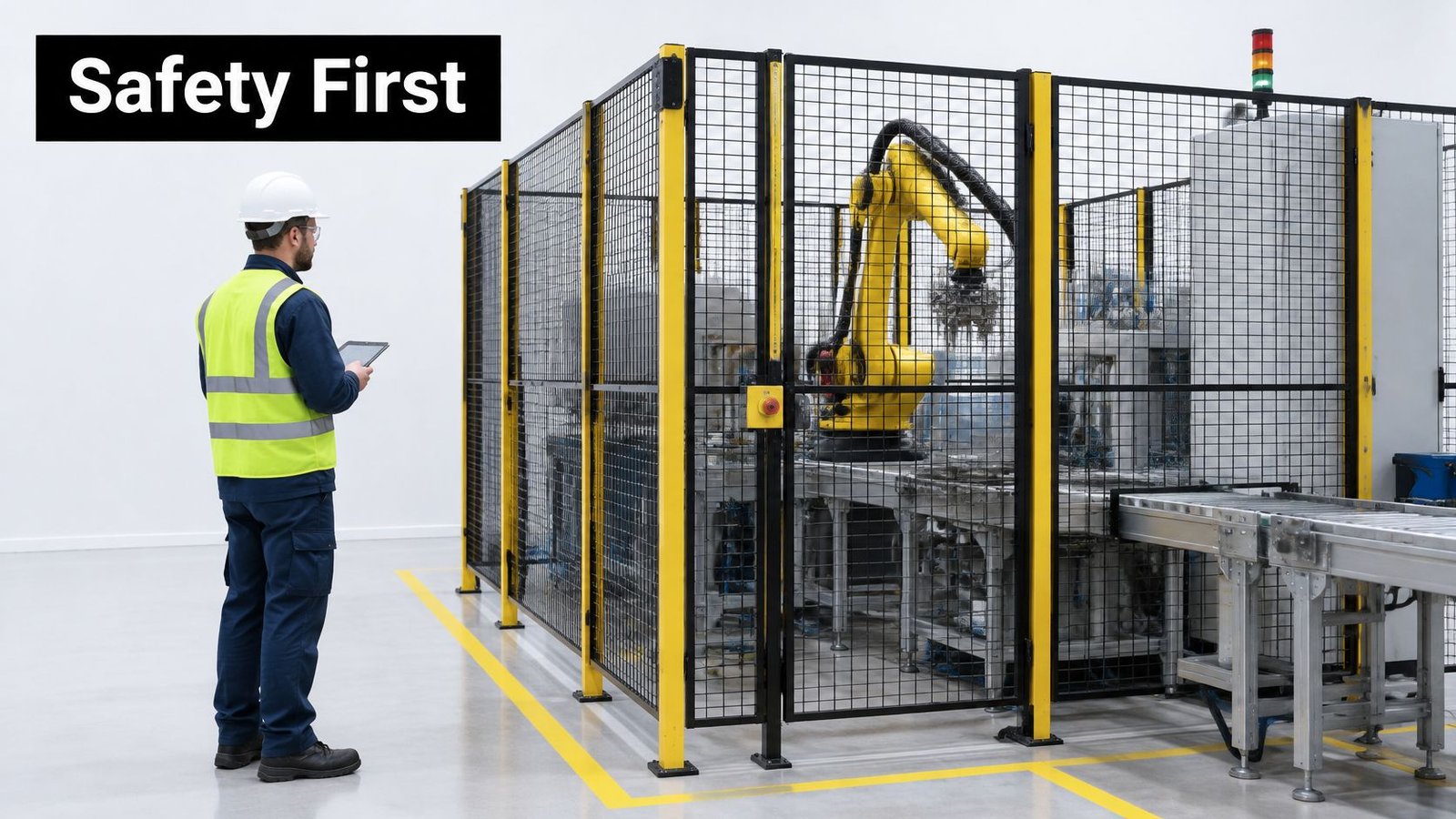
Design against struck-by, caught-between, crushing, trapping, and electrical hazards from the first layout. Semi-automated workstations still need full guarding because operators work beside moving tooling. Proximity doesn't become safe just because a person initiates the cycle.
Safeguards in Order
- Risk assessment: Cover every task, including setup, changeover, jam clearing, and maintenance, because injuries often occur outside normal running.
- Guard points of operation: Prevent hands and clothing from reaching moving mechanisms during the cycle.
- Interlocked gates: Opening access stops hazardous motion, and closing the gate alone doesn't restart it.
- Emergency stops: Place them within reach of every operator position and test the actual stopping path.
- Prevent unexpected startup: Use controlled restart plus lockout and tagout for maintenance.
- Fixture design: Hold the part so tooling does the hazardous work and hands stay out of the hazard zone.
- Safety in the control system: Build safety functions into the design rather than adding them after installation, then align the design with machine safeguarding standards.
This short demonstration shows why separation, controlled access, and a tested stop path matter in practice.
Before production starts, test every stop, every gate, and every sensor-to-stop path under realistic conditions. Then record the results. If a safeguard can't be tested, you can't claim it works.
GMP-Aware Automation for Medical Device Production
In GMP-aware production, every control change is a validated change. The question isn't whether you can edit PLC logic quickly. It's what evidence you can produce when quality, a customer, or an auditor asks who changed it, why, and what you tested afterward.
Start with qualification in plain language. Installation qualification confirms the equipment is installed as specified. Operational qualification confirms it operates against the specification across its ranges. Performance qualification confirms it performs with product-representative runs. Skip one stage, and you may have a machine that runs but no defensible evidence that it makes conforming product.
| Element | GMP expectation | Evidence to keep |
|---|---|---|
| Equipment qualification | Installation, operational and performance qualification completed before use | Protocols, test records and signed reports |
| PLC and HMI software | Version control and change control over validated logic | Software backups, change requests and approvals |
| Audit trail | Traceable record of who changed what, and when | Audit trail review records |
| Remote vendor access | Authenticated, time-limited and recorded sessions | Access logs, session recordings and approvals |
| Batch and traceability data | Complete and accurate record for each lot | Electronic batch records and lot history |
| Recovery after an incident | Tested restore to the validated state | Restore test reports and deviation records |
For a broader framework, align your procedures with good automated manufacturing practices before you select hardware. Software control isn't a folder of unnamed backups. It's version control, approved change requests, and a restore point that returns the exact validated logic.
Remote Access Without Losing the Validated State
Vendors and maintenance teams often need diagnostics, so telling everyone to disconnect everything usually fails in real production. The risk is real. A 2025 SANS ICS/OT study reported that 21.5% of organizations experienced an ICS/OT cyber incident during the prior year, 37.9% of those incidents involved ransomware, and 40.3% caused operational downtime. Unauthorized external access accounted for about half of incidents, yet fewer than 15% of organizations had advanced remote-access controls.
Build a production-friendly minimum instead.
- Asset inventory: Know every PLC, HMI, workstation, and remote pathway.
- Network segmentation: Keep validated cells separated from business systems and other lines.
- Brokered jump host: Route vendor access through one monitored point, not a modem on the panel.
- Time-limited access: Use named accounts, multifactor authentication, approval, and automatic expiry.
- Session recording: Keep access logs and recordings as quality evidence, not just security data.
- Offline backups and tested recovery: Restore the validated PLC and HMI configuration on a test setup before you need it urgently.
For legacy PLCs that can't be patched, use compensating controls, such as tighter segmentation, allowlisting, restricted engineering workstations, and monitored access. Distinguish cyber risk from process risk, so the team knows which controls can slow a line and which cannot touch a safety-critical loop.
Decision before go-live: Name who may change PLC logic, who approves it, how it's tested, and how the previous validated version is restored.
Detection isn't recovery. Your plan must show how you'll restore production without compromising product quality or validated state.
Choose Your First Automation Step
Start with one bottleneck in one cell. It's cheaper to fix, faster to validate, and easier to expand than a whole line that carries every unresolved product and process question into commissioning.
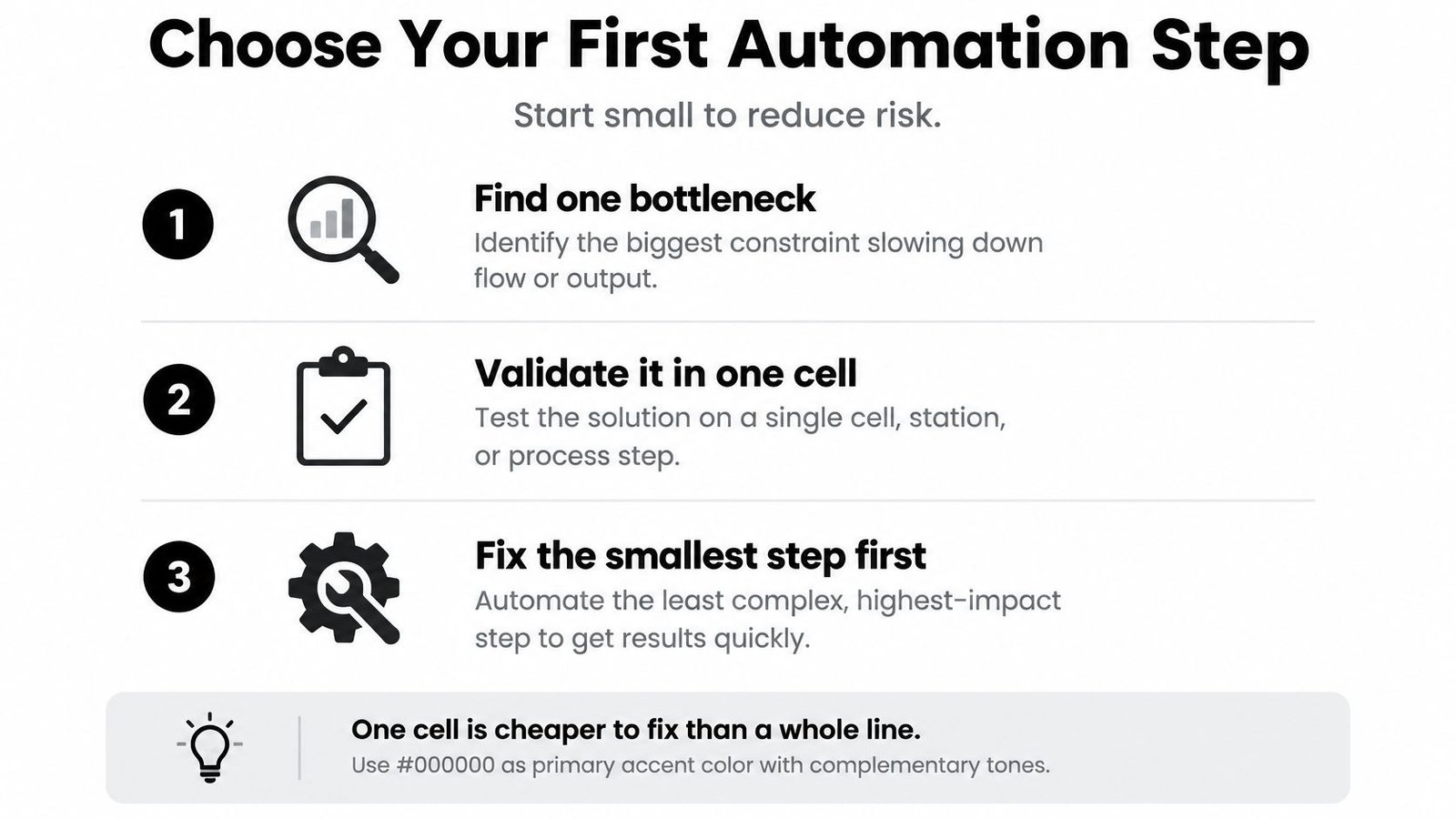
Use this checklist before you request quotations.
- Map the bottleneck: Record volume, number of changeovers, defect cost, safety exposure, and labour content per unit.
- Pick the smallest intervention: Choose a fixture, error-proofing tool, inspection aid, controlled dispenser, or semi-automated workstation.
- Specify the control architecture: Use a PLC for the machine, SCADA once several machines need one view, and MES once traceability is required.
- Write safety and validation requirements first: Suppliers can't quote safeguards or evidence you haven't defined.
- Pilot one cell: Track scrap, cycle time, and unplanned downtime for at least eight weeks, and expand only when the numbers hold.
Run a payback check using volume, changeover frequency, labour content, defect cost, safety exposure, and validation burden. Then test how sensitive payback is to a drop in volume. Auburn University smart-manufacturing research found automation use rose from 30% of respondents in 2022 to 37% in 2024 and remained at 37% in 2025, while high cost was the leading adoption barrier, in the Auburn University smart-manufacturing report. That supports staged investment rather than waiting for a lights-out budget.
Sometimes manual flexibility beats automation. Low volume, frequent changeovers, and highly variable parts usually favor an operator supported by better fixtures and error-proofing. Preserve operator judgement where parts vary or inspection requires context a sensor can't capture reliably.
System Engineering & Automation has over 30 years of hands-on experience in manufacturing and inline automation. With SEA's integration expertise, legacy equipment can be upgraded with automated control systems, real-time monitoring sensors, data tracking and analytics platforms, and safety system enhancements, so you can begin with one workstation and scale when it proves itself.
This week, list your current bottleneck and its cost per unit. Then request a review of that one step before you quote the whole line.
If you're weighing a fixture upgrade, a semi-automated workstation, or modern controls for legacy equipment, we can help you scope the smallest step that improves quality, throughput, and safety without disrupting your current production. Tell us the bottleneck, your volume, and the defect or downtime you're trying to remove, and we'll help you define the controls, safeguards, and validation evidence before you buy. Start with System Engineering & Automation and request a review of the one cell you want to fix first.