
You're looking at a bench that still hits the week's volume, and quality just asked for a force record the operator never wrote down. A full-line quote is sitting in your inbox. The drawing changed twice this year, and the next revision is already in design review. The biggest machine looks like the safe answer. For most medical device lines, it isn't.
Medical device assembly automation works best as a mix of levels, not a single leap to a lights-out line. The useful middle path is a semi-automated station that takes the repetitive, precision-sensitive step and leaves loading, changeover, and exceptions with a trained operator. That choice only holds up if you score the steps, match the station to GMP production controls, and run a payback number from a real baseline.
Table of Contents
- Automation Levels Compared at a Glance
- Which Assembly Steps Are Worth Automating First
- How a Semi-Automated Station Runs One Cycle
- GMP Production Controls Your Station Must Meet
- Validating Automation Without Over-Validating
- Implementation From Concept to Commissioning
- Calculating Payback for a Semi-Automated Cell
- Confirm Your Automation Level Before You Buy
Automation Levels Compared at a Glance
Most medical device assembly lines mix automation levels rather than picking one. The right level follows product volume, how often the design changes, and how many steps are repetitive and sensitive to force, dose, or alignment. A stable, high-volume device can justify a line. A family of parts that changes several times a year usually cannot.
Medical device assembly automation levels compared
| Option | Machine role | Operator role | Capital outlay | Changeover effort | Best fit |
|---|---|---|---|---|---|
| Manual with fixtures | Fixtures hold and locate parts; no automated cycle | Performs every step | Low | Low | Low volume, frequent design changes |
| Semi-automated table-top | Automates pressing, dispensing, testing, labeling or assembly | Loads parts, starts the cycle, removes finished units | Moderate | Moderate | Repetitive steps with mixed volume |
| Fully automated line | Runs the full sequence, including part transfer | Supervises and handles exceptions | High | High | Stable, high-volume product |
| Robotic cell | Pick-and-place and machine tending | Programs, supervises and maintains | High | Moderate to high | Precise handling over long runs |
Manual with fixtures keeps flexibility, and consistency stays with the operator. Semi-automated table-top equipment automates the repeatable step while the operator loads and starts each cycle. A fully automated line pays off only when the product stays stable for years. A robotic cell suits precise handling across long runs, with programming and upkeep as the operator's real job.
Practical rule: If the design changes several times a year, changeover cost eats the savings of a full line, so the middle level is often the better fit.
We build that middle level as a specialty, alongside manual fixtures and full equipment when the volume supports them. Automation here can be fixtures, vision, or PLC controls. It does not have to mean a robot.
Which Assembly Steps Are Worth Automating First
Automate the steps that repeat all shift, drift with force, dose, or alignment, and are hard to prove after the part leaves the bench. Those operations showed up first when medical device plants started adding robots. Assembly Magazine's 2007 industry report projected demand for robots used in medical device assembly at about 11% a year over the following five years, against 7% for the broader industrial-robotics market, with that robotics market rising from about $394 million in 2004 to $668 million by 2011. The work behind those numbers was pick-and-place, insertion, dispensing, inspection, and packaging, often on semi-automatic stations rather than whole factories.
Score each candidate step on four points, 1 to 3:
- Repetitions per shift: 1 is occasional, 3 is nearly every unit.
- Sensitivity to force or dose: 1 is forgiving, 3 is a tight window the hand cannot hold.
- Scrap and rework history: 1 is rare, 3 is a known defect driver.
- Traceability need: 1 is checked later by eye, 3 is a record you must keep per unit.
Say adhesive volume on a dispensing step drifts between shifts. Sensitivity scores 3, rework scores 3, repetitions score 3, and traceability scores 2. Total 11. That step goes first.
Say a label-and-pack step is easy by hand, but one missed label blocks a lot reconciliation. Repetitions score 2, sensitivity scores 1, rework scores 2, and traceability scores 3. Total 8. Automate the check and the print trigger, not the whole pack-out.
Leave these manual until a later pass: loading parts that vary by lot, changeovers between designs, and exception handling when a sensor fault or a damaged component needs a judgment call.
Automate the highest-scoring one or two steps first. After that station holds its reject rate and cycle time for a full month, score the remaining steps again. The second station should earn its place on new numbers, not on the original wish list.
How a Semi-Automated Station Runs One Cycle
One healthy cycle is a short handshake between the operator and the machine. The operator owns the load and the unload. The station owns force, volume, and the accept or reject decision.
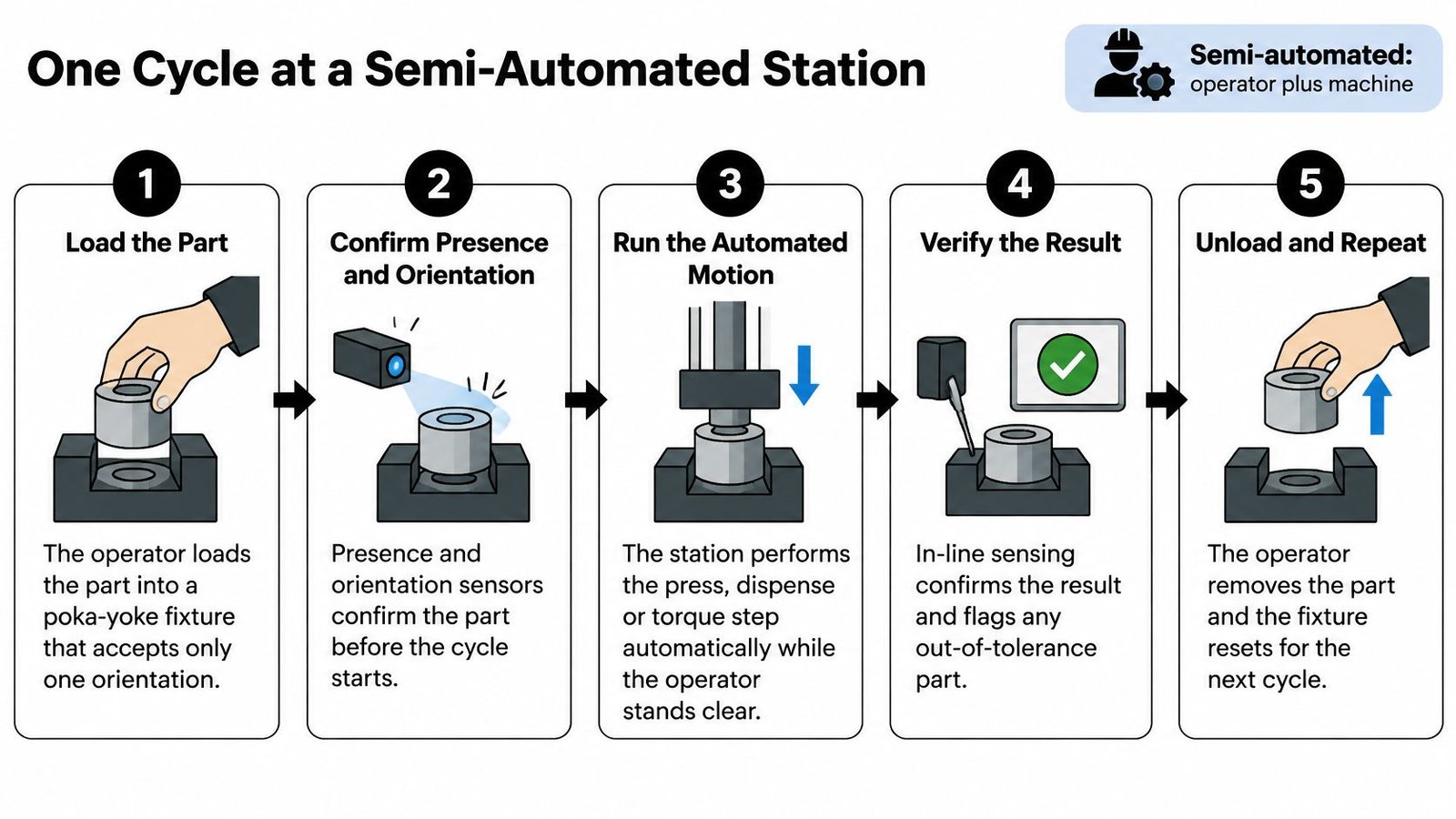
The operator loads the part into a poka-yoke fixture that accepts only one orientation. A wrong rotation never reaches the press, which is cheaper than catching it in inspection. The common slip is a fixture worn enough that a second orientation still seats.
Presence and orientation sensors confirm the part before the cycle can start. The interlock provides control beyond a visual check the operator might skip on a busy shift. Starting without that check lets a missing part reach the press and bend the nest.
The operator starts the cycle with a guarded start control, two-hand or light-curtain, so hands are clear. The start button is not a speed feature. It is the point where the machine takes the hazard. Bypassing the guard to "just finish the lot" is the slip that turns a safe station into an injury report.
Automated pressing or insertion runs at a set force and displacement, and both values are recorded on that unit. Same parameters every time is the point of taking the step off the hand. A drifted load cell that still "passes" visually is the slip, so the alarm limit has to sit inside the process window, not at the sensor's maximum.
Automated dispensing or torque control applies the set volume or torque on every unit. The recipe, not the operator's feel, sets the dose. A thumbwheel left from the previous product is the slip, which is why the recipe number should display before the cycle arms.
Testing or vision inspection checks the result and routes failures to a reject position the operator cannot casually put back. The station, not a later audit, separates bad units. Skipping that route lets a failed unit move into packaging with a good label on it.
Labeling runs, the operator removes the finished unit, and the next load begins. The fixture should reset on its own so the next cycle cannot inherit a clamp from the last one. Leaving a rejected unit in the nest is the slip that double-counts a good record.
The short clip below shows the same rhythm on a bench: load, confirm, motion, check, unload.
A healthy cycle has a steady cycle time, every critical parameter stored against the unit, and rejects physically separated at the station before anyone walks them toward a carton.
GMP Production Controls Your Station Must Meet
The Quality System Regulation in 21 CFR Part 820 requires manufacturers to develop, conduct, control, and monitor production so devices conform to specifications. Where the process can drift, documented controls have to define what is controlled. For a station, that list is the design brief, not a paperwork exercise after the machine arrives. A plain-language walk-through of what GMP means on the shop floor helps the same conversation with operators who will run the cell.
GMP requirements and what the automated station must do
| Requirement | What the automation must do | Records to keep |
|---|---|---|
| Documented procedures and work instructions | Enforce the approved sequence and block out-of-order steps | Approved work instruction linked to recipe number |
| Monitoring of process parameters | Measure and control force, torque, dispense volume and cycle time | Time-stamped parameter logs with alarm events |
| Approval of process equipment | Qualify the station across its intended operating range | Installation, operational and performance qualification records |
| Workmanship criteria | Apply defined accept and reject limits or compare against approved samples | Inspection results with reason codes |
| Change control | Restrict recipe and threshold edits to authorized users | Change requests, approvals and impact assessments |
What the records look like
A press step keeps a force window, for example a set point with high and low alarms, and writes the peak force, the displacement at peak, and any alarm against the unit serial. A torque step keeps a log of final torque and angle for each unit, not a shift average. The recipe number on the HMI matches the number printed on the approved work instruction. A reject log stores a reason code such as low force, missing component, or vision fail, with the time and the operator ID.
Three station habits make those records believable. Sensors used for accept or reject decisions stay on a calibration schedule. Recipe and threshold edits sit behind named permissions, not a shared password. Electronic records carry a time stamp that quality can pull without asking someone to export a spreadsheet from a laptop.
The machine does not replace the documented process. It enforces it. If the work instruction says 12 N and the recipe says 14 N, you do not have a controlled process, no matter how repeatable the press is. Match them before the first production lot.
Validating Automation Without Over-Validating
More software is not more confidence. A common assumption is that a semi-automated bench needs either a full software validation package on every function or none at all. Both ends waste effort. FDA expectations still apply. Software used to automate device production or a quality-system activity has to be validated for its intended use under 21 CFR 820.70(i). A defensible package still has documented user requirements, a protocol, acceptance criteria set before you test, representative cases, recorded results, and a summary.
The FDA's February 2026 Computer Software Assurance guidance recommends a risk-based approach for production and quality-system software, rather than identical rigor on every function. That is the opening smaller plants need. You can get repeatable checks without buying a fully automated line, and you should not test a mechanical pin the way you test a batch-release decision.
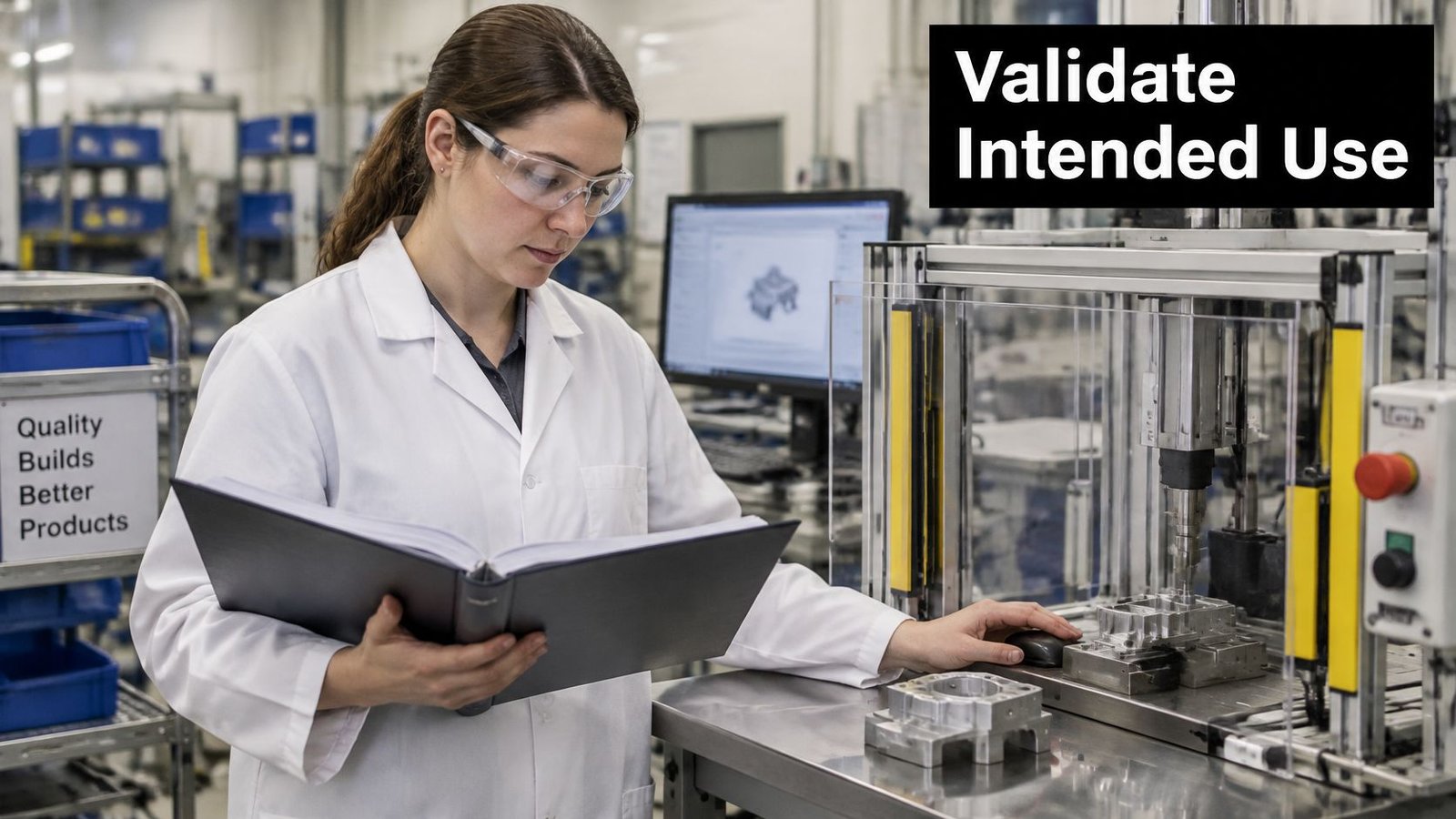
Two functions, two evidence levels
A poka-yoke pin that physically blocks the wrong orientation is a mechanical control. Prove the pin rejects the bad orientation and accepts the good one, on the actual part, and file the photos and the check sheet. Little or no software testing belongs there.
A software-controlled release that writes a pass into the batch record or the device history record is the other end. That function needs scripted tests for pass, fail, power loss mid-cycle, and a rejected unit that someone tries to clear. The record impact is the reason, not the size of the PLC.
Rank these functions before you write protocols: part presence and orientation, torque or force limits, recipe control, reject handling, alarm response, and electronic records. High impact on the record gets the deeper tests. A display-only counter does not.
When you requalify
Requalify when you replace a sensor used in an accept decision, change PLC code, edit an inspection threshold, or add a recipe. A like-for-like sensor swap with the same range can be a short challenge test. A new threshold is a process change and needs the impact assessment before the edit goes live.
Poorly scoped automation creates undocumented software dependencies, and that burden is the opposite of compliance confidence. For each function, answer three questions before you add a test case. What is the intended use? What risk does the function control? What evidence will an auditor see? If you cannot name the risk, you are probably over-testing.
Implementation From Concept to Commissioning
Projects stall in two places: a process change that nobody approved, and a network connection nobody owns. The build itself is a straight sequence if those two are settled early.
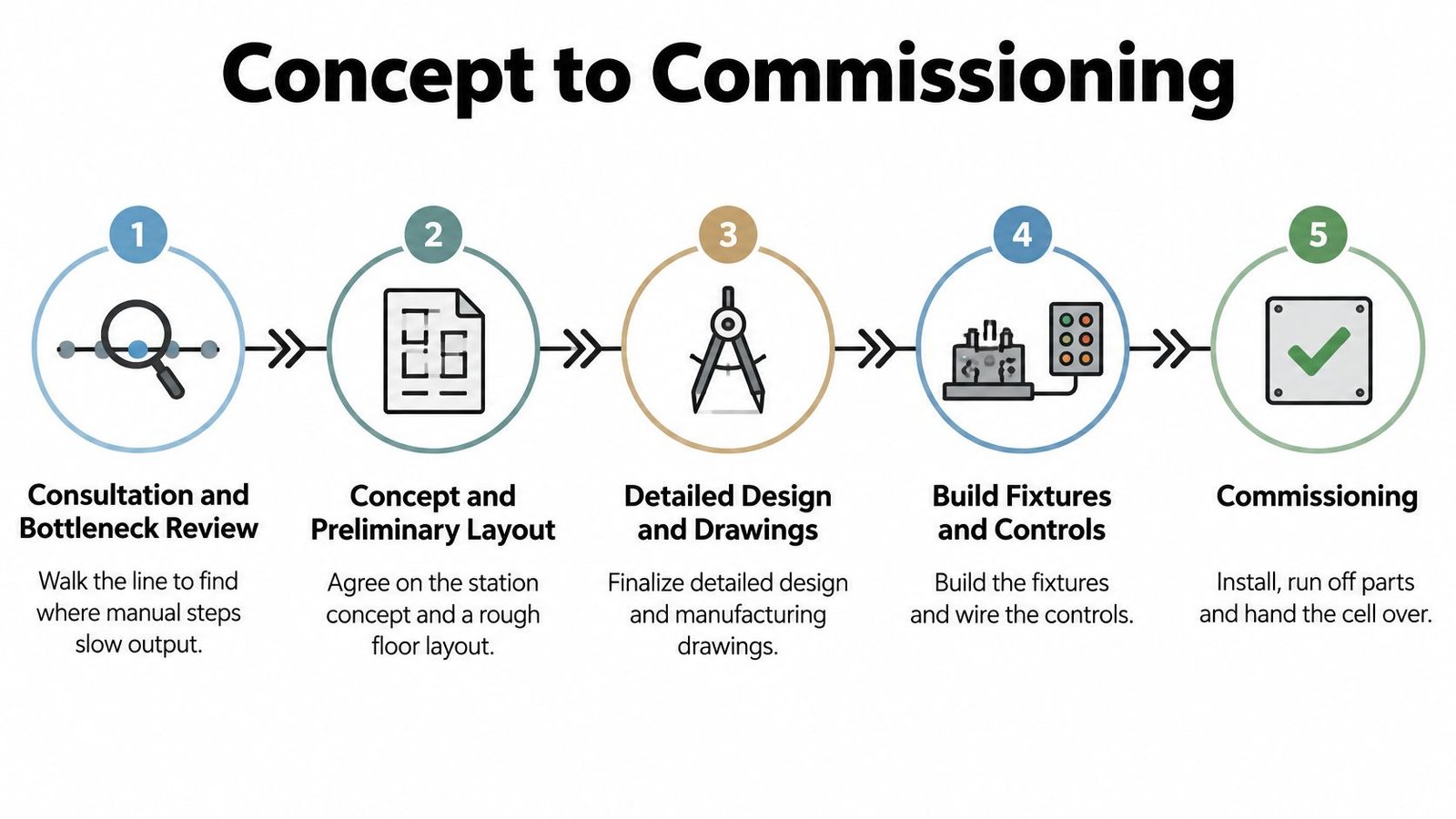
The phase sequence
- Consultation and bottleneck review. Walk the line and name the step that limits output or creates the defect.
- Concept and preliminary layout. Agree the station concept and a rough floor spot, including where rejects sit.
- Detailed design and drawings. Lock manufacturing drawings, sensor list, and the recipe structure.
- Build of fixtures and controls. Machine the nests and wire the PLC, HMI, and safety circuit.
- Factory acceptance, then site work. Run factory acceptance tests on known good and known bad parts before the station ships.
- Installation and site acceptance. Repeat a shorter challenge on your floor, with your parts and your utilities.
- Qualification. Installation, operational, and performance checks across the intended range, not only at the nominal set point.
- Staged rollout. One station on one shift until the records and the reject rate hold. Then add the next.
Under the FDA framework described in the agency's quality system regulation overview, changes to specifications, methods, processes, or procedures must be approved, and verified or validated where appropriate, before implementation, and the work must be documented. Production engineering, quality, validation, and maintenance should sign the scope before metal is cut. A faster cycle with no approved method is not an improvement you can ship.
Retrofit before replacement
Upgrading a bench you already understand, with sensors, a small controller, and smart fixtures, is often faster than replacing the line. You keep the approved process knowledge and only validate what changed. Incremental upgrades fit plants that cannot stop a product family for a six-month install.
Connectivity before you plug it in
For any networked cell, write this down before commissioning ends:
- Patch approval: name the person who may approve a vendor patch after go-live.
- Remote access: decide whether a vendor may connect, and block any path that can edit production records.
- Media: control laptops and USB drives. A technician stick is a change, not a convenience.
- Backups and downtime: store a tested backup and a written way to finish the shift if the HMI fails.
- Offline run: confirm the cell can build in-spec units with the network down.
- Cyber check: threat-model the cell in design, list every remote-access path, and keep the security notes with that station's device file.
One station has to prove itself before the next is added. That is how you keep change control smaller than the project.
Calculating Payback for a Semi-Automated Cell
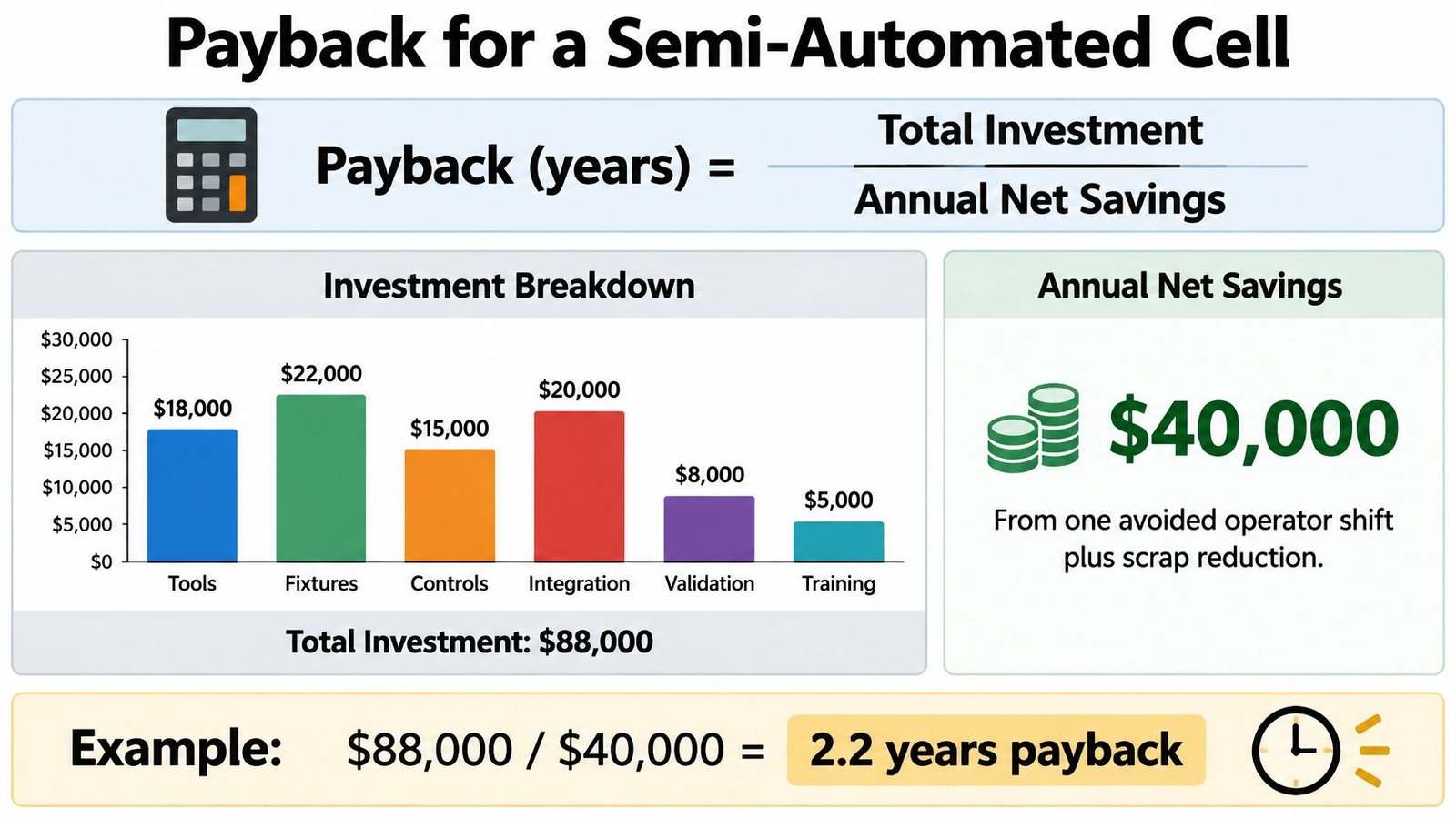
Payback in years equals total investment divided by annual net savings. Total investment includes tooling, fixtures, controls, integration, validation effort, and commissioning. Annual net savings are the gross savings minus added maintenance and operator training. Skip either side and the number flatters the project.
Savings levers and the baseline to collect
| Savings lever | How to measure it | Baseline to collect |
|---|---|---|
| Scrap and rework | Cost of scrapped and reworked units per month | Three months of scrap count, rework hours and material cost per unit |
| Inspection hours | Labor time spent on manual inspection per unit | Inspector hours per shift and inspection reject count |
| Labor hours per unit | Operator time for the assembly steps being automated | Time study of current cycle, including loading and rework |
| Warranty and customer returns | Returns and claims linked to assembly defects | Return rate and cost per return for the affected product |
| Changeover time | Time to switch between products or designs | Changeover log with duration per event |
Plants that automate these steps often cut scrap and rework, tighten inspection, hold specification more consistently, and see fewer warranty returns. Those are the levers. They are not a guaranteed percent. Measure yours. A simple automation ROI calculator is only useful after those five baselines exist.
A worked example you can rerun
Say the station costs 150,000 in your currency and annual net savings are 60,000. Payback is 150,000 / 60,000 = 2.5 years. If validation adds 25,000, investment becomes 175,000. If savings fall to 50,000 once you subtract maintenance and training, payback is 175,000 / 50,000 = 3.5 years. Same station, one honest line item, a full extra year.
The baseline matters more than the formula. A scrap rate somebody estimated in a meeting will almost always look better than three months of counted rejects. Use the counted number, including material and the rework hours hidden in overtime.
The formula also misses gains that still belong in the decision. Fewer high-force hand motions cut ergonomic risk. A per-unit parameter log shortens a complaint investigation. Consistent data makes the next change-control package faster to write. Count them in the narrative, not in the denominator, unless you can price them.
Confirm Your Automation Level Before You Buy
Answer five questions before you request a quote.
- Units per year: Is volume high and steady, or mixed across several SKUs?
- Design changes: How many times a year does the drawing or the label set move?
- Sensitive steps: How many steps are repetitive and tight on force, dose, or alignment?
- Validation scope: Which functions write a record, and which are only mechanical?
- Payback limit: What payback, in years, will the business accept?
Stable high volume with rare changes points to full automation. Frequent changes plus a few repetitive steps point to semi-automation. Precise handling over long runs, with someone on staff to program and maintain the arm, points to a robotic cell. If two answers conflict, trust the change frequency. A line you cannot change over is idle capital.
The practical next step is a no-obligation consultation. We use that conversation to understand your bottlenecks, labor and production constraints, quality or consistency concerns, and budget and timeline. Our team walks the production workflow to find where automation changes output the most. System Engineering & Automation brings over 30 years of hands-on manufacturing and inline automation experience, including GMP-aware practice.
Bring current cycle times, three months of scrap counts, how often the product changes, and what your quality group expects in a validation package. Those four items turn a general tour into a level you can defend.
System Engineering & Automation designs and builds the station level your volume and change rate can support, from smart fixtures through semi-automated cells that record the parameters quality already asks for. If your line is stuck between a manual bench and a full-line quote, we can review the bottleneck, the validation scope, and a payback built from your own baseline. Visit System Engineering & Automation to request that consultation and bring your cycle times and scrap counts with you.