If you're looking at an aging line, rising labor pressure, and a capital budget that has to survive scrutiny, the control panel decision usually lands in the middle of all three. It affects uptime, changeovers, troubleshooting, operator training, and how hard it is to expand later. Yet many panel projects still get treated like a parts list instead of a production strategy.
That's where manufacturers lose money. They buy more automation than the process needs, or they underbuild a panel that becomes painful to service six months later. The right answer often isn't the most complex architecture. It's the one that fits your process, your staffing reality, and the way your plant operates.
Table of Contents
- Defining Your Panel's Purpose and Scope
- Selecting the Right Core Components
- Designing for Safety, Compliance, and Environment
- Integrating and Commissioning Your Panel
- Planning for Long-Term Performance and ROI
- Key Questions Answered About Automation Control Panels
Defining Your Panel's Purpose and Scope
A control panel project usually goes off track before the first component is ordered. A plant wants to reduce manual handling on one station, then adds downtime tracking, recipe management, remote access, and a future line tie-in halfway through the job. The result is familiar. Budget climbs, startup slips, and the finished panel is harder to operate than the process it was supposed to improve.
The fix is simple in principle and disciplined in practice. Define the production objective, the operating limits, and the expected life of the system before anyone locks in hardware. A practical workflow starts with the functional specification and sequence of operation, then moves through requirements review, component selection, electrical design, layout, installation, commissioning, and training, as outlined in E Tech Group's panel design guidance. That order protects both cost and schedule because each later decision depends on the scope being settled first.
Start with the production problem
Start with the business problem, not the parts list.
If the actual issue is inconsistent output from a manual station, a semi-automated panel with clear operator prompts and basic fault handling may deliver better ROI than a fully automated cell. If the process runs high volume with stable product mix and expensive downtime, a higher level of automation may make sense. The right answer depends on labor content, changeover frequency, maintenance depth, and how much disruption the plant can absorb during startup.
Write the project brief in plain language. It should answer these questions:
- Process boundary: What exact machine, station, or line segment will the panel control?
- Inputs and outputs: Which sensors, motors, valves, buttons, and safety devices need to connect?
- Operator interaction: Does the operator need pushbuttons, an HMI, recipe selection, alarms, or guided work instructions?
- Data needs: What has to be displayed, logged, or sent to a larger system?
- Expansion path: Will this stay a single workstation, or is line integration likely later?
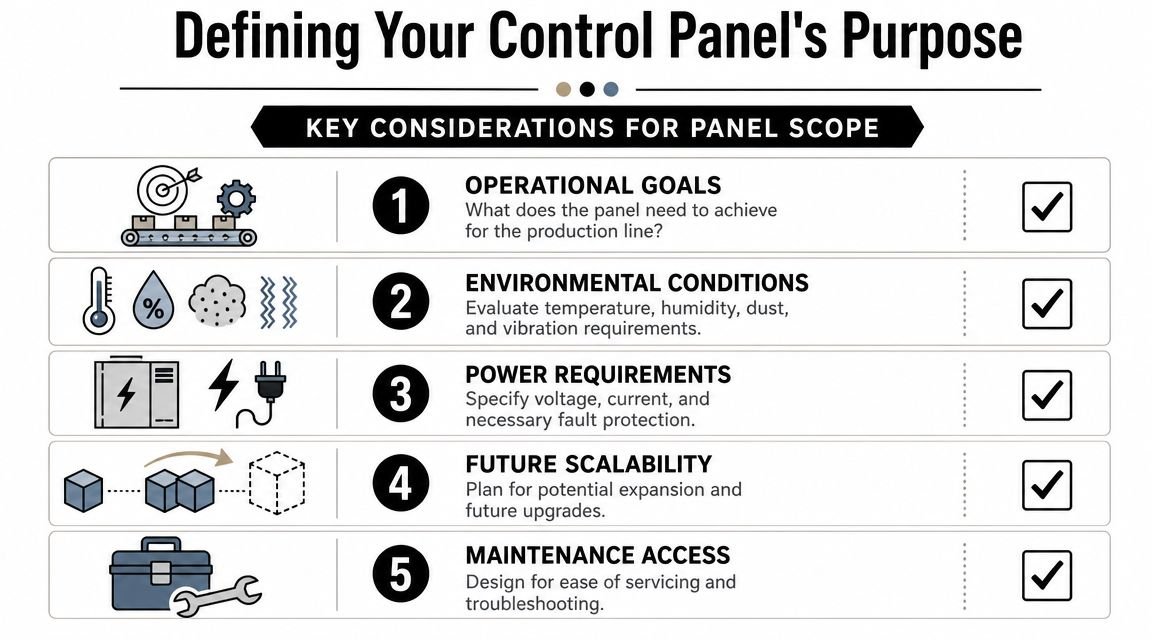
Good scope work pays off twice. It prevents overspending on features the plant will not use, and it prevents undersizing a panel that will need rework within a year.
Questions that prevent scope creep
Many panel projects start with a reasonable target and then expand one request at a time. A simple station controller turns into a panel that also needs OEE data, quality interlocks, remote diagnostics, extra field devices, and provisions for a second machine. None of those requests are unusual by themselves. The problem is adding them after the original concept, enclosure size, and budget are already set.
Ask these questions early and get written answers:
What sequence of operation must happen every cycle?
Write it step by step. If the sequence is vague during review, programming and troubleshooting will be slow later.What conditions stop production?
Define faults, alarms, interlocks, and recovery steps. Plants lose time when operators and maintenance technicians have different ideas about what requires a reset, what requires inspection, and what can auto-recover.What environment will the panel live in?
Confirm temperature, humidity, dust, washdown exposure, vibration, and utility quality. Missing one of these details can force enclosure, cooling, or component changes late in the job.Who will maintain it after startup?
A panel that depends on one outside programmer for every fault call is expensive to own. Clear labels, readable schematics, and standard parts usually beat clever customization.
Practical rule: If the night shift maintenance team cannot trace a fault quickly from the schematic to the device, the design is too complicated for the plant.
Enclosure size deserves the same level of scrutiny. A common value-engineering move is to reduce cabinet size to save wall space or a small amount of upfront cost. That choice often creates tighter wiring, higher heat density, worse service access, and limited room for future additions. For many small and mid-sized manufacturers, a slightly larger enclosure is the cheaper decision over the life of the system because it cuts labor during assembly, speeds troubleshooting, and leaves room for sensible expansion.
This is also where the semi-auto versus full-auto decision needs a hard look. Full automation can be the right investment, but only when throughput, staffing, and product stability support it. In many plants, a semi-automated station with good controls, clear operator interaction, and room to scale delivers faster payback with less training burden and less startup risk.
A good integrator helps define that boundary early. The job is not to add complexity. The job is to match the panel scope to the production need, the maintenance reality, and the return the plant can capture.
Selecting the Right Core Components
Core components determine how expensive the panel will be to own, not just how much it costs to buy. A control scheme that fits the process usually delivers better uptime, faster troubleshooting, and less operator training than a feature-heavy design that never gets used.
One major turning point in panel design was the arrival of the programmable logic controller, or PLC, in the late 1960s. It replaced large hardwired relay schemes with reprogrammable control that could be changed, diagnosed, and expanded more efficiently, as described in Progressive Automations' overview of automation history. That matters today because the PLC choice still sets the ceiling for flexibility, serviceability, and future modification cost.
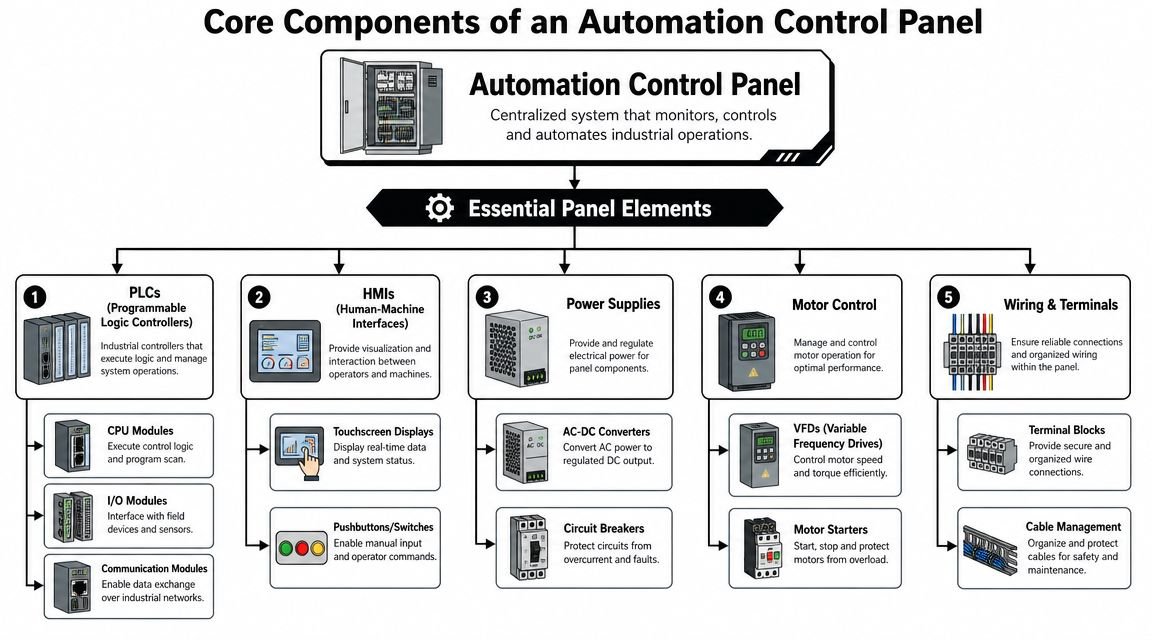
Early in the evaluation, this visual helps production, maintenance, and operations teams get aligned on what belongs in the panel and what each device is expected to do.
Choose the control platform by process complexity
Start with the process, then size the hardware. A simple fixture with a few sensors, one motor, and a repeatable sequence does not need the same architecture as a multi-station cell with recipes, alarms, data handling, and upstream or downstream coordination.
| Component | Best fit | Typical reason to choose it | Common mistake |
|---|---|---|---|
| Micro-PLC | Standalone stations, simple sequences | Lower cost, compact footprint, straightforward maintenance | Expecting it to absorb major future expansion without planning |
| Modular PLC | Multi-device machines, scalable cells, line integration | More I/O flexibility, easier communications expansion, better fit for growing systems | Buying one for a simple station that only needs basic logic |
| Basic HMI | Clear operator prompts, status, start/stop, alarm display | Improves usability without adding unnecessary software layers | Turning the screen into a cluttered engineering console |
| VFD | Motor speed control, ramps, process tuning | Useful where speed variation improves the process | Installing drives on motors that only ever run at one fixed speed |
| Motor starter | Simple motor control | Lower complexity when variable speed isn't needed | Using the simplest option when the process needs controlled acceleration |
The surrounding devices matter just as much. Relays, timers, sensors, starters, circuit breakers, terminal blocks, transformers, pushbuttons, pilot lights, selector switches, and indication devices all support either the control circuit or the power circuit. Poor choices here create the slow, expensive failures that plant teams remember.
In regulated production, component selection also needs to support documentation, cleaning requirements, and change control. Plants working under good manufacturing practice requirements in manufacturing usually benefit from standard components and clear device identification because validation and maintenance both get easier.
Later in the buying cycle, many plant teams find this walkthrough useful for aligning controls decisions with machine behavior.
Where plants overspend
Overspending usually shows up in three places.
The first is the PLC platform. Plants buy for a hypothetical future line expansion that may never happen, then carry the added hardware cost, software complexity, and spare parts burden from day one. The second is the HMI. A screen should help operators run the machine and recover from common faults, not expose every internal variable in the program. The third is motor control. A VFD is the right choice when the process benefits from speed control, ramping, or torque management. If the motor only needs to start and stop at full speed, a starter is often the lower-cost and lower-maintenance option.
Lower purchase price and lower ownership cost are not the same thing. The panel that wins on TCO is usually the one your team can support without outside help for routine issues.
A few selection rules hold up well in real plants:
- Match PLC size to the production need: Leave room for credible expansion, but do not pay for unused architecture.
- Keep the HMI focused on operations: Clear prompts, alarm history, and basic status usually provide more value than dense engineering screens.
- Use drives only where the process gains from them: Speed control, soft acceleration, and tuning can improve the machine. They also add setup time, fault codes, and replacement cost.
- Standardize common devices: Repeatable parts and layouts reduce spare inventory, shorten training time, and make service calls faster.
- Choose components your maintenance team can get locally: Saving money on a niche part disappears fast when one failed device shuts down production for days.
For small and mid-sized manufacturers, this is usually where semi-automation produces the best return. A right-sized panel with sensible controls often captures most of the productivity gain without the cost, startup risk, and training load that come with pushing to full automation before the process is ready.
Designing for Safety, Compliance, and Environment
A panel that passes a bench test can still become an expensive problem on the plant floor. I have seen panels meet the basic control requirement, then lose value through nuisance trips, slow troubleshooting, heat issues, and inspection delays. Those costs usually come from avoidable design decisions, not from a lack of processing power or extra features.
Safety and compliance affect total cost of ownership. For a small or mid-sized manufacturer, that means fewer startup surprises, less downtime tied to electrical faults, and less dependence on outside specialists when something fails. The right design also keeps your automation level in line with what your team can support. A simpler semi-automated panel with clear safety logic and good service access often delivers better long-term return than a more complex full-auto design that stretches maintenance and training capacity.
Compliance supports uptime
Code compliance is the baseline. Good panel design goes further and makes the system easier to live with for the next ten years.
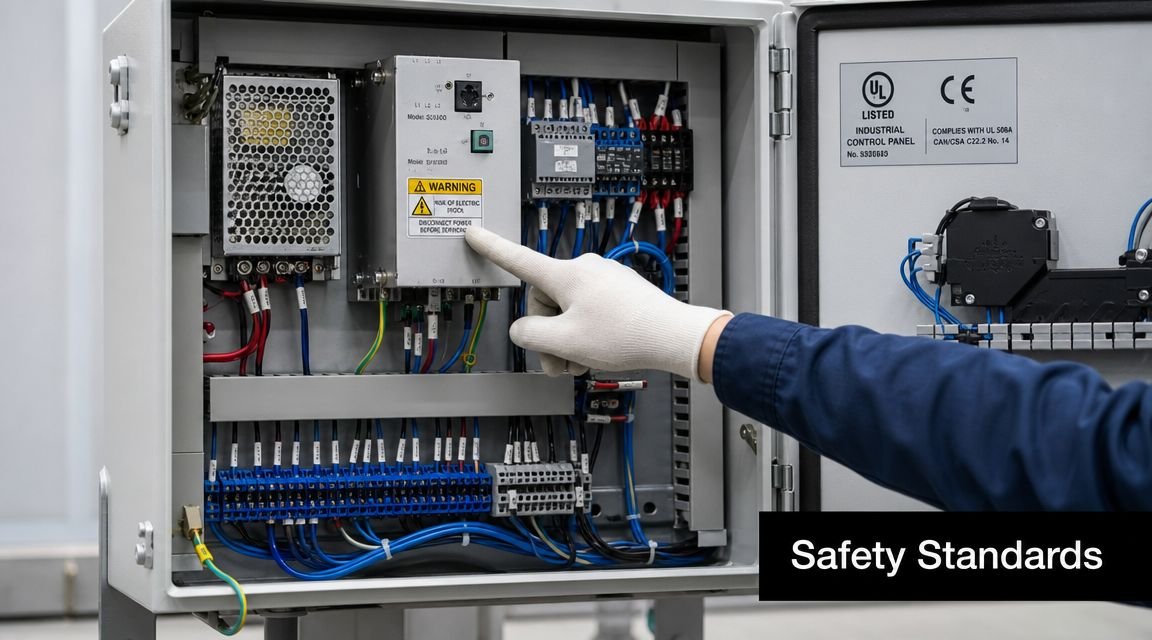
Many panel failures start with ordinary execution problems. Components are packed too tightly, heat is ignored, high and low voltage wiring are routed poorly, or field terminations are hard to reach. The panel may still run at first. It just costs more to maintain, and every fault takes longer to isolate.
Good builders pay close attention to details that directly affect uptime:
- Component spacing: Better airflow helps control heat and extends component life.
- Wire segregation: Clean routing reduces electrical noise and makes faults easier to trace.
- Clear labeling: Technicians should be able to identify terminals, devices, and conductors without guessing.
- Service clearance: Fuses, relays, power supplies, and I/O should be accessible without disassembling half the panel.
- Safety circuit design: Emergency stops, interlocks, and reset behavior need to be clear, testable, and appropriate for the machine risk.
Build for the real environment
The room drives the enclosure and layout. A panel in a clean packaging area has different needs than one mounted near coolant mist, dust, vibration, or washdown. If the enclosure rating, sealing method, cooling approach, and material selection do not match the site conditions, the panel may be compliant on paper and still underperform in service.
That problem gets more expensive over time. Fans pull in contamination. Poorly chosen enclosures corrode. Heat shortens device life. Maintenance spends more time cleaning, tracing faults, and replacing parts. The lower-cost build stops being the lower-cost option.
Regulated plants need another layer of discipline. In food, medical device, and similar operations, controls decisions should support documentation, cleanability, and controlled process behavior. If your line falls under regulated production requirements, align the panel design with GMP requirements in manufacturing.
The practical rule is simple. Design for the operator, the maintenance technician, and the actual room conditions. That is what keeps safety work from becoming a paperwork exercise and turns compliance into longer equipment life, faster service, and better ROI.
Integrating and Commissioning Your Panel
A panel can look excellent in the shop and still disappoint at startup. Integration is where drawings meet actual conveyors, sensors, utilities, operators, and production pace. Commissioning is where hidden assumptions get exposed.
The smooth projects tend to follow the same rhythm. The panel arrives with clear schematics, labeled wiring, tested software, and a realistic startup plan. The rough projects arrive with open questions.
What a clean startup looks like
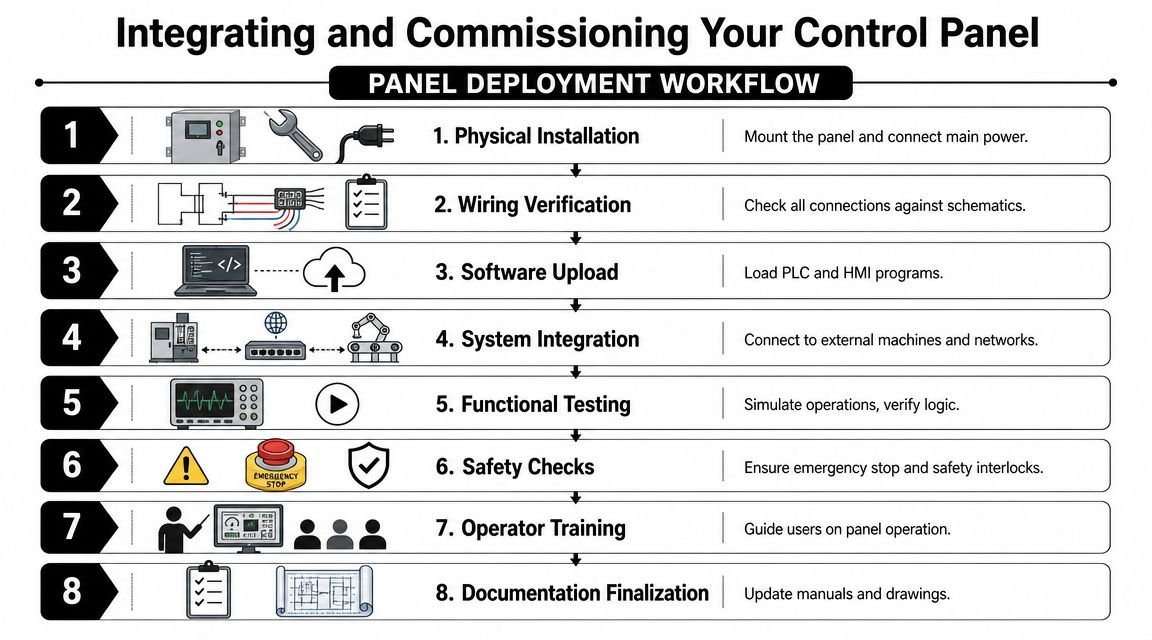
A disciplined startup usually moves through a sequence like this:
Physical installation
Mount the panel, bring in power, land field wiring, and confirm mechanical placement supports access.Verification against drawings
Check every connection against the schematics before applying full operation logic.Software loading and device checkout
Load PLC and HMI programs, then prove communications and basic device response.Functional testing
Run the sequence in a controlled way. Confirm sensors, outputs, alarms, and operator actions match expected behavior.Safety validation
Emergency stops, interlocks, and recovery behavior must be verified before normal production.
This workflow is easier to visualize when the team shares the same startup map.
Most experienced plants also want acceptance testing at two points. One happens before shipment, when the machine builder or integrator demonstrates core operation in a controlled setting. The second happens on site, where utilities, upstream and downstream equipment, and real production variables are in play. If your team uses formal pre-shipment validation, factory acceptance tests are a useful framework for structuring that review.
What the handover should include
The handover is where many projects become harder to own than they should be. Operators get a quick demo, maintenance gets partial files, and nobody is sure where the latest backup lives. That isn't commissioning. That's deferring risk.
A proper handover should include:
- Current schematics: Not marked-up drafts. Final drawings.
- Bill of materials: With actual installed devices.
- Program backups: PLC, HMI, and any drive parameter files.
- Alarm and fault guidance: Clear enough for operators and maintenance to act on.
- Training: Enough for daily operation, basic troubleshooting, and escalation.
A panel isn't fully commissioned when it runs once. It's commissioned when the plant can support it after the integrator leaves.
For manufacturers choosing outside support, practical engineering matters more than polished presentations. Firms such as System Engineering & Automation provide panel engineering, integrated controls, installation, and commissioning as part of broader manufacturing automation work. The useful question isn't who can make the panel run. It's who can hand it over in a way your plant can sustain.
Planning for Long-Term Performance and ROI
The purchase order is the start of panel cost, not the end of it. The expense shows up over the life of the machine in downtime, troubleshooting effort, operator training, spare parts confusion, and how painful changes become. That's why the best automation control panels are designed around total cost of ownership, not just initial build cost.
This matters more now because industrial automation investment is rising while buyers still have to justify ROI under labor pressure and capital constraints. Market analysis also shows persistent skills gaps in manufacturing, which makes maintainability and troubleshooting speed more valuable than maximum complexity, strengthening the case for simpler, semi-automated panels with standardized components in many low-volume, high-mix, and GMP-aware operations, according to AutomationDirect's discussion of industrial control panel needs.
When semi-automation wins
Fully automated systems make sense when the process is stable, volumes are predictable, and the production model supports the added complexity. But many small and mid-sized manufacturers don't live in that world every day. They deal with product variation, staffing constraints, engineering change requests, and shifts in demand.
In those environments, semi-automation often delivers the better business result because it keeps the operator involved where human flexibility still has value while automating the repetitive, error-prone, or safety-critical parts of the process.
A semi-automated panel tends to outperform a heavily customized full-auto approach when:
- Product mix changes often: Operators can adapt without a major controls rewrite.
- Training resources are limited: Simpler interfaces reduce learning burden.
- Maintenance depth is uneven: Standard devices are easier to support across shifts.
- Expansion is likely: Modular architecture leaves room to add functions over time.
Design choices that lower ownership cost
A few panel decisions have outsized effect over the equipment life.
Standardized components make spare stocking easier and reduce the chance that one obscure part stalls production. Logical layouts cut diagnosis time during faults. Intuitive HMIs reduce the need for tribal knowledge. Extra panel space makes future additions cheaper and safer.
Here's the trade-off in simple terms:
| Approach | Upfront appeal | Long-term risk | Better fit |
|---|---|---|---|
| Highly customized full-auto panel | Maximized automation and tailored features | Harder training, more specialized troubleshooting, less flexibility | Stable, repetitive, high-confidence processes |
| Semi-automated modular panel | Lower complexity, easier adoption | Some manual interaction remains | Small to mid-sized plants, evolving products, phased automation plans |
One practical buying question helps cut through the noise: will this design still make sense when your current operators, supervisors, or maintenance techs change? If the answer depends on one specialist, the panel is carrying hidden cost.
For manufacturers comparing options from a panel builder or integrator, it helps to review examples of control panel maker services through that lens. Look for evidence of scalable architecture, maintainable layouts, and realistic support expectations. The panel should fit the business as much as the process.
Key Questions Answered About Automation Control Panels
How should connected panels be secured
Once Ethernet, remote access, IIoT gateways, or wireless links are added, the panel becomes part of your cyber-physical risk surface. Many articles talk about enclosure sizing or component lists and skip that issue entirely. That's a mistake.
Current guidance points in a clear direction. Control panel design needs to address security from the start, including network segmentation, secure remote access, and port hardening, with the broader context reinforced by CISA ICS advisories and NIST CSF 2.0 (2024), as noted in Interstates' discussion of underrated control panel issues.
In practical terms, ask these questions during design and handover:
- Who owns remote access after commissioning?
- Which ports and services are required?
- How will the asset inventory be maintained?
- What is the patch and update strategy?
- How is the panel separated from broader business networks?
Security added as a retrofit is usually messy. Security designed in from the start is far easier to manage.
Should you retrofit or replace
Retrofitting makes sense when the enclosure, layout, and field device architecture are still sound and the main problem is obsolete logic, weak operator interface, or limited diagnostics. Replacement makes more sense when the panel is overcrowded, poorly documented, hard to service, or mismatched to current production needs.
Use a simple screen:
- Retrofit if the panel structure is still serviceable and the main bottleneck can be solved by the upgrade.
- Replace if the old design locks you into repeated downtime, poor access, or expanding workaround costs.
If your maintenance team already avoids opening the panel because it's difficult to trace and cramped to work in, replacement is usually easier to justify.
What does UL 508A really tell you
For most buyers, UL 508A matters because it signals disciplined panel construction against a recognized industrial control panel standard. It doesn't guarantee that the process design is perfect or that the user experience will be good. It does mean the build should reflect a defined approach to industrial control panel construction and compliance.
That's why UL status should be part of the buying criteria, not the only criterion. You still need to review serviceability, device standardization, documentation quality, environmental fit, and how the panel supports long-term ownership.
Good automation control panels don't just power a machine. They fit the process, the people, and the plant's future changes.
If you're evaluating a panel upgrade, a new semi-automated workstation, or a broader manufacturing automation project, System Engineering & Automation can help assess the right level of automation for your process and budget. Their work includes control panels, integrated controls, tooling, fixtures, installation, and commissioning for manufacturers that need practical solutions focused on production performance, flexibility, and long-term support.