
The fixture works when your tooling engineer loads it, but the next shift keeps stopping to reseat parts. Quality is questioning a drifting dimension, production wants faster changeovers, and nobody can confirm whether the locator on the bench matches the released drawing. You need more than a stronger clamp.
Custom fixture design should address the part, the operator, and the record of what changed. For manufacturers upgrading manual processes or adding semi-automation, that means choosing the simplest equipment that delivers repeatable results and remains practical to maintain. Over-engineering costs money too, especially when unnecessary controls make troubleshooting harder.
Table of Contents
- The Four Phases Every Custom Fixture Passes Through
- How to Gather Requirements and Characterize the Part
- Choosing Locators, Clamps, Materials and Tolerances
- CAD and CAM Habits That Prevent Rework
- Prototyping and Validating Before Production Release
- Production Pitfalls and How to Fix Them
- Confirm Your Fixture Plan Before You Cut Metal
The Four Phases Every Custom Fixture Passes Through
A fixture can meet the drawing and still fail on the floor: an operator loads the part backward, a clamp blocks tool access, or a revised locator is installed without the change reaching the setup sheet. A practical project framework has four phases: setup planning, fixture planning, unit design, and verification. The 2018 peer-reviewed flexible-fixture study provides relevant context on flexible fixture design, but this sequence is the working framework used here. Each phase should resolve decisions before they become hardware changes.
Design Phases, Outputs and Exit Checks
Agree on exit checks before design begins. Keep the operator and revision record in view alongside the part.
| Phase | Question it answers | Output | Exit check |
|---|---|---|---|
| Setup planning | Which features can be machined without changing the fixture? | Feature groups and setup sheet | Setup count is lower than the current process |
| Fixture planning | Does the concept meet the project requirements? | Requirements matrix covering stability, tolerance, collisions, locators and clamps, usability and cost | Each requirement has an owner and a check method |
| Unit design | How do locators and clamps fit the part and the operator's loading path? | Layout, GD&T callouts and bill of materials | Clearances and interferences pass in CAD |
| Verification | Does the fixture hold tolerance with real parts and repeatable loading? | Simulation report and first-article data | Capability is measured on worst-case parts |
Setup planning groups features to reduce setups and manufacturing lead time. Fixture planning checks stability and deformation control, tolerance, collision prevention, locator and clamp selection, usability, and affordability. It should also account for likely loading errors and identify how revisions will be recorded. Unit design turns those requirements into geometry; verification checks the result through simulation or physical testing.
The phases connect workholding to repeatability, tool access, quality, operator use, and cost. A generic workholding product is the sound choice when it meets the requirements. Custom tooling earns its cost when part geometry, process sequence, or tolerances call for a different solution. Extra mechanisms add purchase and maintenance costs, so specify them only when they solve a defined process problem.
Consider a hypothetical six-face bracket machined in three setups because accessible features were not grouped. If machine access allows, a setup plan could combine operations and reduce the count to two. That is a planning opportunity, not a guaranteed saving. Record the approved setup and fixture revisions together so the shop can confirm that the installed tooling matches the current process.
Design gate: Start unit design only after every requirement in the fixture plan has an owner, a check method, and approval.
How to Gather Requirements and Characterize the Part
Start at the workstation with production and quality, not with an empty CAD assembly. Bring representative incoming parts, the current process instructions, and the people who load and inspect them.
Build the Requirements From the Actual Process
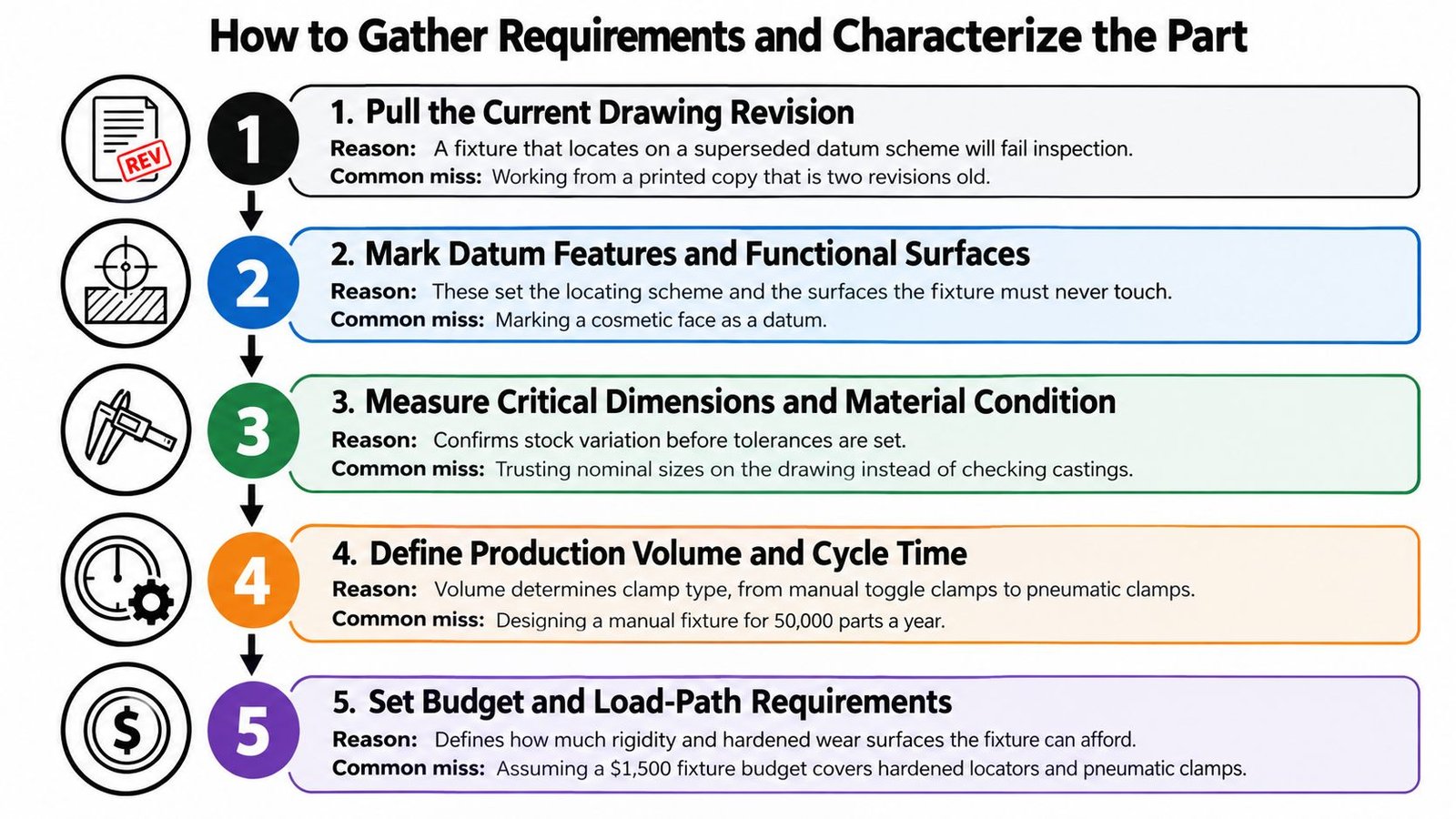
Pull the current drawing revision and mark functional datums. Confirm which features establish the part's position and which surfaces must remain untouched. Use a consistent method for reading manufacturing drawings; the common miss is choosing an accessible face that doesn't control product function.
Record loading direction and the cycle-time target. Top loading and side loading require different clamp clearance and hand access. Don't measure machining time alone while ignoring the operator's loading and unloading work.
Identify vulnerable geometry and allowable contact pressure. Mark thin walls, irregular casting surfaces, and finished areas, then establish acceptable contact conditions. The usual omission is specifying clamp capacity without asking what force the workpiece can tolerate.
Define what the fixture must hold. Reference each critical tolerance to the functional datum scheme and identify where the process applies force. Avoid treating every drawing dimension as an equally demanding fixture requirement.
Estimate annual volume and product mix. Use expected demand, changeover frequency, and likely design changes to compare dedicated, modular, and semi-automated concepts. Don't select automation solely because the current manual operation looks slow.
Describe the operator range and foreseeable mistakes. Include experienced staff, new operators, and relief coverage, then identify reversed, tilted, and partially seated loading conditions. A loading method that depends on an experienced operator's feel isn't a complete requirement.
List all access needs. Include cutting tools, inspection probes, chip clearing, maintenance tools, and safe removal of rejected parts. Check access with clamps closed as well as open.
Issue a signed requirements sheet. Keep the working summary concise, with acceptance criteria and ownership for unresolved questions. Production and quality should approve it before the concept becomes detailed hardware.
The flowchart provides a visual prompt for gathering that information.
Check the Loading Assumptions
Consider an illustrative thin-walled aluminum housing whose initial fixture requires the operator to hold it against a stop while closing a clamp. During a shift handover, a replacement operator lets the housing tilt before clamping. The fixture then holds the wrong position securely.
The requirement wasn't just “hold the housing.” It should have specified stable seating before clamping and an obvious indication of correct loading.
You should finish with a signed requirements sheet that the concept can be measured against, not a collection of informal preferences.
Choosing Locators, Clamps, Materials and Tolerances
A fixture can clamp a part securely and still locate it incorrectly. Start by defining how the workpiece's six degrees of freedom are constrained. A 3-2-1 scheme uses three primary, two secondary, and one tertiary locating contacts. Check that the contacts seat the part consistently and that operators can tell when it is loaded correctly.
The workpiece-to-plate relationship is the starting point for reviewing contact locations.
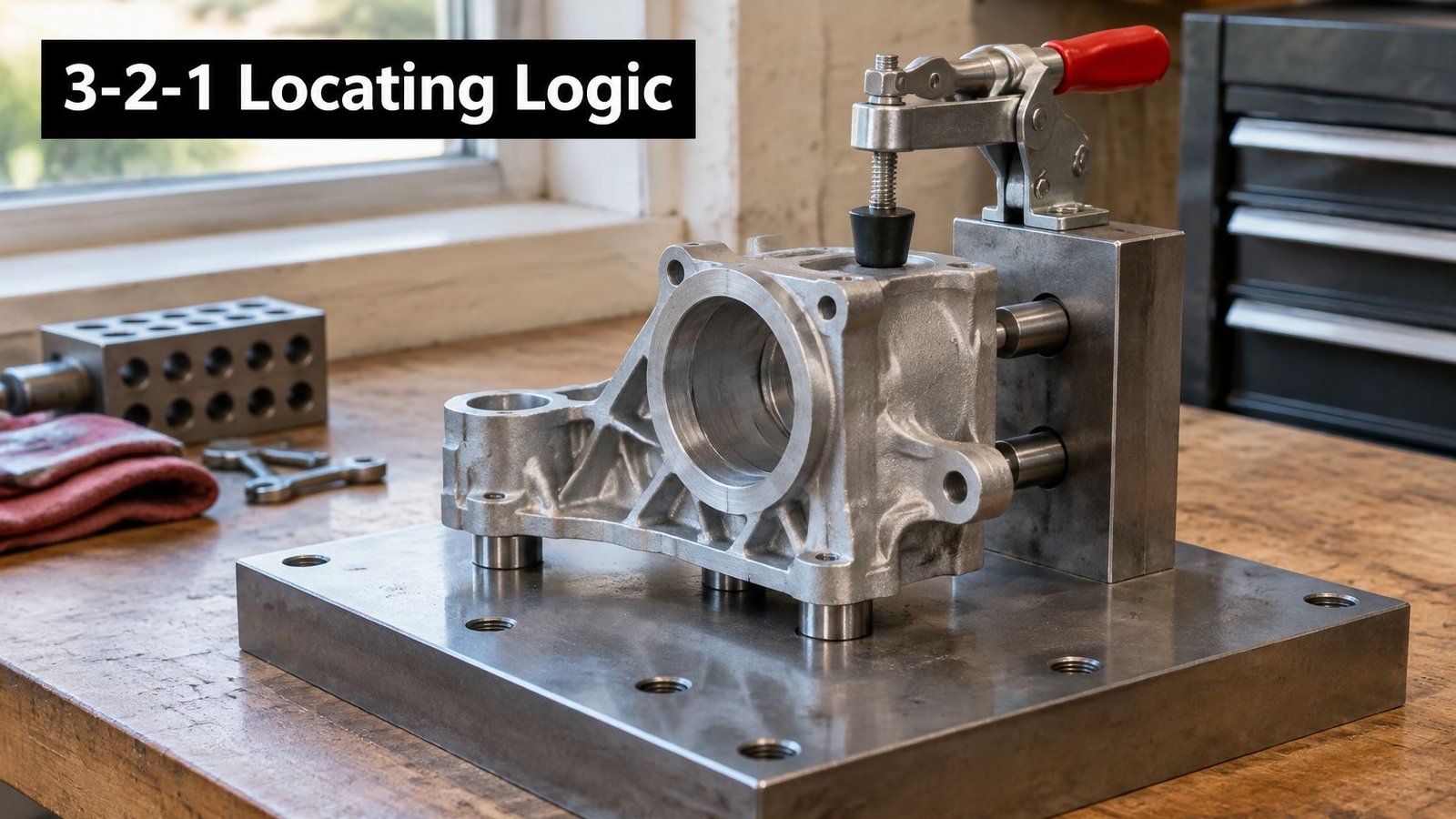
Locators establish position; clamps maintain contact with them. Direct clamping force toward supported regions, control its magnitude, and avoid concentrated loads on unsupported thin walls. Design the loading sequence so a part cannot appear secure while resting against the wrong locator. Where practical, use keyed features or a clear seating check, and document locator changes in the fixture revision record.
Locator and Clamp Material Choices
Select contact materials separately from the base material. A lightweight plate can carry hardened locating elements, while a rigid steel fixture may still need protective contact pads.
| Material or component | Best use | Trade-off |
|---|---|---|
| Hardened ground locator pins | Primary and secondary contact points | Must be replaceable and inspected for wear |
| UHMW-PE or acetal (Delrin) | Non-marring contact on finished or soft parts | Creeps under load and gives low stiffness |
| 4140 or 1045 steel | General plates and clamp bodies | More handling weight and machining effort than a light-duty aluminum design |
| Aluminum 6061-T6 | Prototypes and light clamps | Contact wear and stiffness need attention |
| Modular T-slot base | Changing part mix and short-run work | Higher upfront cost; less rigid than a dedicated plate |
Use wear-resistant material where repeated contact requires it, then weigh the added material and processing cost against service life. Soft pads protect finishes, but they should not serve as precision locating surfaces. A modular base can suit frequent changeovers, while a dedicated plate may provide greater rigidity for a stable part mix. The operator's loading effort and the maintenance team's ability to replace worn contacts belong in that choice.
Use the video alongside the layout review when discussing workholding arrangements.
Allocate Error Before Specifying Precision
Set a locating-error budget before specifying fits and ground surfaces. As a general engineering heuristic, locating error may be allocated a fraction of the part tolerance, such as one-fifth to one-tenth, but validate that choice for the application through tolerance stack-up analysis. Include contact geometry, pin fits, workpiece deformation, and process variation. The resulting analysis should define which locator fits and surfaces need precision. Tightening every fixture dimension adds cost without necessarily improving the controlled feature.
Plan for service, too. Use replaceable pads and bushings where wear is expected. Replacing a worn contact is generally more practical than restoring the base plate's locating geometry. Keep the drawing and change log clear about which contacts control position, so replacement parts preserve the approved setup.
CAD and CAM Habits That Prevent Rework
A clean CAD model can still describe a fixture that's awkward to load or impossible to machine around. Model the production condition, including the features that designers are tempted to omit for convenience.
Model What the Machine and Operator Will Encounter
Represent the as-clamped workpiece. Include incoming stock, casting allowance, and relevant variation so contacts land on real material rather than the finished nominal envelope.
Use a parametric assembly deliberately. Relate locator positions, clamp locations, and drawing dimensions so a part revision updates the intended relationships without leaving disconnected geometry.
Simulate the complete cutting arrangement. Include the full fixture, actual tool-holder length, clamp heights, and stock because clearance around the cutting edge alone doesn't establish collision clearance.
Provide chip escape paths. Avoid pockets around locating contacts that can retain swarf beneath the part, and make cleaning access visible in the model.
Build mistake-proofing into geometry. Model an asymmetric locator, keyed feature, or seating-check interface rather than leaving error prevention as a note for the assembler.
Standardize reusable interfaces where justified. A common base grid can support future nests and hardware reuse, but it shouldn't force unnecessary bulk or compromise access on the current job.
A useful review question is whether someone unfamiliar with the design can identify the intended loading direction and service access from the assembly. If those actions require a designer's explanation, review the geometry before releasing drawings.
Make the Drawing a Service Document
The manufacturing drawing should include datum callouts aligned with the part's functional requirements, an unambiguous bill of materials, and clearly identified replaceable wear items. Show any assembly settings that affect performance, including adjustable support positions and controlled clamp conditions.
Keep the revision block readable and describe the actual change. “Updated fixture” doesn't tell production whether the loading sequence changed or quality whether an acceptance result remains applicable. A useful drawing supports fabrication, inspection, repair, and the next engineering review.
Prototyping and Validating Before Production Release
Fixture repeatability belongs in the product-variation budget. The assembly-fixture capability approach describes separating fixture effects from part variation and carrying measured locator error into tolerance simulation. A fixture isn't proven merely because a nominal part fits and the clamps close.
Run a Measured Acceptance Sequence
Inspect the first article against the intended datums. Use a CMM or suitable gauge and establish a stable measurement reference. Check the fixture's relationship to the workpiece, not just individual component dimensions.
Repeat unloading and reloading across operators. For the acceptance plan, require at least two operators and record the spread in measured position. Treat this as a project test requirement, with loading sequence and clamp conditions documented.
Separate the sources of variation. Use a gauge-capability or variance-components study to distinguish measurement, workpiece, and fixture effects. Otherwise, the team may modify tooling to correct an inspection problem.
Challenge the incoming tolerance range. Include parts near the dimensional limits and the least favorable thin-wall or oversized condition. Record whether each part seats normally without special handling.
Measure clamp-induced movement. Check displacement at the clamp locations and inspect the part after release. An acceptable dimension while clamped doesn't establish acceptable free-state geometry.
Time the whole changeover. Measure setup, teardown, and reset against the current process. Include cleaning and adjustment rather than timing only the best loading cycle.
Inspect contact condition. Examine pins and pads for wear or unusual witness marks, then define a maintenance trigger based on measured repeatability drift.
Compile the release report. Include acceptance results, fixture identification, drawing revision, test conditions, deviations, and production and quality sign-off.
For inspection-intensive applications, define custom test fixture requirements alongside the production fixture so the team can distinguish a positioning failure from a measurement failure.
Release Evidence Must Match the Intended Use
Mechanical simulation and tolerance analysis should address stiffness, thermal effects, and collision clearance where relevant. Physical testing then checks whether the built fixture behaves as intended with representative parts and operators.
Acceptance principle: A successful loading demonstration is not a repeatability study.
Validating with only a nominal part and the designer operating the fixture is a frequent failure mode. It can conceal sensitivity to incoming variation, debris, clamp sequence, and loading technique until production begins.
Production Pitfalls and How to Fix Them
A fixture may run smoothly for its designer and still fail when a new operator loads it on the night shift. Ease of loading and recovery is a design requirement, not a training problem to leave unresolved. Staff turnover makes undocumented setup knowledge a production risk: when an experienced operator leaves, the next person may not know how to seat the part, recognize a bad load, or recover from a jam.
Production Symptoms, Causes and Fixes
Use the symptoms below to guide checks on the floor. Confirm the cause through observation and measurement before changing the fixture.
| Symptom | Likely cause | Fix |
|---|---|---|
| Parts loaded half-seated or reversed | No mistake-proofing; symmetric locators | Add a keyed or asymmetric locator, or a seating sensor pad |
| Dimensions drift after a few weeks | Worn locators or debris under contacts | Use hardened replaceable pads and scheduled cleaning with a wear check |
| Part rocks on locators | Over-constrained or located on a rough surface | Locate on the machined datum and add one adjustable support |
| Part distorts when released | Clamp force too high or clamp over a thin wall | Reduce force and add a support pad opposite the clamp |
| New operator cannot run it | No visual cues or too many steps | Add color-coded locators and a one-page setup card |
| Collision during machining | Clamp height or tool holder missing from the model | Run full-stock simulation with the actual tool holder |
| Fixture revision unknown on the floor | No change control | Add a revision label to the fixture and log each change |
For a loading problem, first check whether a mechanical feature can prevent the mistake. A sensor adds cost and maintenance, and it cannot correct a confusing loading sequence. Use detection when the failure cannot be prevented adequately and the signal prompts a useful response, such as stopping the cycle before machining.
Control the Asset After Installation
For medical-device manufacturers, fixture controls should align with the applicable quality system. The FDA Quality Management System Regulation incorporates ISO 13485:2016 into 21 CFR Part 820 and became effective February 2, 2026. This does not make every fixture subject to identical documentation or validation requirements. Set controls according to the fixture's effect on product conformity and the process.
Identify critical fixture attributes, replacement criteria, calibration status where applicable, and changes that require engineering review. Put this information where production staff can use it, rather than leaving it only in an engineering folder. Include enough setup guidance to make the intended loading sequence clear, and enough revision history to show which configuration is on the floor.
A changed locator or undocumented repair can invalidate assumptions behind earlier process evidence, even when the fixture appears serviceable. Treat it as a controlled production asset: label the revision, record repairs and changes, and review their effect before returning the fixture to production. This keeps operator practice and the released configuration aligned.
Confirm Your Fixture Plan Before You Cut Metal
Use a go/no-go review before ordering hardware, then repeat the applicable checks before production release. A missing answer needs an owner and a resolution, not an assumption that the toolmaker will decide.
- Phase approval: Does every phase have an agreed, signed exit check, with completed gates supported by evidence?
- Operator requirements: Does the requirements sheet identify who will use the fixture and which loading mistakes it must prevent?
- Wear and tolerance: Do contact materials, replaceable elements, and the locating-error allocation support the intended service?
- Collision clearance: Has the CAD model passed the planned full-stock simulation with the actual tool holder?
- Verification readiness: Before fabrication, is the multi-operator acceptance test defined? Before release, does the report contain the required repeatability data?
- Configuration control: Is the fixture revision labeled, logged, and matched to the released documentation?
A fixture that cannot be measured for repeatability is not ready for production.
Return unmet requirements to fixture planning. Return material, wear, or tolerance failures to unit design. Missing acceptance data belongs in verification, not in a production deviation that becomes permanent without anyone noticing.
If you don't have in-house fixture engineering, compare providers that cover design, manufacturing drawings, material sourcing, installation, and commissioning. Ask each provider to distinguish necessary controls from optional automation and explain how the equipment will be serviced.
Send the same signed requirements sheet and phase table with every quotation request. Comparable scope makes it easier to evaluate engineering coverage, acceptance testing, and ongoing support rather than selecting on fabrication price alone.
System Engineering & Automation provides custom tooling, fixtures, and semi-automated stations, with support from concept development through installation and commissioning. Visit System Engineering & Automation to discuss your part drawing, loading challenges, and signed requirements sheet, and identify a practical level of automation for your production goals and budget.