
Can your plant build, assemble, and inspect a part from its drawing without stopping to call the designer? If the answer is no, the sheet may look complete, but it isn't yet a usable production definition.
The practical goal of how to make engineering drawings is not to make polished CAD views. It's to create the minimum authoritative product definition that a plant, supplier, and inspector can use consistently. Choose 2D, a controlled hybrid, or model-based definition to suit the shop, and connect every critical tolerance to what the part must do and how someone will measure it.
Table of Contents
- What Each Engineering Drawing Must Contain
- When to Keep 2D or Move to Model-Based Definition
- How to Make Engineering Drawings Step by Step
- Dimensioning Tolerancing and BOM Callouts
- Templates Reviews and Release Habits That Hold
- Drawing Mistakes That Stall Production
- Approve the Drawing Before You Build
What Each Engineering Drawing Must Contain
A drawing is a controlled engineering specification, not a picture. Before adding views, decide what the document must help someone do. ASME Y14.24 defines common drawing types and their applications. Its 1999 edition was reaffirmed in 2009, reflecting a long-standing need to distinguish documents by purpose rather than treat every drawing as the same kind of print (ASME Y14.24).
| Drawing type | Minimum content | Primary users |
|---|---|---|
| Detail part drawing | Geometry, dimensions, tolerances, material, finish, notes | Machining, fabrication, inspection |
| Assembly drawing | Item numbers, fit and function, BOM callouts, fastening | Assembly, kitting, quality |
| Installation drawing | Mounting, utilities, interfaces to the existing cell | Installers, plant engineering |
| Arrangement drawing | Overall layout and equipment relationships | Layout, automation planning |
A detail drawing defines how to make and check one part. Include enough geometry to manufacture it, dimensions and tolerances that communicate its requirements, and material and finish notes. An assembly drawing identifies the components and shows how they fit or operate together. Use item numbers that connect the views to the bill of materials (BOM), and show the fastening information needed to build the assembly.
An installation drawing focuses on the interface with the plant: mounting points, utilities, and connections to the existing cell. An arrangement drawing gives production and automation planners a view of the overall equipment layout and component relationships. For examples of how manufacturing drawings and standards support production, see manufacturing drawings and standards.
Lock down the shared identification details
Whatever the drawing type, the title block should identify the drawing number, units, scale, projection method, revision, approvals, and governing standard. Put notes where users can find them, and make revision status unmistakable. These details tie the geometry to purchasing, production, inspection, and change control.
A preliminary concept is an initial blueprint that shows the general direction of a project. It isn't the final design or an approved manufacturing definition. Start manufacturing drawings only after the full design has been finalized and approved, and make the released drawings specific enough to guide production.
Match each production job to the package it needs. A machined fixture calls for a detail drawing of its manufacturable parts. A welded frame assembly needs an assembly drawing that identifies the members, their relationships, and the items in its BOM. A semi-automatic station may need an assembly drawing for the equipment plus an installation drawing that defines its mounting and utility interfaces with the existing cell. The right package is the one that lets each person do their part without guessing.
When to Keep 2D or Move to Model-Based Definition
The choice between a 2D drawing and model-based definition (MBD) isn't just a CAD setting. It's an operations decision. For manufacturers working with a mixed supplier base, a controlled hybrid package is the sensible default: keep the drawing as a readable shop-floor reference while controlling the model and its product-manufacturing information (PMI) as part of the same revision.
| Method | Best fit | Main risk |
|---|---|---|
| Traditional 2D drawing | Low-volume work, legacy suppliers, paper or hand-tool inspection | Human interpretation and slow reuse of the same data |
| Controlled hybrid | Transition, mixed suppliers, jobs that still need a printed sheet | Model and drawing values drift if revision control is weak |
| Model-based definition | Repeatable production, automated inspection, PMI-capable software and PDM | Incomplete or nonstandard annotations that downstream systems cannot read |
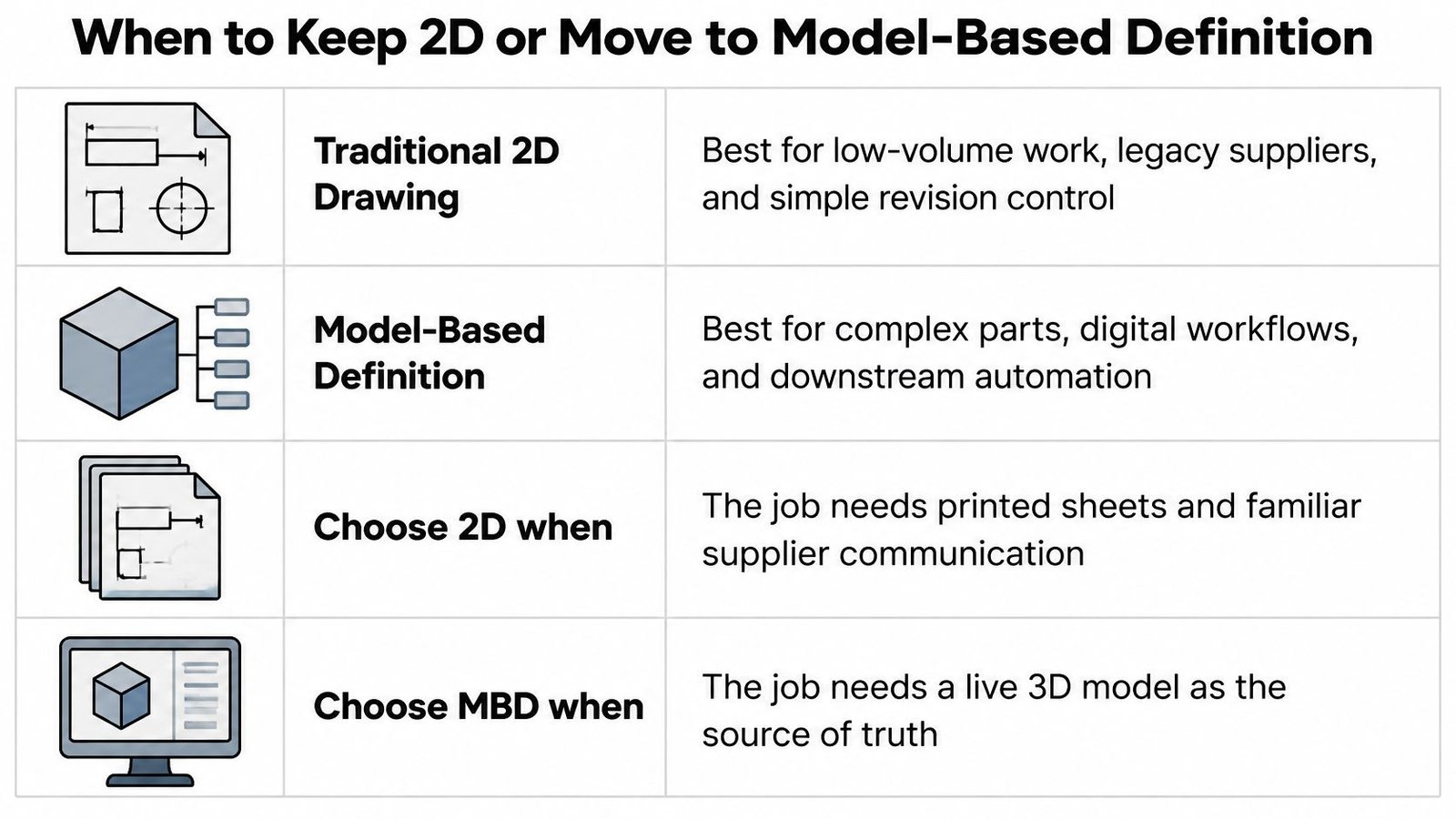
Traditional 2D drawings remain useful when the shop relies on printed sheets, suppliers work with established drawing processes, or inspection happens at a bench with familiar hand tools. In those settings, the drawing is the format operators and inspectors can act on directly. Its main weakness is that people must interpret the information and may have to re-enter it for manufacturing or inspection.
MBD uses a 3D model with geometry, annotations, GD&T, and other manufacturing information that downstream systems can use. NIST describes how this approach can reduce ambiguity from interpreting 2D sheets, while also emphasizing the role of data standards, product data management (PDM) or product lifecycle management (PLM) controls, software interoperability, and staff who can interpret PMI (NIST on MBD and the digital thread).
Choose for the actual handoff
MBD is a stronger fit when production is repeatable, inspection is automated, and the shop has software and personnel that can use the model's annotations. It's a poor shortcut if the model has incomplete or nonstandard PMI, or if downstream systems can't read it. Adding a 3D model without making its requirements usable can create another source of conflicting information rather than a clearer definition.
For a hybrid package, identify which file carries the authoritative requirements and keep every released file aligned to the same revision. Operators may need a printed drawing, while a programmer or inspector may use model data. That can work, but only if the files agree and people know which version governs.
Don't retire the drawing until model exchange and revision control work in the actual production chain. The right question isn't whether a 3D model is available. It's whether the plant, suppliers, and quality team can reliably use one consistent product definition.
How to Make Engineering Drawings Step by Step
Start with requirements, not dimensions. Define the functional interfaces, materials, manufacturing process, inspection method, and applicable standard before deciding what to put on the sheet. The standard must be named because symbols and interpretation rules can't safely be inferred from appearance alone. ISO 1101 provides a symbolic language for geometric tolerancing, while the appropriate choice for a specific program may be ISO 1101 or ASME Y14.5 (ISO 1101).
Manufacturing drawings should begin after the full design is finalized and approved. They then capture the specifications production needs. Use this sequence to turn the approved design into a releasable drawing package:
Write functional requirements first. Record mating interfaces, material, manufacturing process, inspection method, and the governing standard. These requirements keep the drawing focused on what the part must do and how production will verify it.
Start the manufacturing drawings after design approval. Don't release an early concept as a production print. The drawing must describe the approved design.
Build the nominal geometry in CAD. Create the intended shape before adding manufacturing requirements. The model provides a consistent geometric starting point for views and annotations.
Establish the datum reference frame. Choose features that locate and orient the part in its assembly or fixture. The datums should reflect how the part is held and related to mating parts, not an arbitrary coordinate system.
Place clear views and sections. Show only what production and inspection need to understand the geometry. Follow ISO 128 conventions for projection, line types, views, and sections so the graphics communicate consistently across organizations (ISO 128).
Dimension from the datums. Use the datum reference frame to locate features. Remove duplicate dimensions and avoid chains that allow variation to accumulate from one feature to the next.
Add functional geometric controls. Apply GD&T only where it protects a real requirement, and pair each control with a measurement method. A requirement that cannot be measured in the shop is not ready for release.
Add material, process, and general notes. Specify material, heat treatment, finish, units, and general tolerances. Make sure the notes agree with the manufacturing process and the requirements called out on the views.
Balloon the assembly and complete the BOM. Connect each identified item to its BOM entry so assembly, purchasing, and quality can identify the same components.
Run an independent release check. Have someone who didn't author the drawing compare it with the 3D model, BOM, and process plan. Release one controlled revision, not a collection of files that may disagree.
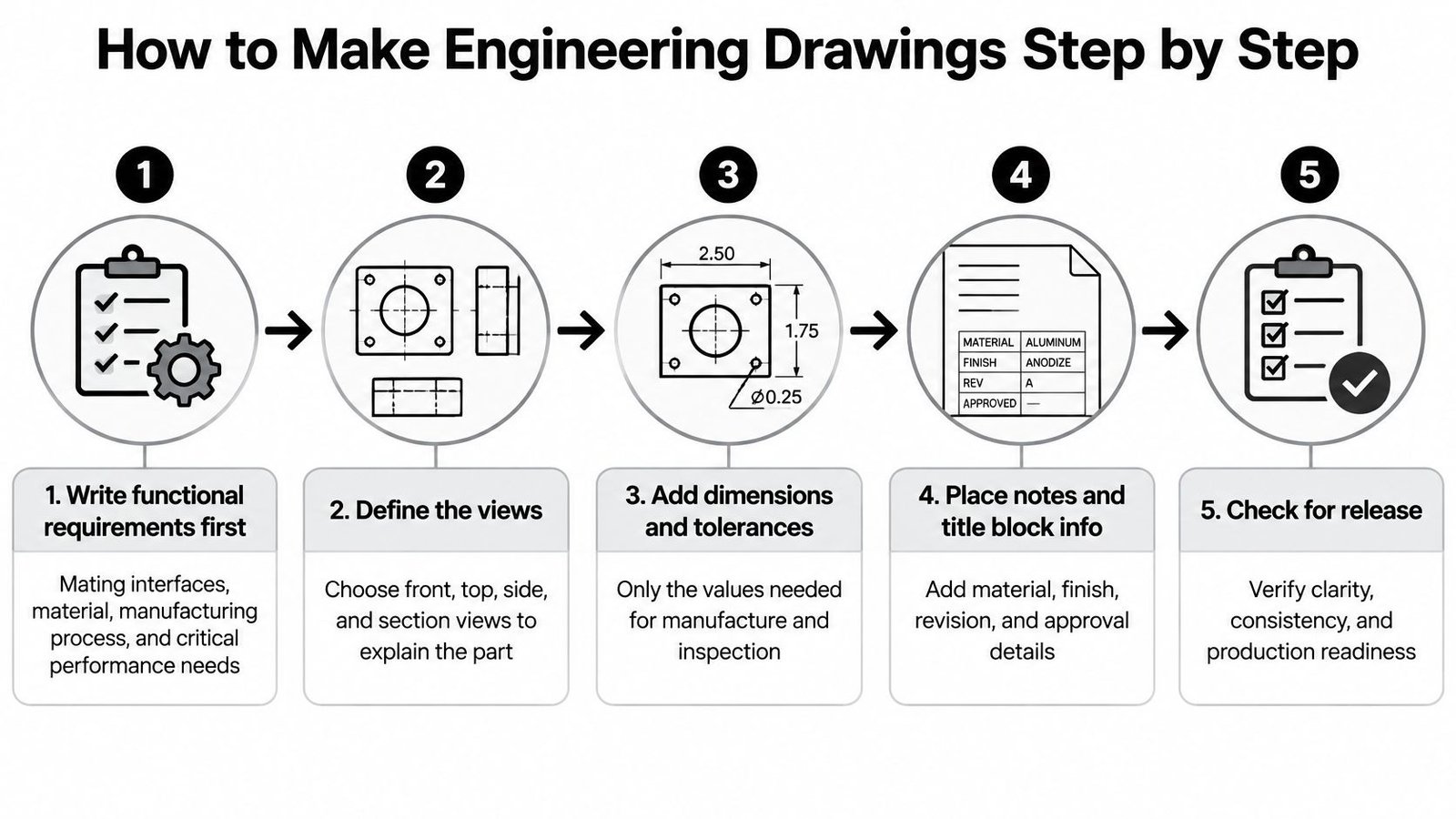
A drawing is ready when a machinist can make the part and an inspector can check it using the same controlled requirements. For a broader view of how requirements move through project development, see the engineering design process. Don't trade away clarity for a crowded sheet or a large number of callouts. Every requirement should be readable, tied to a function, and verifiable with the equipment available.
Dimensioning Tolerancing and BOM Callouts
A tolerance should protect a function, not decorate a dimension. Prioritize requirements by consequence: safety, fit and function, then regulatory needs. Give cosmetic features less emphasis when they have no functional or inspection consequence.

Consider a locating pin on a welding fixture. Datum A should be the mounting face that bolts to the table, since it establishes the fixture's position in use. Control the pin pattern from that datum reference frame, specify contact-surface finish where it affects location, and use a suitable general note for noncritical surfaces. A convenient CAD plane that does not represent the mounting condition can produce a drawing that looks precise but does not define the working interface.
Keep the tolerance tied to the check
Name the governing standard on the drawing. ISO 1101 or ASME Y14.5 defines how geometric controls are interpreted. ISO 128 sets shared conventions for projection, line types, views, and sections, helping plants and suppliers interpret drawing graphics consistently.
For each tolerance on the locating pin, ask: What function does it protect? How will quality measure it? Who owns the requirement in manufacturing or quality? Inspection may use a suitable gage, a CMM routine, or another practical method. If the shop cannot identify how to verify a requirement, revise it before release.
Practical rule: A tighter tolerance isn't automatically better quality. Specify only the precision the function needs and the process can repeatedly deliver.
For example, a 0.01 mm tolerance band that the selected process cannot hold may increase machining and inspection effort and create scrap without improving fixture performance. Set tolerances with manufacturing and quality input, rather than choosing a small number by preference. For assemblies with interacting dimensions, tolerance stack-up analysis helps assess whether feature relationships preserve the required fit.
BOM callouts must let assembly, purchasing, and inspection identify each needed component. Include item number, part number, description, quantity, material, and make-or-buy status. List purchased sensors and fasteners alongside manufactured details. Identify inspection methods for critical characteristics so quality can verify them against the same requirements used for production.
Here's a useful walkthrough of engineering measurement and drawing requirements:
Templates Reviews and Release Habits That Hold
A template should make the drawing easier to control, not just faster to format. Lock the title block fields: company, drawing number, revision, units, projection symbol, scale, material, finish, governing standard, and approval names. Keep sheet layout and view placement consistent so technicians can find revision information and general notes without hunting across each print.
Start purchase-item ordering alongside work on the manufacturing drawings. That keeps long-lead bought parts from waiting for the last assembly balloon. At SEA, ordering begins at the same time as manufacturing-drawing work, while the drawings define the specifications needed for production.
Use a review sequence that separates concept decisions from release approval. After a purchase order is received, SEA moves into concept development, where the customer can review and revise the design before it is finalized. The preliminary concept is a direction-setting blueprint, not permission to manufacture. Once the design is approved, issue the manufacturing drawings and assign the released revision.
Keep one release set
A controlled release should contain the approved PDF sheet, native model, BOM export, and, when MBD is used, the STEP file. Keep them at the same revision. When a change is approved, issue a new revision and a written change note. Don't overwrite a PDF on a shop laptop and leave purchasing, inspection, or a supplier working from an older copy.
A drawing proves what the design requires. It doesn't, by itself, prove that a station will repeat in production. At commissioning, identify what will be measured, which gage or inspection tool will be used, and which process parameters must be monitored. That distinction matters when a process result can't be fully verified by later inspection.
For medical-device manufacturing, drawing control connects directly to design controls. The FDA describes requirements for design inputs and outputs, verification, design reviews, design changes, transfer to production specifications, and retention in the device history file for applicable devices. It also states that design-transfer procedures must confirm outputs are suitable for manufacturing before they become final production specifications (FDA design-control and quality-system information).
Those controls make a released drawing more than a tidy PDF. It has to be the version production uses for tooling, assembly, inspection, and process documentation. Release the revision the floor will build, and keep concept material clearly separate from production specifications.
Drawing Mistakes That Stall Production
The model and PDF disagree, but both look finished. This often happens when someone edits a dimension in one file and leaves the other unchanged. Choose the authoritative dataset, regenerate the sheet from it, and check the released files together before production receives them.
| Symptom | Likely cause | Fix before release |
|---|---|---|
| Model and PDF disagree | Late edit in only one file | Regenerate the sheet from the authoritative model |
| Hole pattern drifts in build | Chained dimensions | Dimension from the datum reference frame |
| Quality cannot accept the part | Tolerance has no measurement method | Name the gage or open the tolerance to function |
| A part never arrives | Missing BOM balloon | Add part number, quantity, material, and make-or-buy |
| Bench uses an old concept | Design was never transferred | Issue only the approved revision |
| Two shops read one symbol differently | Governing standard not stated | Name ASME Y14.5 or ISO 1101 on the sheet |
A drawing can be formally correct and still stop production. A chain of dimensions can let variation accumulate across a hole pattern. A tolerance that has no gage, CMM routine, or other measurement method leaves quality without a clear acceptance check. A missing balloon can also keep a sensor, fastener, or made detail out of purchasing and kitting.
Check the people who use the drawing
An unstated governing standard leaves room for different interpretations of a symbol. A copied note can also specify a process the line no longer uses. Have a machinist check manufacturability, an inspector check measurability, and a buyer check whether the BOM identifies what must be sourced.
Treat each defect as a specific release failure, not a formatting blemish. If the model and PDF conflict, regenerate the sheet. If quality can't accept the part, define the inspection method or reconsider the tolerance. If a concept print is on the bench, replace it with the approved revision. Each fix should make the production definition more consistent for the people who must build and verify it.
Approve the Drawing Before You Build
Go only when one approved revision exists, the governing standard is named, datums match the way the part is fixtured, every tight tolerance has a measurement method, the BOM is complete, and a manufacturing reviewer has signed the check. If any item is missing, don't cut metal or order a cell from a concept PDF. For a custom fixture or semi-automatic station, the released set must account for mechanical fit, electrical interfaces, and controls together.
System Engineering & Automation builds custom tooling, fixtures, manual systems, and semi-automatic systems, with semi-automatic systems as its specialty. With 30+ years of engineering experience, SEA can also design tooling to upgrade a manual system to semi-automatic as production demands increase, without a complete overhaul.
If a drawing package is holding up a fixture, tooling upgrade, or production station, System Engineering & Automation can help turn the production constraint into a reviewed concept and a buildable manufacturing definition. Contact SEA to discuss the requirements your plant, suppliers, and inspectors need from the released package.