If you're running a plant with aging controls, you already know what legacy systems feel like. A line stops for no obvious reason. One HMI still works, but nobody can find the last clean backup. A robot controller talks to the PLC through an interface box that only one technician understands. Spare parts are getting harder to source, and every shutdown turns into a hunt for tribal knowledge.
That's where legacy system modernization usually starts in manufacturing. Not with a cloud strategy deck. With production pressure, quality risk, and the simple need to keep equipment running without pouring money into dead-end fixes. The right approach isn't to rip everything out at once. It's to identify what's putting uptime, safety, and margin at risk, then modernize in a way that keeps the plant moving.
Table of Contents
- The Real Cost of Doing Nothing
- Starting with a Clear Blueprint to Assess Your Production Systems
- Choosing Your Modernization Path Retrofit Replace or Hybrid
- A Practical Migration Strategy for Your Tech Stack
- From Commissioning to Compliance Your Go-Live Checklist
- Beyond Deployment Measuring Success and Driving Continuous Improvement
- Your Partner in Practical Modernization
The Real Cost of Doing Nothing
A lot of plants treat old controls like an annoyance instead of a business problem. That's a mistake. Legacy system modernization becomes urgent when production depends on equipment that can't be secured properly, can't expose reliable data, and can only be repaired by people who are close to retirement or already gone.

The business impact is bigger than initially assumed. One industry analysis says legacy systems cost U.S. businesses up to $1.8 trillion annually in lost productivity, and 58% of companies cite stronger security while 54% cite better efficiency as their main reasons for modernization in 2023, according to this legacy modernization analysis from Orases.
Start with an audit, not a shopping list
The first bad move is buying new hardware before you understand the current line. Plants don't need a wish list. They need an asset and risk map.
Start by inventorying:
- Control hardware: PLCs, remote I/O, drives, safety relays, motion controllers
- Operator layer: HMIs, panel PCs, barcode stations, printers
- Connected equipment: robots, vision systems, torque tools, weigh scales, test stands
- Data path: SCADA nodes, historians, MES connections, SQL databases, custom scripts
- Support reality: backup files, vendor support status, spare parts availability, internal skills
Then score each asset on two axes: business value and technical risk. A simple conveyor PLC that fails often but only affects a non-critical buffer isn't the same as a packaging cell controller that can stop shipment.
Practical rule: Modernize the assets that can stop production, compromise quality, or create a support cliff first.
What the plant manager should look for
In manufacturing, the cost of doing nothing usually shows up in small repeated losses. Not one dramatic event.
Watch for these signals:
- Recurring nuisance faults: Short stops that operators clear manually often hide control or integration issues.
- Manual workarounds: If people are writing production counts on paper because systems don't connect, the line is already underperforming.
- Opaque quality events: When a bad lot happens and nobody can trace machine state, recipe version, or operator action, the data layer is too weak.
- Unsupported components: If a failed HMI or PLC would trigger a scramble through online surplus channels, the risk is already operational.
Legacy system modernization isn't about making equipment look new. It's about reducing avoidable downtime, restoring control over the process, and making sure your next improvement project isn't blocked by yesterday's architecture.
Starting with a Clear Blueprint to Assess Your Production Systems
A plant audit has to cover more than software. On the floor, legacy risk sits in the physical machine, the controls cabinet, the network, and the way operators run the job. If you only assess one layer, you miss the failure path.
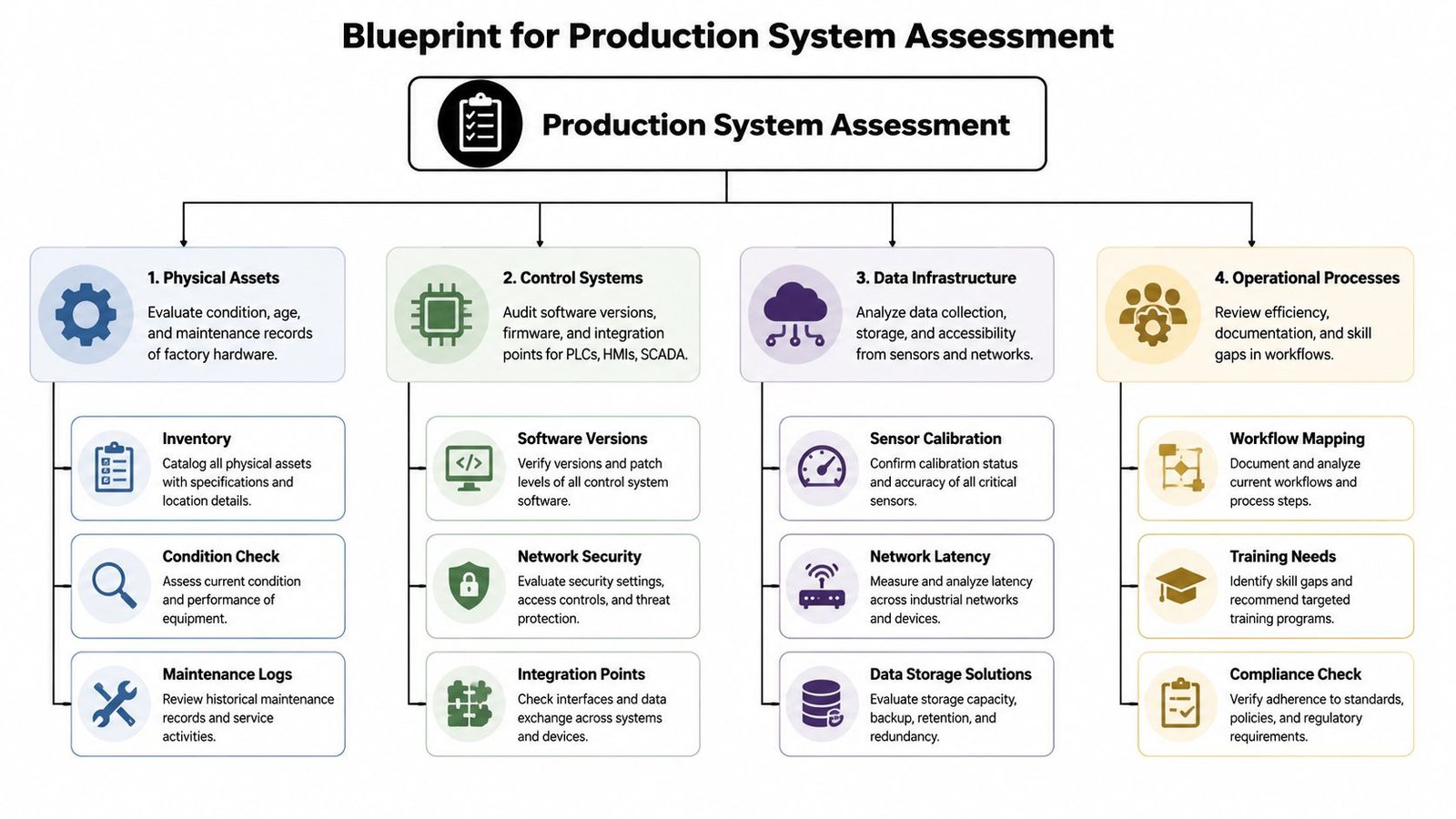
A useful modernization method classifies each component as refactor, replatform, replace, or retain. That matters because 78% of organizations report difficulty bringing legacy systems up to modern security standards, and 43% cite legacy code as a major constraint, based on FPT Software's discussion of why modernization efforts fail.
Assess the plant in four layers
A solid blueprint starts with four questions.
Physical assets
Is the machine mechanically sound? A stamping press with years of useful life left may justify a controls retrofit. A worn-out assembly cell with repeated mechanical drift may not.
Check machine condition, age, maintenance history, and whether replacement parts are still obtainable through normal channels.
Control systems
Look at PLC families, HMI software versions, fieldbus networks, safety architecture, and custom code. Find out which programs are backed up, which are password-protected, and which rely on old engineering laptops to make edits.
This is also where hidden integration debt shows up. A line may look stable until you discover one old OPC bridge or serial converter is carrying half the plant's data.
Data infrastructure
Most plants have more data than they can use and less usable data than they need. Review sensor health, historian quality, recipe management, alarm records, and how production data moves to quality, maintenance, or ERP systems.
If the data is inconsistent, missing, or trapped in one machine, future reporting and AI ambitions will stall before they start.
Operational processes
Walk the line with operators, maintenance, quality, and supervisors. Ask how changeovers happen, where faults are cleared, and which screens people trust.
A machine can pass a technical audit and still fail an operational one if the workflow depends on undocumented operator habits.
Retrofit and replace are not the same financial decision
Many plants frame the choice as old versus new. That's too simplistic. The more accurate comparison is whether the asset still has production value after targeted upgrades.
| Decision factor | Retrofit | Replace |
|---|---|---|
| Existing mechanical platform | Worth preserving | Worn out or limiting output |
| Downtime exposure | Usually easier to phase | Often requires larger cutover |
| Training impact | Lower if workflow stays familiar | Higher if operation changes significantly |
| Future flexibility | Good when controls are the bottleneck | Better when the whole process needs redesign |
For teams evaluating how far to go, this guide on modernizing legacy manufacturing without starting over is a practical example of why full replacement isn't always the smartest first move.
If you can't explain what each machine does, what it connects to, and what fails when it goes down, you aren't ready to modernize it yet.
Build a scorecard the floor team will trust
Keep the scoring model simple enough that operations will use it.
Use categories like:
- Critical to shipment
- Quality impact
- Safety impact
- Supportability
- Cybersecurity exposure
- Integration difficulty
- Ease of staged upgrade
That gives you a ranked list instead of a vague modernization plan. It also keeps the conversation focused on uptime, quality, and operational risk, which is where the budget case usually gets won.
Choosing Your Modernization Path Retrofit Replace or Hybrid
Most manufacturing plants don't need a full tear-out. They need the right level of change in the right place. That's why the decision usually comes down to retrofit, replace, or hybrid.
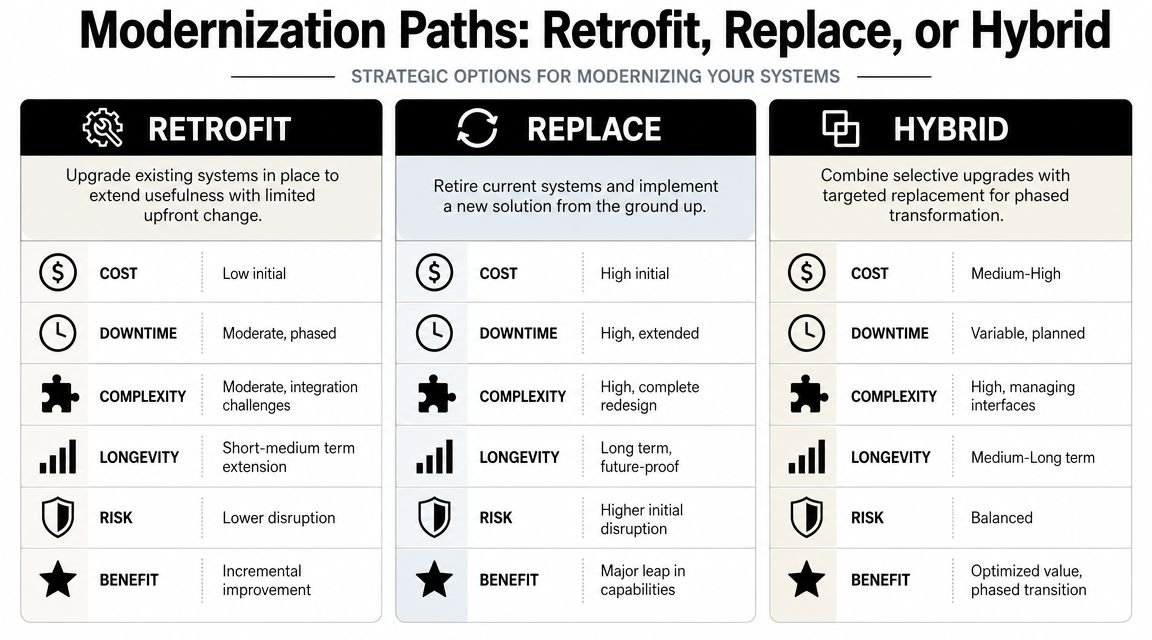
One benchmark-style industry synthesis reports that replatforming held 32.45% market share in 2024 and delivered 288% to 362% ROI within 3 to 5 years. It also notes 30% to 40% lower IT maintenance costs in manufacturing contexts, according to TenUp Software's review of modernization best practices and pitfalls.
When retrofit makes sense
Retrofit is usually the best call when the machine still does its job mechanically, but the controls are becoming the liability.
A common example is a reliable conveyorized workstation or press with an old PLC, unsupported HMI, and poor diagnostics. In that case, you can often keep the frame, pneumatics, guarding, and core process, then upgrade:
- PLC layer: move to a current platform with available support and better diagnostics
- HMI layer: replace obsolete screens with a modern interface that exposes alarms, recipes, and maintenance prompts
- Network layer: remove fragile gateways and standardize communications where possible
- Data layer: add clean tags for downtime, production counts, reject reasons, and critical process values
That approach often reduces disruption while giving maintenance and engineering a system they can support. For teams considering that path, retrofit automation for legacy systems is often the most practical bridge between budget limits and performance goals.
When replacement is the right answer
Replacement makes more sense when the machine itself is the problem. If throughput is capped by the physical design, safety can't be brought up to standard cleanly, or changeovers are too manual for your demand profile, new equipment may be the better investment.
Use replacement when:
- Mechanical wear is chronic
- The process can't meet current quality expectations
- The machine layout blocks flow or labor efficiency
- You need capabilities the old platform can't realistically support
A new robotic assembly cell, for example, may be easier to justify than rebuilding a patchwork station that was never designed for traceability, vision checks, or repeatable motion control.
Why hybrid wins on many plant floors
Hybrid is often the smartest answer in brownfield manufacturing. You keep what still creates value, then replace what limits reliability, visibility, or capacity.
A hybrid path might look like this:
- Keep the mechanical base of a proven machine.
- Replace controls and HMI on the highest-risk stations first.
- Add an integration layer so old and new equipment can exchange production and fault data.
- Move supervisory functions such as recipes, historian tags, and dashboards to a cleaner platform over time.
Don't modernize by line item. Modernize by failure path. Fix the assets that create the most downtime, quality escapes, or support risk.
Make the choice layer by layer
You don't have to make one decision for the entire system. Break the stack apart.
| Layer | Typical best-fit question |
|---|---|
| PLC | Is the logic supportable and portable, or is it locked in an obsolete platform? |
| HMI | Does the operator interface help recovery, setup, and diagnostics, or just display buttons? |
| SCADA | Can it collect and expose useful plant data, or is it mainly an alarm screen? |
| MES or historian | Is it trustworthy enough to support scheduling, traceability, and improvement work? |
The plants that struggle usually try to modernize everything in one cutover. The plants that succeed tend to stage the work, validate each layer, and keep a fallback path until the new system proves itself under real production conditions.
A Practical Migration Strategy for Your Tech Stack
Most failed modernization projects don't fail because the new platform is bad. They fail because the cutover plan ignores how the line operates. In manufacturing, migration has to respect dependencies, validation requirements, operator habits, and the fact that downtime isn't theoretical.

Public guidance on low-risk modernization warns that organizations often underestimate legacy complexity and recommends smaller phases using patterns such as Strangler, especially where downtime isn't acceptable, as explained in OXD's guidance on low-risk legacy modernization.
Map dependencies before touching code
On a production line, the PLC program is only part of the system. Before migration, map what each layer sends, receives, and depends on.
That means documenting:
- PLC interactions: interlocks, handshakes, safety states, startup conditions
- HMI dependencies: tag names, alarm logic, recipes, operator permissions
- SCADA connections: polling methods, historian tags, downtime signals, reports
- MES and business links: work orders, part IDs, serialization, quality records
If you skip this step, you get the classic surprise. The machine runs locally after the cutover, but downstream reporting breaks, label data disappears, or traceability records no longer line up.
Migrate the stack in controlled waves
A phased migration works better than a single weekend rewrite. It lets the team test assumptions while protecting output.
PLC and controls
Where possible, build and test the new PLC logic offline first. Use simulation, factory test benches, or a duplicate I/O map before touching the live machine.
For critical assets, a parallel approach is safer. Keep the old controller stable while the new logic is validated against known sequences, fault conditions, and startup behavior.
HMI and operator layer
Don't redesign screens for the sake of aesthetics. Operators need better visibility, not a new learning curve in the middle of production pressure.
Keep common workflows familiar, then improve what was missing: clear fault context, maintenance prompts, recipe status, and guided recovery steps.
SCADA and supervisory control
Move SCADA carefully because bad tags and mismatched states create instant distrust. Start with read-only visibility where possible. Validate alarm behavior, timestamps, and production counts before handing supervisors a new dashboard.
MES, historian, and reporting
This layer should be migrated only after machine states and data naming are stable. If the event model changes mid-project, your reports become unreliable and every improvement discussion turns into an argument about data quality.
A migration wave isn't done when the code downloads successfully. It's done when operators, maintenance, quality, and reporting all get the same answer from the system.
Treat testing and change management as production work
In regulated or quality-sensitive environments, acceptance isn't only technical. The upgraded system has to be testable, documentable, and repeatable.
Build the rollout around:
- Defined test cases: startup, stop, fault recovery, e-stop behavior, recipe changes, reject handling
- Version control: final approved logic, HMI files, parameter lists, and backups
- Operator training: how to run, recover, clean, and escalate on the new interface
- Maintenance training: how to diagnose common faults, replace components, and restore backups
- Rollback criteria: conditions that trigger a return to the previous stable state
Plants sometimes treat training as the last item on the checklist. That's backwards. If operators don't trust the new sequence or maintenance can't troubleshoot the new controls, production will drift back into manual workarounds.
Use the Strangler mindset on the floor
The Strangler pattern works in plants when you apply it physically and logically. Instead of replacing the whole system at once, put a modern layer around the unstable part first.
Examples include adding a new HMI while the old machine logic remains in place, introducing a data collection layer before replacing the PLC family, or migrating one cell in a larger line before standardizing the rest. That reduces operational shock and gives the team proof before the next wave.
From Commissioning to Compliance Your Go-Live Checklist
Go-live is where a good design meets real production. This is the point where details matter most. If testing is shallow, documentation is incomplete, or operators feel blindsided, the launch will expose every gap at once.
What has to be signed off before startup
A reliable go-live checklist should cover technical performance, safety, documentation, and user readiness.
Use this as a minimum:
- Factory Acceptance Test completion: Confirm the machine or upgraded controls passed the agreed test sequence before shipment or installation. If FAT discipline is weak, this overview of factory acceptance tests in manufacturing projects is worth reviewing.
- Site Acceptance Test readiness: Verify utilities, network access, field devices, guarding, and upstream or downstream interfaces are ready on site.
- Backup integrity: Confirm current PLC, HMI, drive, vision, and recipe backups exist and can be restored.
- Training records: Make sure operators, maintenance technicians, and supervisors have been trained on the released version, not a draft build.
- Change control documentation: Capture approved revisions, validation evidence, and final as-built information.
GMP and quality-sensitive environments need more discipline
Medical device, life sciences, and other quality-regulated plants can't treat modernization as just a controls swap. If the system influences product quality, inspection, traceability, or electronic records, validation planning has to happen before commissioning.
That usually means the team needs:
- Clear requirement traceability
- Documented test evidence
- Controlled software and recipe changes
- Defined user access and audit expectations
- A release package that quality can review
A rushed startup often creates a second project after go-live. The line may be running, but the records, procedures, and training don't support long-term compliance.
The go-live date matters. The first stable week after go-live matters more.
Tie launch criteria to business outcomes
A plant should know what success looks like before startup day. Pick a short list of measurable launch criteria and review them daily after cutover.
Examples include:
- Uptime stability: Is the line holding normal production without repeated intervention?
- Quality confidence: Are rejects, alarms, and process deviations visible and explainable?
- Operator adoption: Are crews using the new workflows correctly, or bypassing them?
- Support response: Can maintenance diagnose faults faster because the system exposes better information?
If those conditions aren't met, hold the next migration wave. Stabilize first. A disciplined pause saves more time than pushing a troubled rollout into the next asset.
Beyond Deployment Measuring Success and Driving Continuous Improvement
A modernization project earns its keep after deployment, not at the ribbon-cutting moment. The plant needs proof that the upgraded system improved operations and created a stronger base for the next improvement.
Track the KPIs that matter on the floor
The best metrics are the ones production, maintenance, and leadership can all understand. In most plants, that means watching uptime, fault response, changeover consistency, scrap drivers, and how quickly teams can find root causes.
A useful review rhythm includes:
- Production performance: Compare planned versus actual output and identify whether losses come from stops, speed, or quality.
- Failure behavior: Look at repeat alarms, recovery time, and whether faults are now easier to diagnose.
- Quality visibility: Confirm the system captures enough context to connect defects to machine state, recipe, or operator action.
- Maintenance burden: Check whether the upgraded platform reduced support friction, especially around backups, spares, and troubleshooting.
Use modernization to prepare for better data use
Recent guidance increasingly frames legacy system modernization as a prerequisite for AI, with emphasis on centralized data structures and strong governance. It also argues that the highest-ROI path may be selective data and workflow upgrades, not full replacement, as described in EPAM's view of modernization for AI readiness.
That idea fits manufacturing well. Many plants don't need a dramatic platform overhaul first. They need cleaner machine states, consistent naming, usable timestamps, governed recipe data, and fewer manual handoffs between systems.
Once that foundation exists, the plant can support more advanced use cases with less risk:
- Predictive maintenance signals
- Better production dashboards
- Faster root-cause analysis
- More trustworthy process optimization work
Legacy system modernization should leave you with more than newer hardware. It should leave you with a production environment that people can understand, support, and improve without starting from scratch every time.
Your Partner in Practical Modernization
Manufacturers rarely have the luxury of shutting down a plant and rebuilding everything cleanly. Most modernization work happens in running facilities, around shift schedules, quality requirements, and tight capital decisions. That's why the practical path usually wins.
The strongest results come from clear assessment, smart scoping, phased execution, and ruthless attention to uptime. Keep the assets that still create value. Upgrade the layers that create risk. Validate each step before the next one. That's how legacy system modernization turns from a painful IT project into a production improvement program with measurable return.
For manufacturers, the goal isn't modernization for its own sake. It's better control of the line, better visibility into performance, and fewer surprises when the business needs to scale, validate, or improve quality.
If your team needs a practical path to modernize equipment without unnecessary disruption, System Engineering & Automation helps manufacturers improve production with cost-effective automation, retrofit strategies, custom tooling, integrated controls, and end-to-end engineering support. Whether you're upgrading a single workstation or planning a phased line modernization, SEA focuses on the level of automation that fits your process, budget, and uptime requirements.