
Automation equipment is the hardware and control technology that performs manufacturing tasks with limited direct human intervention. Worldwide, factories now operate 5.079 million industrial robots alongside millions of fixtures, sensors, programmable controllers, and semi-automatic workstations that keep production repeatable and safe.
Walk onto almost any busy shop floor and you'll spot the moment managers start asking what is automation equipment and whether they need it. At bench four, an operator aligns a metal housing by hand, drives four fasteners, checks the gap by eye, and repeats that motion hundreds of times a shift. By hour six, wrists ache, cycle times drift, and an extra batch of parts lands in the rework bin.
Most plant leaders assume fixing that station means buying a six-axis robot and fencing off half the room. It rarely does. Choosing the right level of automation is a selection decision matched to a measured bottleneck, not a race toward lights-out manufacturing. For many plants seeking practical manufacturing solutions to optimize production and services, a semi-automatic bench solves the problem faster and cheaper than a fully automated line, while keeping hidden costs like validation, safety engineering, and network security under control from the start.
Table of Contents
- What Automation Equipment Means in Plain Terms
- The Parts That Make Up an Automation Cell
- Four Levels of Automation Equipment Compared
- Where Automation Equipment Gets Used
- Safety, Quality and Connected Risks to Plan For
- Choosing the Right Automation Level and Preparing the Baseline
What Automation Equipment Means in Plain Terms
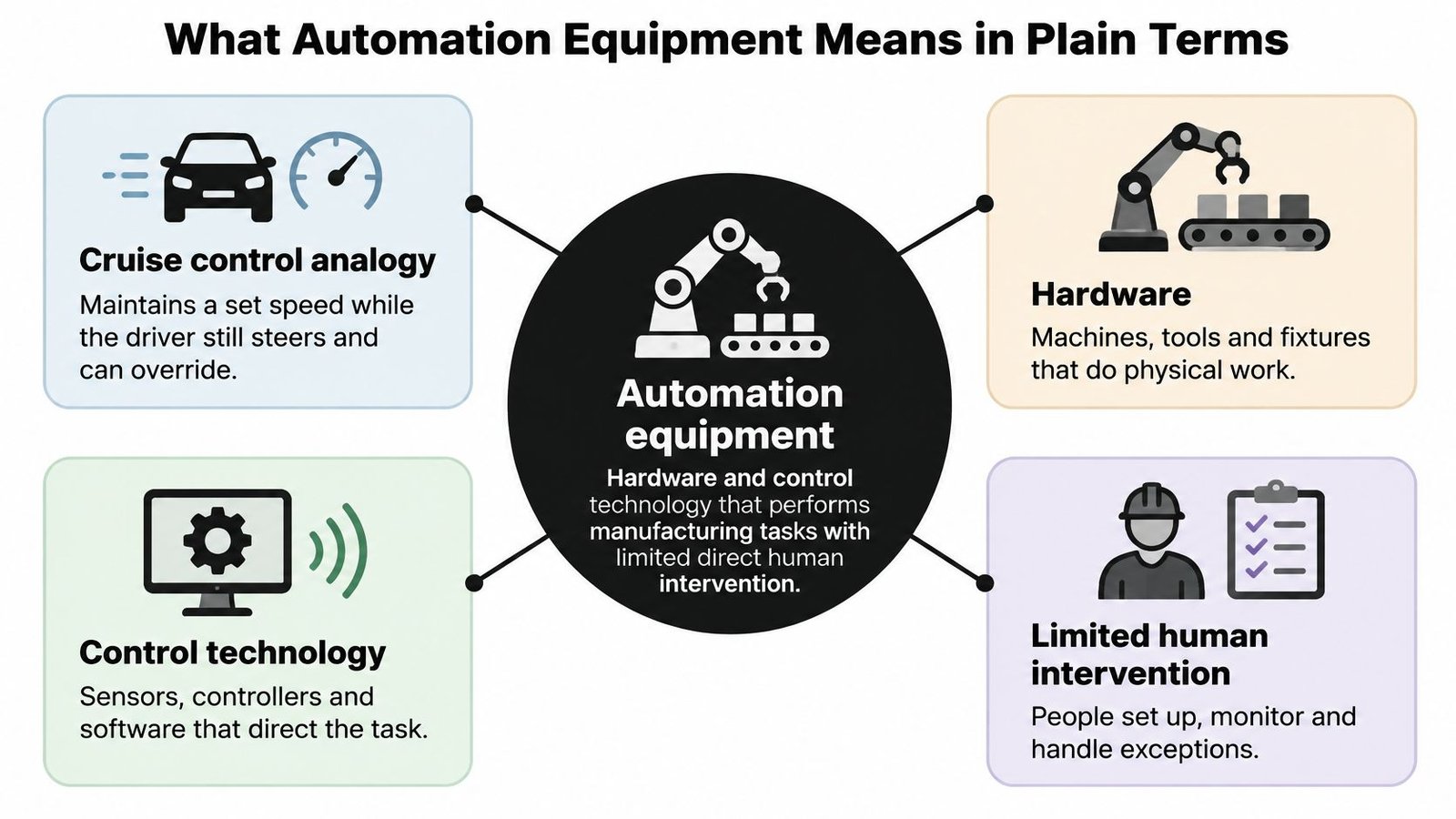
Think about cruise control in a car. You still steer, watch traffic, pick your lane, and tap the brake whenever road conditions change, yet the system holds your speed steady so your foot doesn't have to adjust the gas pedal every second. Automation equipment does the same thing on a manufacturing floor: it holds a specific production step steady so an operator doesn't have to repeat every fine movement or visual check by hand.
Automation equipment is the hardware and control technology that performs manufacturing tasks with limited direct human intervention.
That definition covers far more than robotic arms behind safety cages. It includes custom holding fixtures, pneumatic presses, conveyors, barcode and camera inspection units, programmable controllers, and the complete workstation that ties those pieces together. The diagram below breaks down how physical hardware, control logic, and human oversight fit together in plain terms.
Factory adoption has expanded well beyond massive automotive plants. According to the International Federation of Robotics, factories worldwide installed 542,076 industrial robots in 2024, the second-highest annual total ever recorded. That surge builds on a long climb documented in a U.S. Census Bureau working paper, which tracked global annual installations rising nearly fourfold from about 100,000 units in 2010 to almost 400,000 units per year by the early 2020s. By 2025, the International Federation of Robotics President's Report placed the global operational stock at 5.079 million units.
Those numbers only count industrial robots, which represent one slice of the equipment running inside modern plants. Count every motorized conveyor, torque-controlled driver, automated labeler, and sensor-checked assembly jig, and the true footprint of manufacturing automation is far larger.
The Simple Floor Test for Automation Equipment
Automation isn't an all-or-nothing switch. It sits on a continuum that starts with a machined fixture guiding an operator's hands and stretches all the way to an unattended cell loading, assembling, inspecting, and boxing parts on its own.
If you're standing beside a machine and wondering whether it qualifies, apply one straightforward floor test. Ask yourself whether the equipment executes a repeatable production task that would otherwise rely on a person's hands or undivided attention on every single cycle. A manual hand wrench doesn't pass that test, while a fixture-mounted driver that verifies part presence, applies exact torque, and logs the cycle does.
The Parts That Make Up an Automation Cell
A single motor or robot sitting on a skid isn't an automation solution. Real production equipment works as an integrated automation cell, where mechanical hardware, sensing devices, control logic, safety hardware, and custom tooling operate together as one coordinated unit. Automation can involve mechanical fixtures, conveyors, vision systems, or PLC-based controls, and it doesn't always require robotics.
Before looking at a full station on the floor, review how the five core building blocks connect inside one cell.
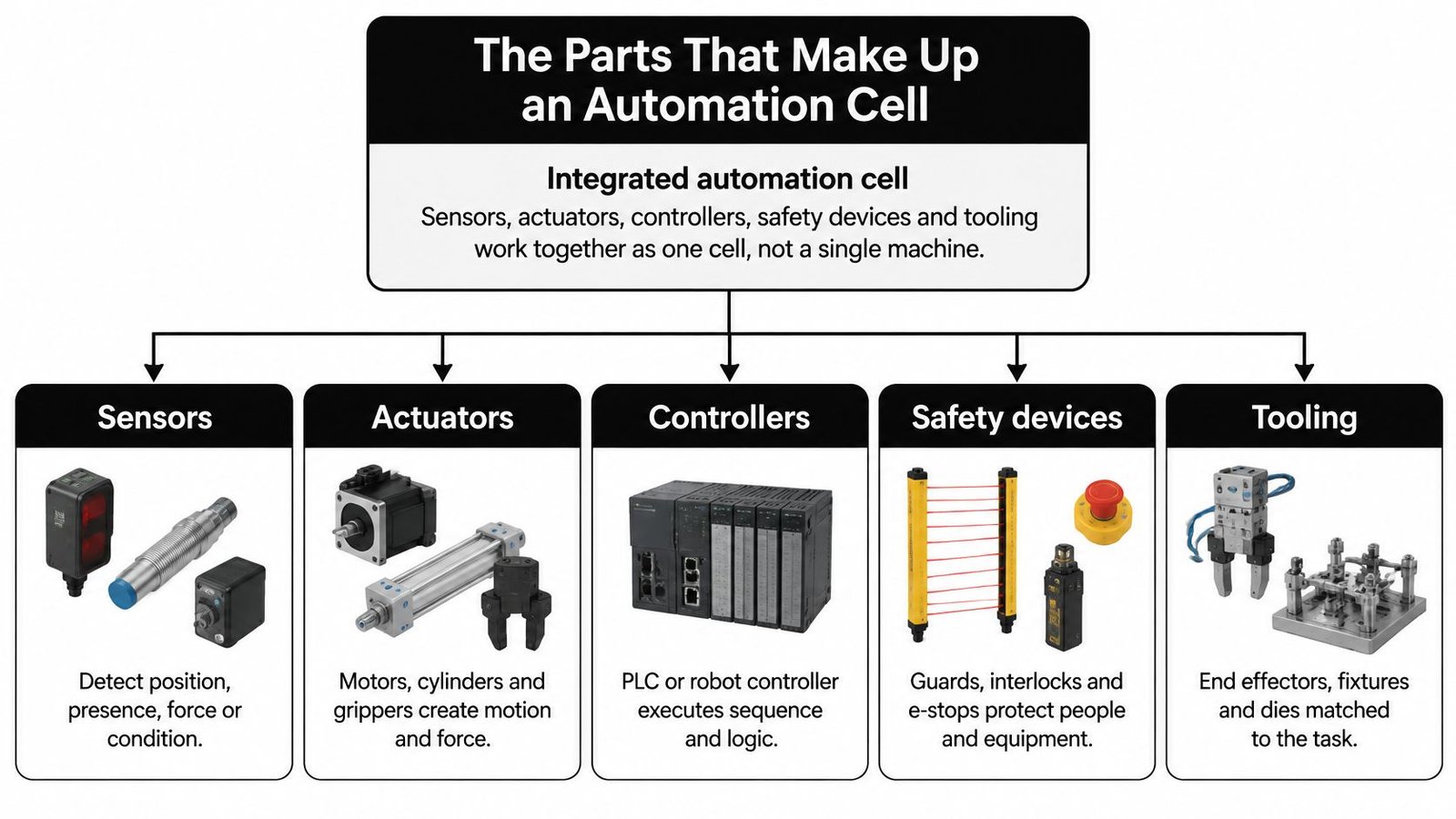
Every reliable cell assigns a clear job to each component so mechanical motion, part verification, and operator interaction never fight one another. Well-engineered automation control systems coordinate these inputs and outputs in milliseconds.
| Component | What It Does | Typical Example |
|---|---|---|
| Programmable logic controller (PLC) | Sequences actions and reads inputs | Runs clamp, index and release steps on a station |
| Sensors | Detect presence, position or size | Proximity switch confirms a part is loaded |
| Actuators and drives | Move parts and tools | Pneumatic cylinder pushes a part into a fixture |
| Industrial robot | Repeats motion across a wider range | Pick-and-place of parts from a tray |
| Machine vision | Inspects using a camera | Checks label position or a missing screw |
| Fixtures and tooling | Hold the part in one repeatable location | Locating pins on an assembly plate |
| Safety devices | Stop or restrict motion when access is unsafe | Light curtain and emergency stop |
| HMI | Lets operators start, monitor and recover the cycle | Touchscreen showing cycle count and faults |
How Those Parts Work Together on a Bracket-Assembly Station
Say a plant needs to fasten a steel mounting bracket to a molded housing without cross-threading screws or misaligning the joint. No robotic arm is required here. Instead, engineers build a compact benchtop cell from five tightly linked elements.
First, a machined locating fixture with hardened pins seats the housing and bracket in one exact orientation so the part can't go in backward. Second, an inductive proximity sensor checks that the steel bracket is present before anything moves. Once the operator presses dual palm buttons, the PLC locks a pneumatic clamp (the actuator) to hold the assembly rigid and triggers a controlled electric screwdriver to drive each fastener to its target torque.
Throughout the cycle, an optical light curtain guards the front opening; if a hand crosses the beam, safety relays cut air and drive power immediately. Meanwhile, a small HMI touchscreen displays cycle count, torque confirmation, and plain-English fault messages so the operator can clear a jam without hunting through wiring diagrams.
For a quick visual walkthrough of how industrial controllers, sensors, and actuators interact inside live factory equipment, watch this overview.
That bracket station illustrates the golden cause-and-effect rule of controls engineering. Detecting a missing part or low torque reading only improves quality when the PLC links detection to a forced action: stopping the cycle, locking the fixture until a supervisor clears it, diverting the bad part to a reject bin, or triggering an alarm. A sensor wired to nothing more than a tiny yellow indicator light on a cabinet door lets defective parts walk right down the line.
Four Levels of Automation Equipment Compared
Not every process deserves the same degree of machinery. When you evaluate automation options, sort them by how much of the production cycle the equipment controls versus how much stays with the operator. Each step upward trades flexibility and simplicity for higher throughput, stricter maintenance needs, and steeper engineering effort.
| Level | Who Controls the Cycle | Flexibility | Validation and Capital Effort | Best Fit |
|---|---|---|---|---|
| Manual with tooling and fixtures | Operator, guided by jigs | High | Low | Low volume and frequent changeovers |
| Semi-automatic | Operator and machine share the cycle | Medium to high | Medium | Repetitive steps with variation that needs operator judgment |
| Fully automatic | Machine runs the cycle | Low to medium | High | Stable, high-volume single product |
| Connected line | Machines and software exchange data | Low | Highest | Multi-station flow with traceability requirements |
A plant still running largely on manual labor often gains more from custom tooling and fixtures first than from jumping straight into complex machinery. Simple locating jigs, poka-yoke nesting blocks, and ergonomic stands stabilize part alignment for a fraction of the budget. Later, transitioning to semi-automated systems delivers a major leap in efficiency, while full automation makes financial sense once product volume and design stability justify rigid equipment.
Why Semi-Automatic Stations Are Often the Smart Middle Path
The second row of that table is easy to overlook because it doesn't look flashy in a trade-show booth. Yet semi-automatic workstations automate repetitive tasks like assembly, packaging, inspection, or testing while operators stay in charge of loading, changeovers, and exception handling. By letting the machine control force, timing, and repeatable positioning, semi-automation allows operators to work faster and more accurately without losing the adaptability a high-mix floor needs.
That shared model also reflects what happens to plant teams when automation succeeds. In the 2026 State of Factory Automation in North America report, 47% of successful companies reported that workers gained more responsibility rather than being displaced. Operators shift from sore-wrist repetition to running multiple stations, verifying setups, and catching upstream material issues early.
Moving up to fully automatic cells or connected lines introduces obligations that never appear on an initial machine quote. Every extra axis, feeder bowl, barcode scanner, and MES database handshake adds validation protocols, spare-parts inventory, PLC troubleshooting, and preventive maintenance hours.
Practical rule: Start with the automation level your current team can run, maintain, and validate without waiting on an outside specialist every time a sensor drifts.
Where Automation Equipment Gets Used
Instead of sorting automation by industry label, look at the physical task being performed. A torque station tightening screws on a consumer appliance uses almost the exact same engineering principles as one assembling an industrial valve. Seeing the technology by task makes it easier to match equipment to your own floor, and reviewing real-world automation system examples shows how modular builds adapt across very different products.
Here is a look at operators working alongside an articulated robotic arm in a modern assembly environment.
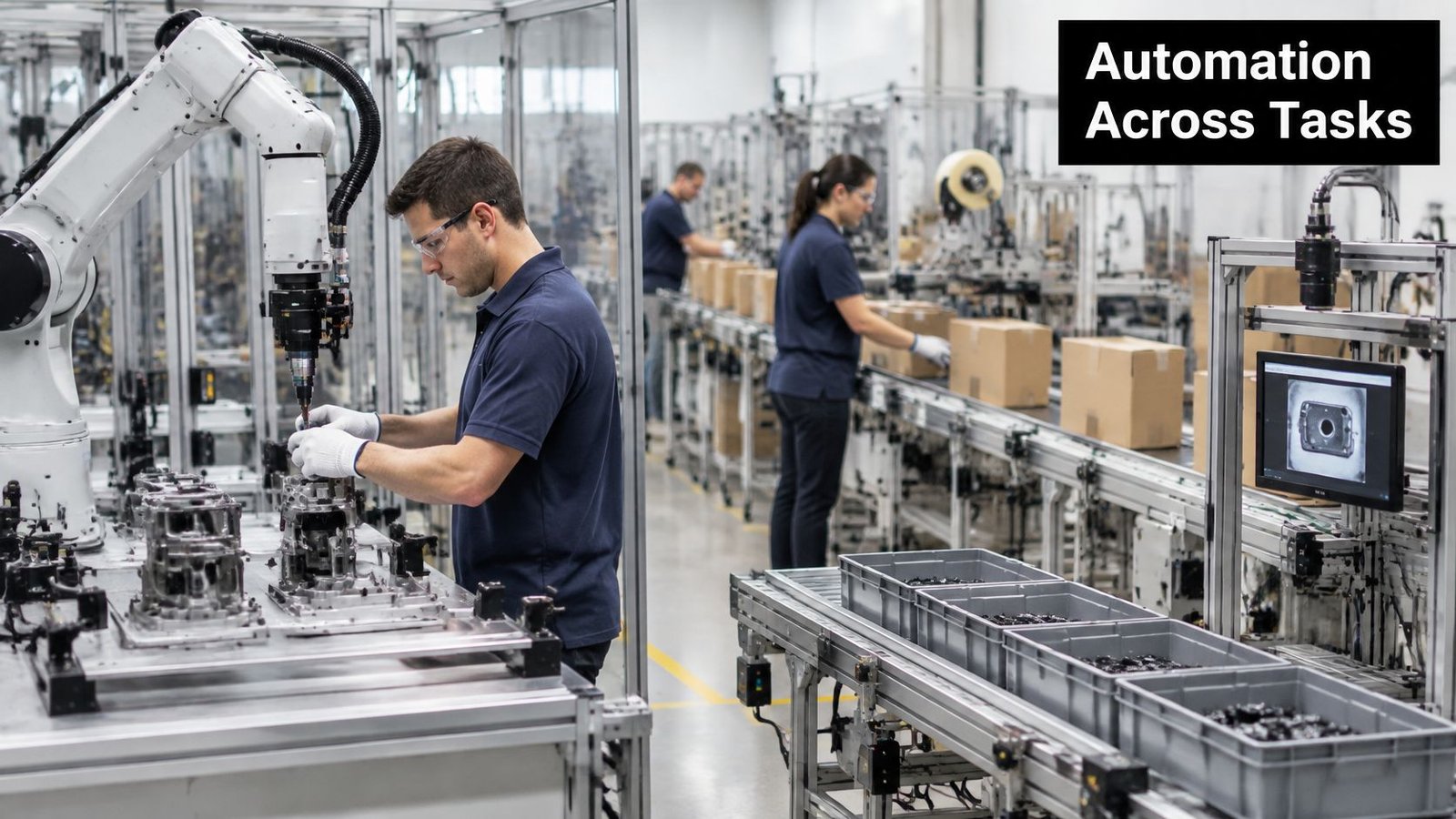
Across factory floors, five core task groups account for the bulk of practical installations:
- Assembly operations: Fastening, press-fit insertion, ultrasonic welding, and metered adhesive dispensing all benefit from controlled force and travel depth. A benchtop press with a load cell stops an operator from cracking a plastic housing by pushing too hard or leaving a bearing half-seated.
- Packaging lines: Heat sealing, cartoning, tamper-evident labeling, and case erecting run smoothly when machines govern temperature, dwell time, and label registration. Consistent seals cut field returns and keep downstream shippers moving without jams.
- Inspection and functional testing: Machine vision cameras check label position, print legibility, or missing hardware at line speed without eye fatigue. Picture a benchtop functional test station for a medical pump housing: the operator seats the assembly, closes a safety hood, and the station runs a pressure-decay leak check plus an electrical continuity sweep, logging the pass/fail result against that unit's serial number and locking failed units inside a reject chute until acknowledged.
- Material handling and palletizing: Conveyors, bowl feeders, pick-and-place robots, and automated palletizers move parts between operations while cutting heavy lifting. At the end of a packaging line, an automated palletizer grips sealed cartons off an accumulation conveyor, rotates each row into a stable interlocking layer, and stacks full pallets cleanly while operators focus on staging empty pallets and checking wraps. A CDC review of 63 case studies summarized by the NIST Manufacturing Extension Partnership found that robots deployed as health and safety interventions in small manufacturing enterprises improved worker productivity, reduced musculoskeletal-disorder risk factors, and lowered cost per affected employee in most cases.
- Regulated production: Medical-device and pharmaceutical manufacturers rely on automated dispensing, assembly, and vision verification to hold tight process tolerances and preserve complete batch traceability for every finished unit.
What Every High-Value Application Has in Common
Look across all five task groups and one pattern stands out. None of those stations automate creative problem-solving. Every single one takes over a repetitive, physically taxing, or precision-critical step where human performance naturally drifts between Monday morning and Friday afternoon.
That gives you a quick diagnostic question for your next walk through the plant: which single step on your line creates the most rework, operator waiting, or physical strain right now?
Safety, Quality and Connected Risks to Plan For
Many buyers assume that bolting a machine to the floor automatically makes a job safer and eliminates human error. Floor injury records tell a sharper story. According to OSHA's 2024 Work-Related Injury and Illness Summary, 550 robot-related incidents appeared in 2024 manufacturing injury and illness narratives, with 33% requiring emergency-room treatment and 2% resulting in inpatient hospitalization.
Reported injuries ranged from cuts, bruises, and fractures to musculoskeletal disorders tied to force, vibration, and repetitive motion. Just as important, the worst hazards often happen outside normal automatic production. Technicians get hurt during programming, maintenance, testing, setup, and adjustment when they step inside a machine's working envelope and encounter unexpected movement. Because no robotics-specific federal OSHA standard currently exists, manufacturers must enforce broader rules covering machine guarding and lockout/tagout energy isolation.
Standards treat safety at two distinct layers for good reason. ISO 10218-1 covers the safe design and risk-reduction features built into the industrial robot itself, whereas ISO 10218-2 governs application-level integration, commissioning, operation, maintenance, and decommissioning of the complete robot cell. Buying a compliant robot doesn't make your workstation safe on its own. Guarding, door interlocks, safe access zones, energy isolation, and validated operating procedures must be engineered across the whole cell through a thorough machine safety risk assessment.
Validation Duties in Regulated Production
Safety isn't the only hidden cost waiting after delivery. In medical-device manufacturing, equipment that runs fast without documented process control creates compliance liability instead of throughput value. Under the FDA Quality Management System Regulation (QMSR), which took effect on February 2, 2026 and incorporated ISO 13485:2016 into 21 CFR Part 820 by reference, inspectors verify that software-controlled production processes are properly validated.
That means control logic, operator recipes, alarm limits, electronic batch records, calibration schedules, and change-control rules belong in the concept and design phase before commissioning. Trying to write validation documentation after an unverified station is already bolted to the floor almost always triggers costly control rewrites. Even outside regulated industries, automation doesn't erase quality escapes by itself; defects only drop when every inspection sensor is tied to a positive stop or automatic part rejection.
Cybersecurity and Networked Controls
Once you plug a PLC, HMI, robot controller, or vision camera into a plant network for data logging or remote vendor troubleshooting, you inherit operational technology security responsibilities. The FDA's June 2025 smart manufacturing guidance warns that connected operational technology in medical-product manufacturing introduces vulnerabilities that teams must plan for during implementation and securing.
Before signing off on a networked cell, assign clear ownership for user access controls, software patching, offline backups, machine-network segmentation, and remote-support lockouts.
Write safety guarding, software validation, and network security into the equipment specification on day one. Paying for them after installation almost always costs more than building them in.
Choosing the Right Automation Level and Preparing the Baseline
The biggest mistake manufacturing teams make is shopping from an equipment catalog before diagnosing the shop floor. A vendor demo looks impressive, yet bolting a fast robot onto a station that isn't your bottleneck only builds a bigger pile of work-in-process inventory ten feet downstream. Start with the constraint, measure it, and let the data dictate the machine.
The four-step checklist below outlines how to ground your selection in real production numbers before spending a dollar on hardware.
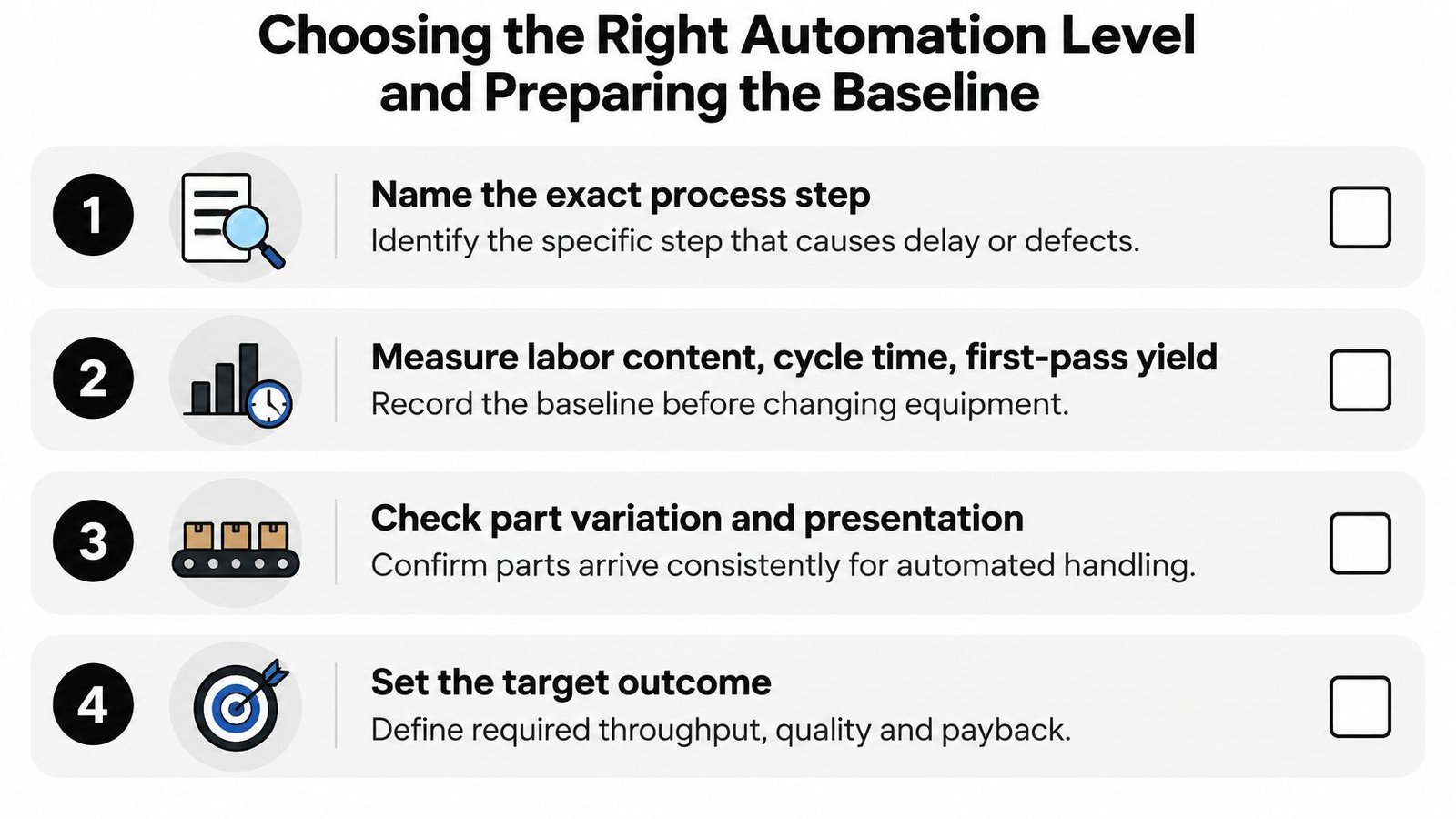
Work through four checks on the exact line you want to improve:
- Name the exact process step causing delay or defects. Don't say "assembly is slow." Pinpoint the specific station, such as pressing bushing B into housing A or applying the final moisture seal.
- Measure the current baseline. Track current labor content, average and worst-case cycle time, first-pass yield, scrap count, unplanned downtime, and ergonomic strain over at least two normal production weeks.
- Compare equipment options against part variation and presentation. Test whether a locating fixture, a custom tool, a semi-automatic bench, a controls upgrade on legacy machinery, or a robot fits your part tolerances and changeover schedule best. If incoming parts vary in dimension or arrive tangled in bulk bins, feeding them into a rigid full-auto cell will stall the line every ten minutes.
- Estimate total lifecycle cost, not just purchase price. Add commissioning, validation paperwork, operator and technician training, spare wear parts, preventive maintenance, and network security into your payback math.
A staged engineering approach beats chasing a mythical universal payback number. A 2023 survey of small and medium manufacturers across all 51 U.S. Manufacturing Extension Partnership centers from NIST's Performance of Emerging Technologies project mapped which tasks stayed manual and which had been automated across industries, reinforcing that smaller plants get better results when they upgrade constraints step by step instead of assuming every line needs full robotics.
Matching Floor Bottlenecks to the First Equipment Type
Once your baseline numbers are on paper, use the matrix below to identify the first equipment category worth evaluating for your specific floor constraint.
| Bottleneck on the Floor | First Equipment to Consider | Why It Fits |
|---|---|---|
| Repeated hand placement with inconsistent results | Fixture with poka-yoke guides | Locates the part so wrong placement becomes hard to do |
| Operator fatigue from repetitive fastening | Semi-automatic screwdriver station | Machine controls torque and cycle while the operator keeps control |
| Visual inspection misses defects | Machine vision station | Consistent detection with results logged for each part |
| Packaging speed limited by hand sealing | Semi-automatic sealing unit | Matches the cycle to line speed |
| High-volume single product with stable demand | Fully automatic cell | Payback depends on steady volume |
| Frequent product changeovers | Semi-automatic station with quick-change tooling | Keeps flexibility while reducing setup time |
Notice how often the smartest first move isn't a fully automatic line. When product SKUs change twice a shift, quick-change semi-automatic tooling preserves floor agility while cutting setup minutes and operator strain. Save full automation for stable, high-volume runners where steady unit counts pay back the higher upfront engineering and validation cost.
Three Steps to Build Your Baseline Before Requesting Quotes
You don't need a six-month consulting study to get moving. Follow three practical steps over the next two weeks:
- Pick one painful step: Choose the single operation generating the highest rework, longest queue, or toughest physical strain on your crew.
- Record clean baseline numbers: Log cycle time, first-pass yield, scrap, changeover duration, and labor hours before changing a single bolt.
- Match the lowest effective level and verify after launch: Pick the simplest automation tier that removes that constraint, then re-measure those exact baseline metrics after commissioning and treat any remaining gap as your next targeted upgrade.
When you're ready to review concepts with an engineering partner, bring four things to the table: your current challenges and bottlenecks, your labor and production constraints, your quality or consistency concerns, and your realistic budget and timeline expectations. During a no-obligation consultation, our team at System Engineering & Automation reviews those exact floor conditions so we can design custom fixtures, semi-automatic stations, or integrated equipment that connect cleanly with your existing machinery and enhance, rather than disrupt, your production environment, backed by commissioning and ongoing maintenance support.
Whether you're stabilizing a manual bench with custom fixtures, deploying a GMP-aware semi-automatic workstation, or upgrading legacy equipment with modern controls, System Engineering & Automation designs practical manufacturing solutions built around your real bottlenecks and budget. Explore our engineering capabilities, equipment options, and no-obligation consultation process at System Engineering & Automation to find the right level of automation for your floor.