Your maintenance lead has probably already asked the question: are you buying a panel that fits the process you have, or a panel built for a factory you may never become?
That's the essential starting point for automation control panel design in small and mid-sized manufacturing. Many first projects go sideways for the same reason. The panel gets treated like a parts list instead of a production tool. The result is usually familiar: too many features, too much I/O, a bigger enclosure than needed in the wrong places, and not enough thought about service, validation, or future change.
For manufacturers trying to optimize production and services, the better path is usually a right-sized one. That often means semi-automation, targeted control, and compliance decisions that support the process without turning a manageable machine into a software project. If you're upgrading a manual station, adding smart tooling, or building a GMP-aware fixture, the goal isn't maximum complexity. It's stable output, safe operation, maintainable hardware, and a payback you can live with.
Table of Contents
- Laying the Foundation with Clear Requirements
- Navigating Standards and System Architecture
- Selecting Core Electrical and Control Components
- Mastering Mechanical Layout and Wiring Practices
- Creating Your Essential Documentation Package
- From Commissioning to Long-Term ROI
Laying the Foundation with Clear Requirements
The most expensive panel mistake happens before the enclosure is even selected. It starts when a team skips the hard planning questions and jumps straight to PLC brands, screen sizes, and quote comparisons.
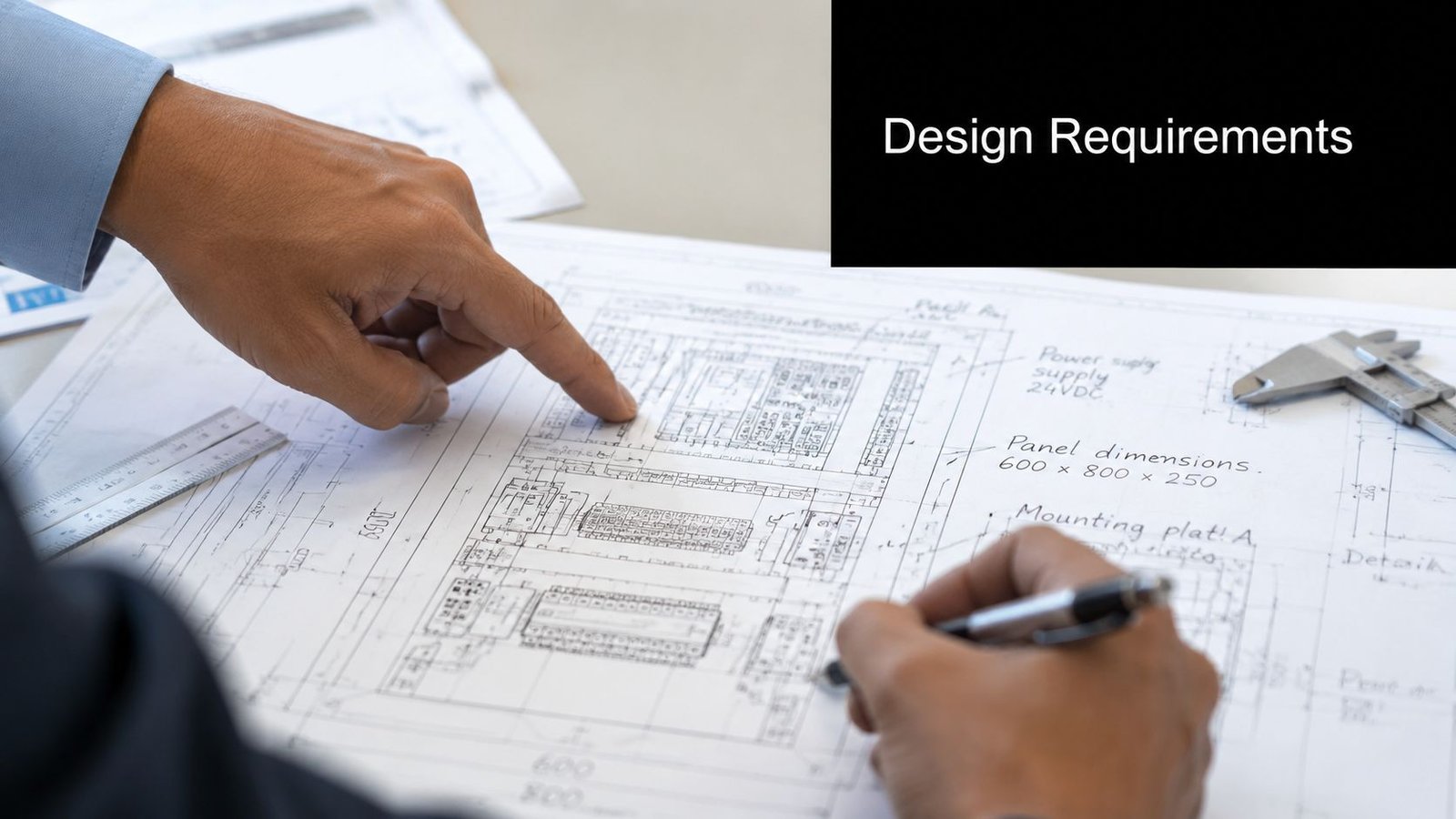
A strong control panel project starts with production intent. What exactly needs to happen at the station? What must be automated, what should stay manual, and what problems are you trying to remove from the process? If you don't lock those answers down early, the panel usually grows around assumptions instead of actual production needs.
Start with production reality
For a first major project, I'd define requirements in plain operating language before turning them into electrical language. That means writing down:
- The product flow: What enters the station, what the operator does, what the machine does, and what exits.
- The failure points: Where scrap happens, where operators wait, where resets are common, and where quality checks break rhythm.
- The human role: Whether the operator loads, confirms, scans, starts, acknowledges alarms, or performs inspections.
- The must-have outputs: Cycle control, traceability, safety interlocks, reject handling, recipe management, or simple status indication.
This step prevents the common trap of automating steps that aren't constraining throughput.
Environmental conditions decide more than most buyers expect
A panel that works on paper can still fail on the floor because nobody took the operating environment seriously enough. The design process starts with a required review of the automation task and the operating environment, including temperature, humidity, dust, and corrosion. That assessment directly affects component selection, enclosure rating, and thermal strategy, and ControlSoft notes that failing to account for those conditions leads to 40% higher maintenance frequency.
That matters in ordinary production, but it matters even more in GMP-aware manufacturing. A medical device assembly area may involve regular cleaning, strict contamination control, and harsher chemical exposure than a general fabrication cell. Those conditions can rule out casual enclosure choices and force better sealing, corrosion resistance, and cleaner interface design.
Practical rule: If the process owner says, "We clean this area aggressively," treat that as an electrical design requirement, not a housekeeping note.
Define sequence first, then hardware
A lot of confusion disappears when the team agrees on the sequence of operation. Write the machine behavior in order. Start condition, permissives, operator prompts, motion or actuation steps, sensor confirmations, fault responses, and recovery mode all belong here.
A short requirements stack for a semi-automated workstation might look like this:
- Operator loads part into nest and confirms fixture present.
- Safety condition verifies guard closed or dual-hand start completed.
- Machine executes cycle with timed outputs and sensor checks.
- Pass or fail state records on the HMI or local controller.
- Operator unloads and the station resets for the next unit.
That sequence becomes the basis for I/O, alarm logic, HMI messaging, and test planning later.
Do the risk review before the design gets comfortable
Risk assessment shouldn't be left for the end. It belongs in the requirements phase because it changes the architecture. Emergency stops, interlocks, safe torque off, reset behavior, and manual mode all need clear decisions before the drawings mature.
A good panel doesn't just run the machine. It tells operators what state the machine is in, what it's waiting for, and how to recover safely.
If you do this upfront, scope creep drops fast. You also stop paying for redesign work that only exists because basic operating assumptions were never settled.
Navigating Standards and System Architecture
Standards can feel like paperwork until they save you from a bad design decision. In practice, they shape architecture in useful ways. They push you toward safer power distribution, better fault protection, cleaner segregation of functions, and hardware choices your electricians can maintain.
For a plant manager on a first panel project, the key is not memorizing every clause. The key is understanding how standards influence system structure. If a design team is working properly, compliance won't sit off to the side. It will show up in the architecture itself.
Build architecture from requirements, not catalogs
The cleanest projects move from requirements into a high-level architecture before anybody gets attached to specific hardware. That architecture should define control scope, power segmentation, operator interface needs, network needs, safety functions, and future service access.
A disciplined process matters here. Automation Distribution describes a methodology that starts with system requirements and then moves into detailed schematics with functional diagrams, I/O maps, power distribution, enclosure layouts, and correct SCCR specification from the start.
That sequence protects you from a common SMB problem: buying capable hardware without deciding how much machine you really want the panel to control.
Why right-sized automation often wins
Generic design guides usually assume a large, heavily automated system. That's not how many small and mid-sized manufacturers operate. In real shops, the smarter architecture is often selective automation around the parts of the process that create the most pain.
A useful way to compare options is this:
| Approach | Best fit | Main strength | Main risk |
|---|---|---|---|
| Manual with basic controls | Stable low-volume task | Low complexity | High operator dependency |
| Semi-automated low-I/O panel | Repetitive station with clear bottlenecks | Better ROI and easier service | Limited expansion if badly scoped |
| Fully automated modular panel | High-volume integrated line | Broad machine control | Cost and maintenance burden |
That middle option deserves more attention than it gets. One industry source reports that 42% of small and mid-sized manufacturers say over-engineered panels push ROI payback beyond 24 months, while modular low-I/O semi-automated panels cut initial cost by 28% and reduce technician troubleshooting time by 35%.
For many first projects, that's the difference between getting approval and getting stuck in capital review.
Standards still matter in smaller systems
Right-sized doesn't mean loosely designed. Even a compact station needs clear electrical hierarchy, safety intent, suitable protection, and maintainable documentation. Standards such as UL 508A, NFPA 79, and relevant IEC frameworks help drive those choices, especially around protection, wiring practice, marking, and safe control behavior.
If machine risk is part of the conversation, machine safeguarding standards and their practical application are worth reviewing early, while the architecture is still flexible enough to change.
Smaller panels fail for the same reasons large panels fail. Poor fault planning, weak separation of functions, and safety added late instead of designed in.
A good architecture should answer a plain question: what belongs in the panel, and what doesn't? If the answer is "everything we might someday want," the system is probably already drifting into over-engineering.
Selecting Core Electrical and Control Components
Component selection is where budgets get tested. This is also where many buyers overspend, because the conversation gets pulled toward feature lists instead of job requirements.
The right panel components are the ones that solve the process cleanly, survive the environment, and don't punish your maintenance team later. That can mean a small PLC with a simple HMI. It can also mean a modular platform with room for validation features and cleaner diagnostics. The answer depends on the station, not the catalog.
Match the controller to the task
For a semi-automated fixture, start by asking how much logic the station really needs.
If the machine has a straightforward sequence, a modest I/O count, a few discrete sensors, and limited recipes, a compact controller often makes sense. If the station needs multiple modes, extensive alarm handling, data handling, or several future process variants, a modular PLC earns its place.
Use this as a rough decision lens:
- Compact PLC or integrated control unit: Good for dedicated stations, bench fixtures, and simple assembly tools where the sequence is stable.
- Modular PLC platform: Better when you expect more devices, cleaner diagnostics, extra communications, or phased expansion.
- HMI selection: Keep the interface tied to operator actions. If operators only need start, stop, reset, recipe choice, and clear fault text, don't buy an HMI loaded with features nobody will use.
In GMP-aware production, the HMI decision gets more nuanced. You may need electronic records or audit-friendly event handling, but that doesn't mean the interface should become custom software in a box. One source notes that FDA 21 CFR Part 11 and EU GMP Annex 11 drive audit trail and electronic record expectations, yet only 19% of control-panel design guidance explicitly addresses panel-level data logging architecture, and 63% of medical device plant managers cite the lack of standardized GMP-ready panel templates as a major bottleneck.
That's a useful warning. Keep the HMI focused. Put compliance logic into a disciplined logging architecture, not into layers of operator screens that become hard to validate.
Choose protection and power devices with discipline
A first-time buyer often notices the PLC and HMI first. Reliability usually depends more on the less glamorous hardware around them.
Focus on these basics:
- Circuit protection: Match protective devices to the actual loads and conductor sizing.
- Power supplies: Give DC loads a stable supply with headroom for expected accessories.
- Relays and contactors: Use them where isolation, switching duty, or serviceability calls for them.
- Terminal strategy: Terminal blocks, segregation, and labeling affect maintenance speed more than many teams expect.
If you need a practical reference point for system-level thinking, automation control systems integration decisions often come down to how well these devices work together, not how advanced each individual part looks.
Wiring paths can ruin good components
A panel can have solid hardware and still behave badly because of layout and routing mistakes. One of the most common issues is running communication wiring too close to high-power conductors. Another is choosing wire types that make heat and service worse instead of better.
Don't judge a component list by brand names alone. Judge it by whether the devices can be wired, protected, and serviced cleanly inside the enclosure you're actually building.
That's especially true when a project starts as a simple station and gradually accumulates extra sensors, stack lights, barcode readers, and interlocks. At that point, the smartest part choice is usually the one that keeps the panel understandable.
Mastering Mechanical Layout and Wiring Practices
A panel usually proves its quality when someone has to open the door during a problem. Neat wiring isn't cosmetic. It shortens troubleshooting, keeps heat under control, and lets the next modification happen without turning the enclosure into a rework job.
The physical build is where good design either survives contact with reality or falls apart.
The enclosure has to support tomorrow, not just startup
I've seen panels that looked efficient at delivery and became liabilities after the first process change. There was no room for another I/O card, no duct space for added conductors, and no airflow margin once one more power device went in.
That's why spare space matters. Industrial Monitor Direct states that industrial control panel design requires 15–20% spare enclosure space for future expansion, and that this practice can reduce lifecycle costs by up to 30%. For a plant manager, that reserve isn't wasted steel. It's insurance against replacing the whole enclosure when the process evolves.
Layout decisions that make maintenance easier
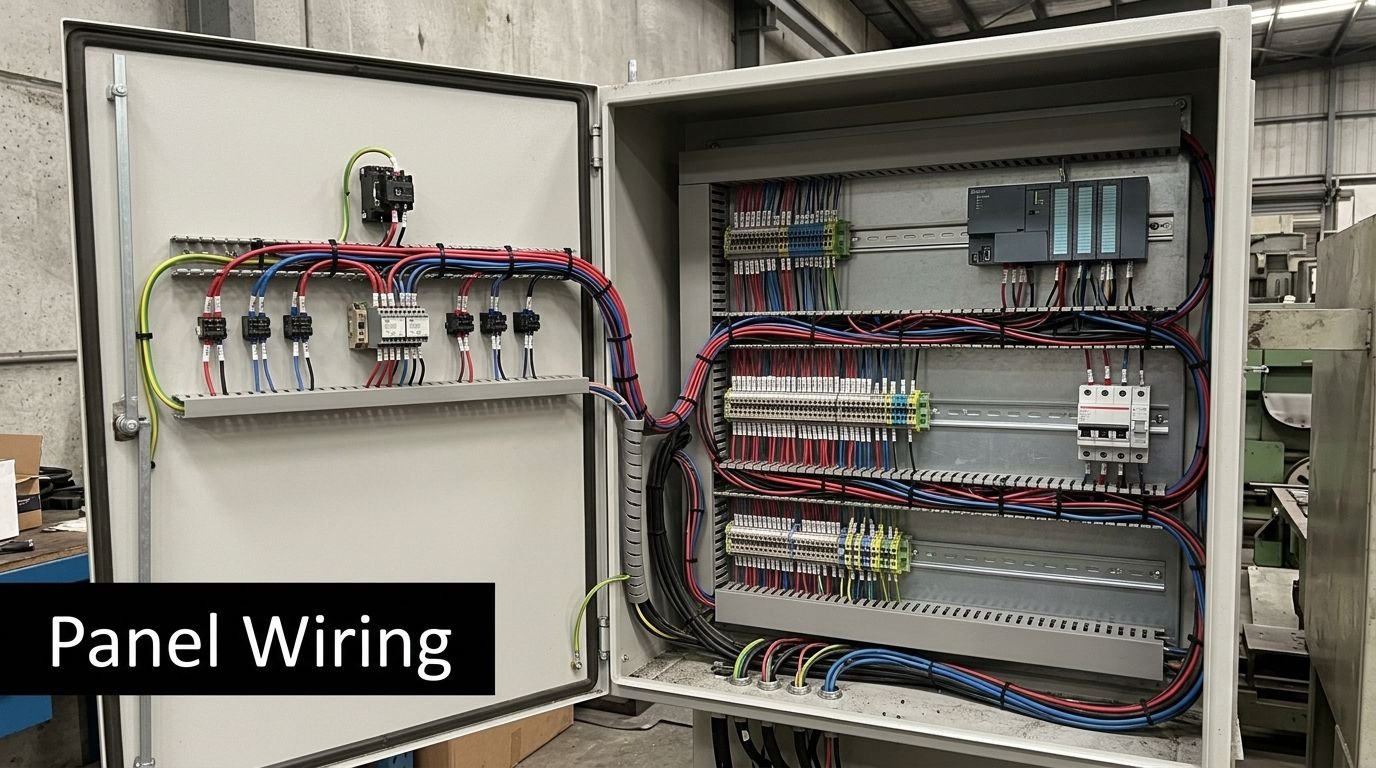
A professional layout tends to look calm because it follows a few disciplined habits. Power devices are arranged with heat and service access in mind. Low-voltage control stays readable. Terminals are grouped logically. Wire duct capacity isn't treated like an afterthought.
A practical build checklist looks like this:
- Keep service access clear: Technicians should be able to land wires, replace relays, and check terminals without dismantling half the panel.
- Separate functions physically: Power conversion, control, field termination, and communication should each have a predictable area.
- Respect heat-producing devices: Drives, power supplies, and other warm components need room around them.
- Make additions possible: Leave usable rail length and duct capacity, not just empty air.
A cramped enclosure usually costs you twice. Once during the build, and again every time someone has to troubleshoot or modify it.
Wiring quality shows up during faults, not tours
Clean wiring practice is where reliability gets built by hand. Use conductors suited to panel work, terminate consistently, and ground the panel correctly. Poor grounding remains one of the most common causes of control device failure, and it's one of the easiest problems to prevent when the build team is disciplined.
For regulated environments, labeling moves from good practice to requirement. In GMP-aware manufacturing, every wire, terminal, and component should be permanently marked to match the schematics. That creates traceability, simplifies audits, and prevents the kind of guesswork that leads to bad field fixes.
A short demonstration helps illustrate the point:
Build for the next technician
The best mechanical layout is the one your own maintenance team can understand six months later on a rushed night shift. That means readable ferrule and marker choices, consistent color coding, sensible terminal numbering, and wire routing that doesn't force a tech to tug on three bundles to identify one conductor.
For medical device manufacturing and other quality-sensitive operations, those habits support more than maintenance. They support validation and controlled change. When the panel matches the drawing, and every component can be identified quickly, the process stays manageable.
Creating Your Essential Documentation Package
A control panel without documentation isn't finished. It's just energized.
That sounds blunt, but it's the truth. If your team can't trace a signal, confirm a spare part, review a safety circuit, or verify what changed after a service call, the panel becomes harder to own every year. Documentation is what turns a custom build into a maintainable production asset.
What belongs in the package
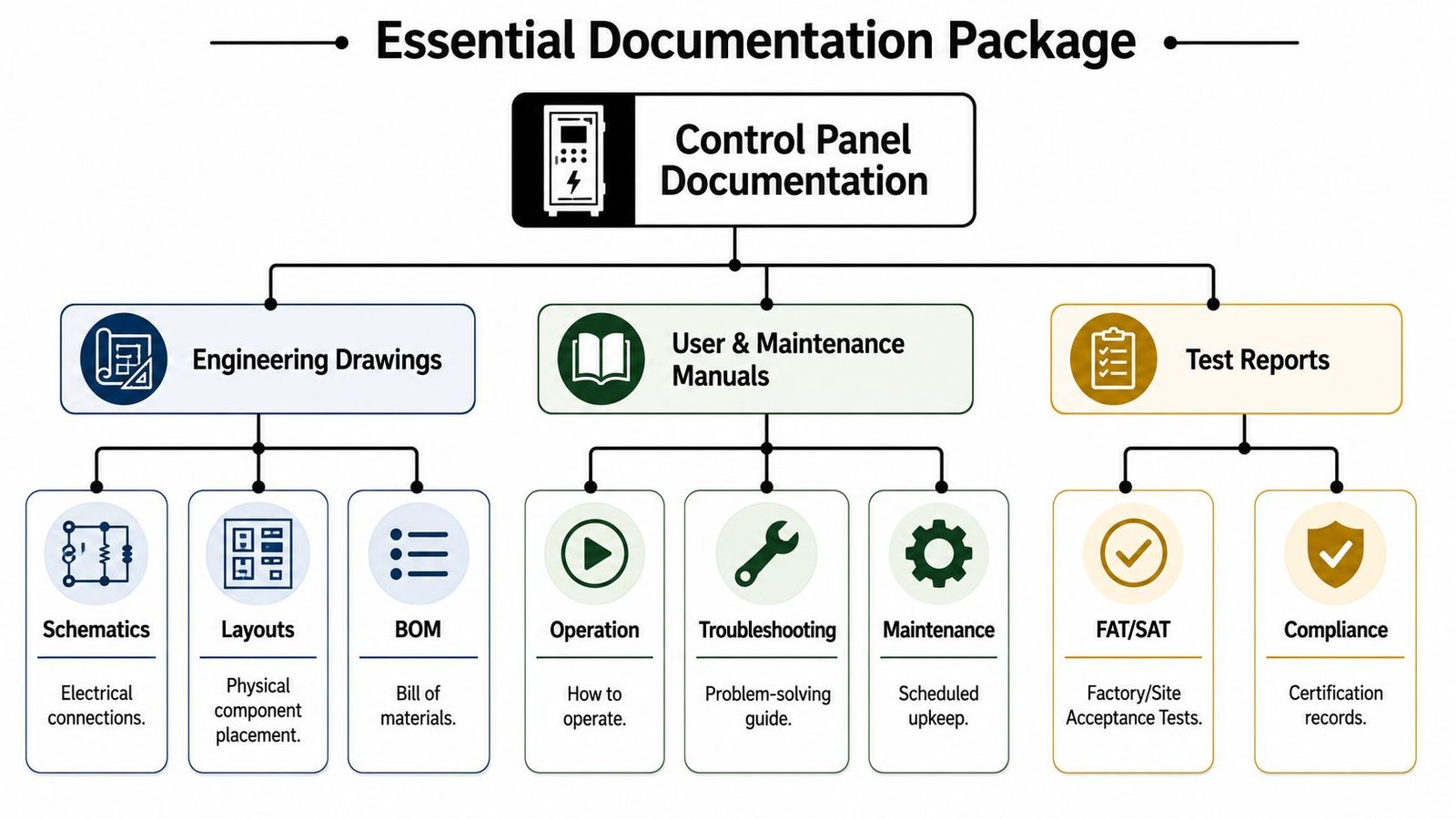
A solid documentation set should cover the panel from engineering intent through service use. At minimum, I'd expect:
- Electrical schematics: The control roadmap, including power distribution, I/O, interlocks, and device references.
- Panel layout drawings: The physical arrangement of devices, terminals, duct, and back panel geometry.
- Bill of materials: Exact replacement references for breakers, relays, power supplies, terminals, PLC hardware, and operator devices.
- I/O list and device schedule: A clean map of field signals, addresses, and descriptions.
- Operating and maintenance notes: Reset logic, basic troubleshooting steps, and service precautions.
- Test records: FAT results, inspections, and any logged verification tied to the build.
Why this matters more in regulated manufacturing
In GMP-aware environments, documentation does more than help electricians. It supports traceability. If a reviewer asks how a signal is captured, how a component was verified, or whether a change was controlled, the answer needs to exist outside someone's memory.
Good documentation lowers dependency on the original builder. That's one of the clearest signs of a professional job.
This is also why panel-level records matter. If your process needs event history, controlled access, or logged states, the documentation package should show how that works. Architecture, wiring, HMI behavior, and exported records should all line up.
Treat documents as operating tools, not turnover paperwork
Teams often accept a drawing PDF and call the job complete. That isn't enough. The package should be usable on the floor and useful during future upgrades. Revision control matters. So does clarity. A complicated drawing set that nobody can follow isn't much better than no drawing set at all.
If your process depends on consistent engineering handoff, technical documentation standards for automation projects are a useful benchmark for what a complete package should include and how it should be structured.
The test for good documentation is simple. If a new electrician, controls tech, or validation lead can pick it up and understand the panel without hunting down tribal knowledge, the package is doing its job.
From Commissioning to Long-Term ROI
A finished panel still has to earn its place on the floor. That happens during commissioning, startup, operator use, and the first few maintenance cycles after launch.
The handoff from build to production should never be casual. Factory Acceptance Testing confirms the panel behaves correctly before shipment. Site Acceptance Testing confirms it works in the actual machine environment with actual utilities, upstream and downstream equipment, and operator interaction. When FAT includes point-to-point checks, continuity and insulation testing, safety validation, and logged results, startup gets far less dramatic.
Long-term return comes from the combined effect of earlier decisions. Clear requirements prevent expensive late changes. Right-sized architecture avoids overbuying. Disciplined component choices keep the panel understandable. Strong mechanical layout makes service faster. Good documentation lowers dependency on one person knowing everything.
For small and mid-sized manufacturers, that's usually the winning formula. Not maximum automation. Useful automation.
The best first panel project is the one your team can run, maintain, and expand without starting over.
If you're upgrading a manual station or planning a semi-automated process, judge the project by practical outcomes. Can operators use it confidently? Can maintenance recover faults quickly? Can quality trust the records? Can the business expand the process without replacing the panel? If those answers are yes, the design is doing what it should.
If you're planning your first major panel project or trying to right-size an existing automation concept, System Engineering & Automation helps manufacturers build practical, cost-effective solutions that improve quality, efficiency, and safety without unnecessary complexity. Their team supports projects from early concepts through design, build, installation, and commissioning, with a strong fit for semi-automated systems, custom tooling, and GMP-aware manufacturing environments.